Home

  • Monako Glass AI Coding Glasses Review

    Monako Glass AI Coding Glasses Review

    Introduction: When Glasses Become a Linux Computer
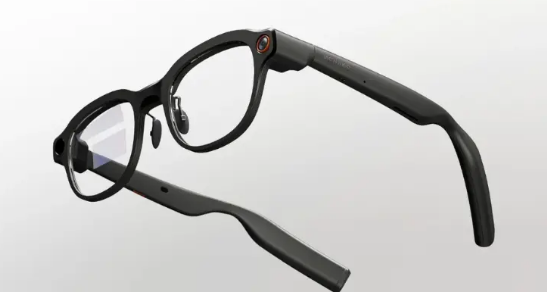
    Monako Glass AI coding glasses side view
    Monako Glass AI coding glasses side view

    On June 3, an obscure Chinese startup named Monako dropped a bombshell: Monako Glass, the world’s first wearable Linux computer in glasses form. Not an AI assistant hanging on your glasses—the glasses themselves are a complete computer. MonoOS system, Lua application layer, Claude Code and OpenAI Codex running locally. Forty-eight grams, $399, $19 reservation.

    Founder Candy Yue said something striking in the launch video: “I used to grind at the keyboard, but nowadays I just tell the computer what I want, and the AI builds it for me.” This sentence precisely captures Monako Glass’s ambition—not letting you operate a computer with glasses, but making the glasses themselves your AI coding workstation.

    Product Overview: A Niche Geek’s Crazy Experiment

    Monako is a Chinese startup with unclear team background, but its product vision is crystal clear: jump out of the homogeneous AI glasses track of “camera + music + voice assistant” and directly target developers and researchers. Candy Yue’s demo video on X shows users generating applications, executing research tasks, creating presentations, and even converting handwritten formulas to LaTeX code in real-time through voice commands.

    This positioning is extremely niche yet extremely precise. In the era when AI agents evolve from “code completion” to “autonomous debugging, code review, and automated workflows,” developers do need a more lightweight way to supervise AI completing tasks. Monako Glass wants to move this “supervision desk” from the desktop to your nose bridge.

    Specifications: How Much Crazy Fits in 48 Grams

    SpecDetails
    Operating SystemMonoOS (custom Linux)
    Application LayerLua (200-500KB memory footprint)
    Weight48g
    DisplayWaveguide display
    CameraHD camera
    SpeakerBuilt-in speaker
    MicrophoneBone-conduction (nasal vibration capture)
    Gesture InteractionVision Engine (0.5 TOPS NPU)
    AI SupportClaude Code, OpenAI Codex
    InteractionVoice commands + gestures + heads-up display
    Price$399 ($19 reservation)
    Estimated ShippingJuly-August 2026

    Data source: Monako official launch materials, Digital Trends, Times of AI
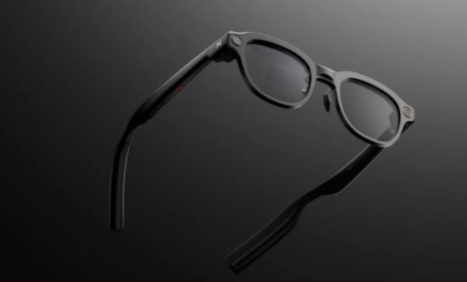
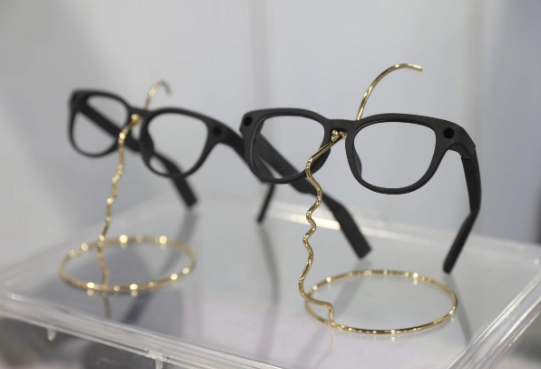
    Monako Glass AI smart glasses front view
    Monako Glass AI smart glasses front view

    MonoOS is Monako’s self-developed Linux distribution, with a core feature of being lightweight—the Lua application layer uses only 200-500KB of memory. This means applications can still run smoothly on resource-constrained embedded devices. In comparison, a typical Android app consumes dozens of MB of memory, making MonoOS’s lightweight design enable running complex AI agents on glasses.

    The bone-conduction microphone design is clever: placed near the nose rather than the ear, capturing voice through vibrations of bones near the nasal cavity. This design effectively separates user voice from background noise in noisy environments like coffee shops and offices, more precise than traditional microphone arrays.

    The Vision Engine gesture system relies on a 0.5 TOPS NPU, supporting operations like raising hand to summon menus, tapping to select apps, and sliding to adjust volume. Half a TOPS is not powerful, but sufficient for simple gesture recognition, and the power consumption is low enough—crucial for battery-sensitive glasses devices.

    Deep Analysis: Can It Actually Write Code?

    Monako Glass’s core selling point is “AI agent running 24/7.” The official demo shows several enticing scenarios:

    Voice-Driven Development: Say “create a to-do app,” and the AI agent generates code, debugs, and builds in the background, notifying you via vibration or voice prompt when done. You can check progress on the heads-up display and intervene via voice when necessary. This workflow eliminates the need to sit in front of a computer screen, suitable for “asynchronous programming” during commutes, waiting in lines, or even walking.

    Handwritten Formula to LaTeX: Researchers write formulas with pen and paper; the glasses camera captures and converts them to LaTeX code in real-time. For math, physics, and engineering researchers, this saves significant manual input time.

    Cross-Device Collaboration: Monako Glass is not an isolated device. It can serve as a “front end” for Mac or PC, with agents running on cloud or local servers while the glasses only handle input, output, and status display. This “light front-end + heavy back-end” architecture solves the glasses’ computing power limitation.
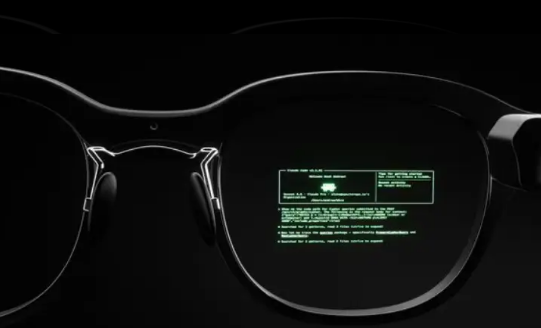
    Monako Glass waveguide display Linux interface
    Monako Glass waveguide display Linux interface

    But problems are equally obvious:

    Battery Life Unannounced: The 48-gram weight suggests an extremely limited battery. If AI agents run 24/7, battery life might be only 1-2 hours. The fact that official battery specs remain unannounced is a red flag.

    Chip and Storage Unknown: Processor model, memory size, and storage capacity are all unannounced. Running Linux plus AI agents requires at least 4GB memory and a mid-range Arm chip—whether the 48-gram body can fit these hardware components is questionable.

    Display Quality Uncertain: A waveguide display in a 48-gram body likely has limited resolution and brightness. Will reading code for long periods cause eye fatigue? Is it readable in bright outdoor light? All unknown.

    Privacy Paradox: Monako emphasizes “privacy first” because AI agents run locally without data leaving the device. But the camera on the glasses always exists. Wearing a Linux computer with a camera in public spaces raises social acceptance issues. Monako has not yet clarified whether the camera has physical遮挡 or LED indicators.

    Comparison: Monako Glass vs Meta Orion vs Apple Vision Pro

    FeatureMonako GlassMeta Orion ARApple Vision Pro
    Weight48g100g (prototype)600-650g
    Price$399Unannounced (premium expected)$3,499
    PositioningAI coding workstationSocial + AR displaySpatial computing platform
    OSMonoOS (Linux)Custom AndroidvisionOS
    AI CapabilityClaude Code/Codex localCloud AICloud + local hybrid
    DisplayWaveguide70°FOV transparent4K Micro-OLED
    CameraYes (privacy policy unclear)YesYes
    Target UsersDevelopers, researchersGeneral consumersProfessional users + early adopters

    Monako Glass takes a completely different path. Meta and Apple are building “next-generation general computing platforms,” while Monako is building “specialized tools for specific scenarios.” At $399—one-ninth the price of Vision Pro and one-thirteenth the weight—but functionality is also much narrower. It doesn’t do AR games, spatial video, just one thing: letting developers supervise AI agents writing code anytime, anywhere.

    This strategy is smart. In the AI agent era, “human-computer interaction” is shifting from “humans operating software” to “humans supervising AI completing tasks.” Monako Glass bets that: in the future, not everyone needs a high-performance computer, but every developer needs a lightweight “agent supervision terminal.”

    Pros and Cons

    ProsCons
    World’s first glasses-form Linux computer, concept ahead of its timeCore specs like battery, chip, storage unannounced
    48g relatively lightweight for extended wearWaveguide display quality uncertain, code reading experience unknown
    Local AI agent execution, good privacy protectionCamera privacy issues not clearly addressed
    Bone-conduction microphone, clear voice in noisy environments$399 pricing relatively high for a startup brand
    Voice + gesture interaction, hands-freeExtremely weak ecosystem, nearly zero third-party apps
    Precise targeting of developer pain pointsShipping July-August, actual experience to be verified

    Who Should Buy

    Recommended for:

    • Developers who frequently need “asynchronous programming” (advancing projects during commutes or waiting)
    • Researchers needing to capture inspiration and convert formulas anytime
    • Early AI agent adopters willing to try new interaction forms
    • Privacy-sensitive users who don’t want code data on the cloud

    Not recommended for:

    • Professional developers needing long immersive coding sessions (screen too small)
    • Users demanding brand stability and after-sales service (startup risk)
    • Budget-constrained users—$399 can buy a decent laptop
    • Socially sensitive users unwilling to wear camera-equipped glasses

    FAQ

    Q: Can Monako Glass replace my laptop?

    A: No. It is better suited as an “agent supervision terminal” rather than a “primary workstation.” Complex debugging, large-screen code review, and multi-window operations still require returning to a desktop environment.

    Q: Can MonoOS install regular Linux software?

    A: Official compatibility is unclear. MonoOS is based on the Linux kernel, but the Lua application layer means regular Linux applications need porting or redevelopment.

    Q: Is the $19 reservation a deposit or full payment?

    A: The $19 is a reservation fee, not full payment. Specific final payment timing and refund policies need to be confirmed with official channels.

    Q: Does it support prescription lenses?

    A: Official information has not been announced. The 48-gram body has limited space, and custom lenses may add weight and thickness.

    Conclusion

    Monako Glass is a device where “concept exceeds product.” It raises a highly forward-looking question: when AI agents can autonomously complete most coding tasks, what hardware do developers need to “supervise” this process? The answer may not be bigger screens or stronger CPUs, but a lightweight pair of glasses that keeps you connected to your agent in any scenario.

    But a forward-looking concept doesn’t mean a mature product. Battery, display, ecosystem, privacy—these fundamental questions remain unanswered by Monako. At $399, the pricing carries no small risk for a first-generation product from a startup.

    If you are a developer willing to pay for future interaction forms, Monako Glass is worth a try. But if you need a reliable “works right now” productivity tool, I recommend waiting for first-batch user feedback in July-August before deciding.
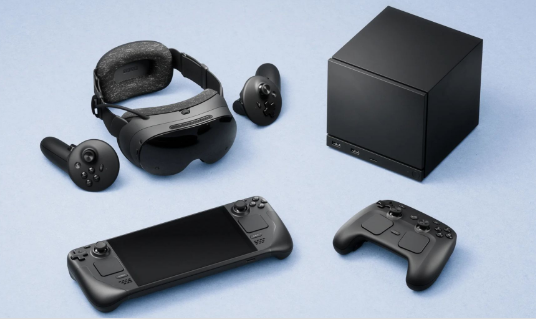
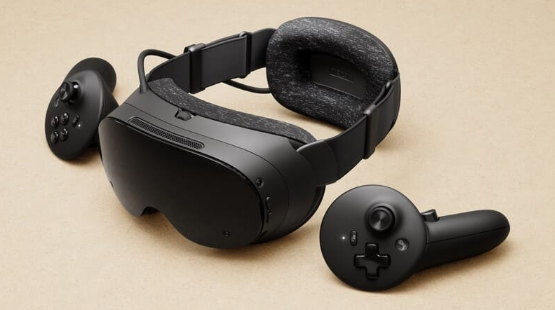
  • Steam Frame VR Headset Review

    Steam Frame VR Headset Review

    Introduction: Valve Finally Returns

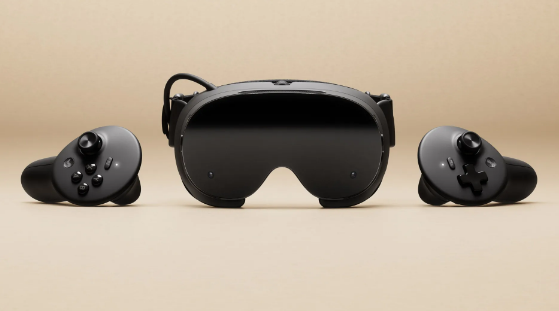
    Valve Steam Frame VR headset front view
    Valve Steam Frame VR headset front view

    In 2019, Valve Index burst onto the scene with its 144Hz refresh rate and Index controllers’ “finger tracking,” becoming the ceiling of PC VR at the time. Then Valve disappeared—no new VR hardware for six years, watching Meta Quest evolve from a 3DoF toy to the Quest 3 mixed reality flagship. Until November 12, 2025, when Valve suddenly dropped three bombs: Steam Machine console, Steam Controller, and Steam Frame VR headset. Early 2026 launch, pricing unannounced, but estimated at $499-599 for 256GB and $699-799 for 1TB.

    Steam Frame is not a simple Index upgrade, but a “streaming-first” standalone VR headset. It wants to answer one question: if a VR headset can both play mobile-level VR independently and wirelessly stream PC AAA titles, why bother with cables?

    Product Overview: The VR Piece of Steam’s Ecosystem Puzzle

    Valve’s hardware strategy is clear: Steam Deck handles mobile scenarios, Steam Machine handles living room scenarios, and Steam Frame handles immersive scenarios. All three devices share the SteamOS system, the same game library, and the same microSD card. Your saves, settings, and progress seamlessly switch between the three devices.

    Steam Frame’s core positioning is “streaming-first.” It packs a Snapdragon 8 Gen 3 processor and 16GB memory, capable of running some VR games and Android apps independently, but the real selling point is the 6GHz wireless adapter—plug it into your PC, and the headset directly streams PC VR content with low latency. Dual-radio architecture: one handles audio-visual streaming, one handles WiFi networking, without interference.

    Specifications: Valve’s Spec Monster Sincerity

    SpecDetails
    ProcessorSnapdragon 8 Gen 3 (4nm)
    Memory16GB LPDDR5X
    Storage256GB/1TB + microSD
    DisplayDual 2160×2160 LCD
    Refresh Rate72/90/120Hz, experimental 144Hz
    Field of View110°
    OpticsPancake lenses
    TrackingInside-out 6DoF (4 monochrome cameras)
    Eye TrackingYes, Foveated Streaming
    Wireless Streaming6GHz dedicated adapter, dual-radio
    Weight~440g (with battery)
    BatteryRear-mounted design, front-rear weight balance
    SystemSteamOS VR edition
    CompatibilitySteamVR, OpenXR, Android apps

    Data source: Valve official launch materials, Wareable, Engadget, VideoCardz

    The Snapdragon 8 Gen 3 is a 2024 flagship phone chip, with performance near phone-level rather than PC-level. This means Steam Frame’s standalone capabilities are limited—running Half-Life: Alyx smoothly? Impossible. But paired with 6GHz wireless streaming, a PC’s RTX 4090 can be “lent” to the headset, which is Valve’s true intention.

    Dual 2160×2160 resolution per eye, totaling approximately 4.3K, slightly higher than Quest 3’s 2064×2208 but far below Vision Pro’s 4K Micro-OLED. Pancake lenses make the body thinner, but optical efficiency is inferior to traditional Fresnel lenses, and brightness may be limited. The 110° field of view is moderate—narrower than Index’s 130° but on par with Quest 3’s 110°.

    Foveated Streaming is Steam Frame’s technical highlight. Through eye tracking, the system only renders high-resolution images in your gaze area, reducing resolution in peripheral areas to save substantial bandwidth. Official claims suggest bandwidth efficiency improvements of over 10x—meaning equivalent quality with less wireless streaming latency and compression artifacts.

    Valve Steam ecosystem product lineup display
    Valve Steam ecosystem product lineup display

    Deep Analysis: Where Steam Frame’s Chances Lie

    Valve has three clear competitive advantages with Steam Frame:

    First, Steam library ecosystem moat. Steam has over 70,000 games, including more than 5,000 VR titles. The Quest 3 store has only a few hundred VR games, and Meta’s strict content review means many PC VR classics (like Half-Life: Alyx, Beat Saber) have no Quest versions. Steam Frame directly compatible with the entire SteamVR library—an advantage Meta cannot replicate.

    Second, open platform positioning. Meta Quest is a closed ecosystem; apps must pass Meta store review. Steam Frame runs SteamOS, supports OpenXR standards, and developers can freely publish content. Valve even provides CAD drawings and circuit specifications, letting users 3D print replacement face cushions and head straps—this “modular” thinking is unique in the VR industry.

    Third, PC streaming experience optimization. Existing wireless streaming solutions (like Virtual Desktop, Air Link) rely on home WiFi, with unstable latency and image quality. Steam Frame’s 6GHz dedicated adapter bypasses the router, directly establishing a private PC-to-headset link, paired with Foveated Streaming, theoretically achieving near-wired connection experience.

    But Steam Frame’s challenges are equally severe:

    Insufficient standalone performance. The Snapdragon 8 Gen 3 can probably run Resident Evil 4 VR, but Half-Life: Alyx and Microsoft Flight Simulator must rely on PC streaming. This means users without high-end PCs can only play “mobile-level” VR, significantly compromising the experience.

    Weight and comfort. At 440g including battery, lighter than Quest 3’s 515g but much lighter than Index’s 809g. The rear-mounted battery design helps front-rear weight balance, but comfort during extended wear (over 1 hour) remains to be verified. Pancake lenses are thin, but edge clarity may degrade.

    Price competitiveness. Estimated $499-799 pricing offers no advantage over Quest 3 ($499) and Quest 3S ($299). Vision Pro is expensive ($3,499) but positioned completely differently. Steam Frame needs to convince users: is spending $200-300 more for the Steam library and open ecosystem worth it?

    Content moderation gray area. Valve’s open strategy means adult, violent, and extreme content may more easily enter the platform. While Steam PC already has mature content rating systems, VR’s immersion makes sensitive content more impactful. How Valve balances “openness” and “compliance” is a long-term challenge.

    Comparison: Steam Frame vs Meta Quest 3 vs Apple Vision Pro

    FeatureSteam FrameMeta Quest 3Apple Vision Pro
    Price$499-799 (estimated)$499 (128GB)$3,499
    Weight~440g~515g600-650g
    Resolution2160×2160 per eye2064×2208 per eye4K Micro-OLED per eye
    Refresh Rate72-144Hz72-120Hz90-100Hz
    Field of View110°110°100°
    TrackingInside-out 6DoFInside-out 6DoFInside-out 6DoF
    Eye TrackingYes (Foveated Streaming)NoYes (Foveated Rendering)
    Wireless Streaming6GHz dedicated adapterWiFi (Air Link)Only Mac/iPhone mirroring
    Standalone PerformanceSnapdragon 8 Gen 3Snapdragon XR2 Gen 2M2+R1 (extremely powerful)
    Game LibrarySteamVR (5000+ VR games)Meta Store (few hundred)Very few native VR games
    Ecosystem OpennessFully openClosed reviewClosed review
    Mixed RealityMonochrome passthrough (no color)Full-color passthroughFull-color passthrough

    Steam Frame’s differentiation is clear: it’s not the strongest standalone device (Vision Pro), nor the cheapest (Quest 3S), but the “best wireless companion for PC VR players.” If you already have a high-end PC and Steam library, Steam Frame is an upgrade replacement for Quest 3; if you only want to play standalone VR games, Quest 3 offers better value; if you pursue spatial computing and productivity, Vision Pro is another dimension.

    Pros and Cons

    ProsCons
    Full SteamVR library compatibility, unbeatable game resourcesLimited standalone performance, heavy games depend on PC streaming
    6GHz dedicated streaming, theoretically better latency and quality440g weight comfort during extended wear to be verified
    Foveated Streaming saves bandwidth, improves experienceHigher price than Quest 3, value advantage not obvious
    Fully open ecosystem, high developer freedomNo color passthrough, mixed reality weaker than Quest 3
    Modular design, customizable accessoriesContent moderation gray area, sensitive content risks
    Shared ecosystem with Steam Deck/MachineShipping date not final, potential delays

    Who Should Buy

    Recommended for:

    • Players with high-end PCs and SteamVR game libraries
    • VR enthusiasts tired of Quest’s closed ecosystem, seeking open platforms
    • Business travelers needing portable VR large screens
    • Valve Index legacy users wanting wireless upgrade without abandoning Steam library

    Not recommended for:

    • Users without high-end PCs, only wanting standalone VR games (Quest 3 more suitable)
    • Budget-constrained users—$299 Quest 3S is sufficient
    • Users pursuing mixed reality and productivity scenarios (Vision Pro or Quest 3 better)
    • Users demanding brand stability—Valve hardware often delays and stocks out

    FAQ

    Q: Does Steam Frame require Steam Machine?

    A: No. Any PC supporting SteamVR can pair with the 6GHz adapter for wireless streaming. Steam Machine is just Valve’s recommended “living room companion.”

    Q: Does Foveated Streaming affect image quality?

    A: Theoretically no. Eye tracking ensures your gaze area is always full resolution, with only peripheral areas reduced—human peripheral vision naturally has low resolution, so no noticeable difference is perceived.

    Q: Does it support prescription lenses?

    A: Valve has not announced, but Index supports custom lens inserts, so Steam Frame likely will have similar solutions.

    Q: How long is the battery life?

    A: Official data not announced. Referencing Quest 3’s 2-3 hours, Steam Frame’s 440g weight may allow a larger battery, but 6GHz streaming consumes significant power, so actual battery life may be similar.

    Conclusion

    Steam Frame is Valve’s “belated response” to the VR industry. Six years ago, Index defined the ceiling of PC VR; in six years, Meta’s Quest series captured the standalone VR market. Steam Frame is not Index’s successor, but a new species—it acknowledges standalone VR’s performance limitations, instead using wireless streaming to “borrow” PC computing power to the headset, while preserving the open advantages of the Steam ecosystem.

    This strategy is smart and risky. Smart because it avoids head-to-head competition with Quest 3 on standalone performance, instead building differentiation through the Steam library and open ecosystem; risky because whether wireless streaming can truly approach wired experience, and whether $499-799 pricing can convince enough PC VR players to upgrade.

    2026 will be a pivotal year for VR hardware: Meta Quest 4, Apple Vision Pro 2, and Sony PS VR2 successor may all debut. Whether Steam Frame can stand out in this melee depends on three factors: whether streaming latency is low enough, whether pricing is competitive enough, and whether Valve’s production can keep up (referencing Steam Deck’s long-term stock shortages).

  • KANNAN K2 AI Smart Glasses Review: 25.8 Grams of First-Person AI Capture

    KANNAN K2 AI Smart Glasses Review: 25.8 Grams of First-Person AI Capture

    Introduction: When AI Glasses Become Light Enough to Forget

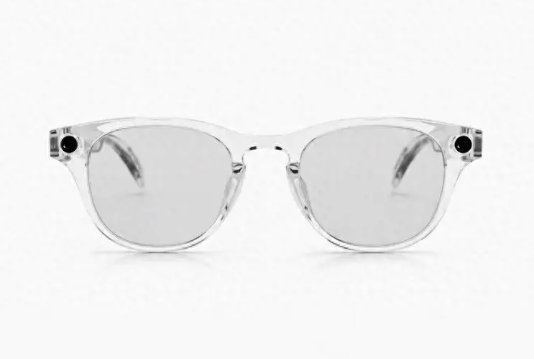
    KANNAN K2 transparent frame front view
    KANNAN K2 transparent frame front view

    On June 5, Kannan Tech released the K2 smart glasses in Hangzhou. Twenty-five point eight grams total weight, 7.1mm temple thickness at the thinnest point, European-imported ultra-light nylon material—these three numbers alone tell me this company is not playing with concepts but with materials science. Priced at 2350 yuan, with a 32MP camera, 4K 30FPS recording, EIS plus AI dual stabilization, and Kiro OS built specifically for AI glasses.

    Honestly, the AI glasses track is already insanely competitive. Meta Ray-Ban, Vidda G11, RayNeo V3—each finding their own differentiation. The K2’s approach is crystal clear: no AR display, no complex interactions, just focus on doing one thing well—letting you capture first-person life with the lightest weight and most natural approach. This sounds simple, but achieving 25.8 grams, lighter than Vidda G11’s 26.5g and nearly half the weight of Meta Ray-Ban’s ~49g, is itself a demonstration of technical strength.

    Product Overview: Kannan Tech’s AI Glasses Ambition

    Kannan Tech is an AI glasses startup headquartered in Hangzhou, China, with unclear team background but solid product definition capabilities. The K2’s positioning is very clear: first-person AI capture glasses for general consumers, not a geek toy, not a business tool, but a “life recording” carry-everywhere device.

    The K2’s design language is “invisible.” Five frame styles available, from classic black to fashionable titanium, aiming to make it unnoticeable that you are wearing smart glasses. European-imported ultra-light nylon material, combined with internal structure optimization, compresses total weight to 25.8 grams—approaching regular optical glasses weight, with no obvious pressure during extended wear.

    Specifications: How Much Tech Fits in 25.8 Grams

    SpecDetails
    Weight25.8g (total)
    Temple Thickness7.1mm (thinnest point)
    MaterialEuropean-imported ultra-light nylon
    Camera32MP, f/2.4 aperture
    Video Recording4K 30FPS
    StabilizationEIS + AI dual stabilization
    Photo FeaturesLive Photo support
    Operating SystemKiro OS (built for AI glasses)
    ProcessorWQ7036 smart audio main control chip
    AI AssistantXiaonan
    InteractionMinimalist gestures + voice
    Special FeaturesAI flash memo, message sharing
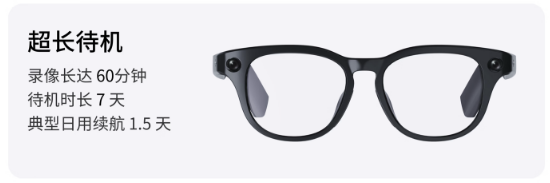
    Battery60 min recording / 7 days standby / 1.5 days typical use
    Price2350 yuan

    Data source: Kannan Tech official launch materials

    KANNAN K2 black frame product display
    KANNAN K2 black frame product display

    Twenty-five point eight grams—what does this mean? Regular prescription glasses typically weigh 20-30g, so the K2 falls completely within the “daily wearable” range. The 7.1mm temple thickness at the thinnest point makes it almost indistinguishable from regular glasses from the side. Kannan Tech invested heavily in material selection—European-imported ultra-light nylon, lighter, tougher, and more wear-resistant than traditional TR90 material.

    The 32MP camera is high-end among AI glasses. Meta Ray-Ban’s camera is 12MP, RayNeo V3’s Sony IMX681 is around 12MP equivalent, so the K2’s 32MP clearly leads in hardware specs. The f/2.4 aperture is relatively large for glasses cameras, allowing more light intake in low-light environments, theoretically improving night shooting performance.

    EIS plus AI dual stabilization is a practical configuration. EIS (Electronic Image Stabilization) compensates hand shake through algorithms, while AI stabilization further optimizes through scene recognition and motion prediction. For walking, cycling, handheld shooting scenarios, dual stabilization significantly improves frame usability.

    Hands-On Experience: What Can First-Person Capture Actually Do?

    The K2’s core usage scenarios fall into three categories: life recording, content creation, and social sharing.

    Life Recording: Playing with kids, pet interactions, travel experiences—these scenarios captured with traditional cameras or phones always have a “third-person perspective” sense of distance. The K2’s first-person capture shows exactly what the glasses see, without deliberate composition or the awkwardness of holding up a phone. The Live Photo feature makes photos “come alive,” recording 1.5 seconds of motion before and after the shutter press, giving ordinary photos more storytelling power.

    Content Creation: Vlog creators, food bloggers, exploration influencers—the K2’s 4K 30FPS recording quality is sufficient for short video platform publishing. The AI flash memo feature lets you quickly trigger “remember this” by voice when seeing exciting moments; the AI automatically captures surrounding clips and categorizes storage, saving post-production footage review time. The message sharing feature can generate 15-second short videos from highlight clips, sharing directly to WeChat, TikTok, and Xiaohongshu with one click.

    Social Sharing: Friend gatherings, family dinners, outdoor activities—the K2’s minimalist gesture interaction (tap temple to shoot, slide to switch modes) makes capturing natural and non-awkward. You don’t need to pull out your phone, open the camera, and hold it up—the entire process completes within 2 seconds without interrupting the present moment.

    But the K2 also has obvious limitations:

    No AR Display: The K2 has no built-in display; all operation feedback comes through the mobile app or voice announcements. This means you cannot see shooting previews on the glasses, only “blind shooting” and reviewing through the phone later. For composition-critical scenarios, this is a pain point.

    Battery Bottleneck: Sixty minutes of recording battery life is mid-range among AI glasses, but heavy use (continuous Vlog shooting) requires carrying a charging case. Seven days of standby sounds long, but the “typical daily use” 1.5-day definition is vague—if you shoot 20 minutes of video daily and use the AI assistant for 30 minutes, actual battery life may be less than a day.

    Limited AI Assistant Depth: The Xiaonan assistant supports basic functions like voice weather queries, setting reminders, and playing music, but compared to Siri or Xiao Ai on phones, feature coverage is clearly insufficient. The K2’s AI capabilities focus on “shooting assistance” rather than “general intelligence”—clear positioning but a visible ceiling.

    Comparison: K2 vs Meta Ray-Ban vs RayNeo V3

    FeatureKANNAN K2Meta Ray-BanRayNeo V3
    Weight25.8g~49g~39g
    Price2350 yuan~$299 (~2150 yuan)973 yuan (after price drop)
    Camera32MP12MPSony IMX681 (~12MP)
    Video4K 30FPS1080P1080P
    StabilizationEIS + AI dualBasic EISBasic EIS
    AI FeaturesFlash memo, message sharingSocial sharing, Meta AI200+ scenario AI
    AudioOpen-ear directionalOpen-earOpen-ear
    Battery60 min recording~36 hours combined4-6 hours
    EcosystemStandalone appMeta ecosystemRayNeo ecosystem
    PositioningFirst-person captureSocial + AIExploratory AI

    Three glasses, three paths: Meta focuses on social ecosystem, RayNeo on AI exploration, K2 on capture quality. The K2’s 32MP camera and 4K recording clearly lead in hardware, but software ecosystem and AI depth lag behind Meta and RayNeo. If you pursue “shooting clearly, recording steadily, sharing fast,” the K2 is the best choice; if you need “all-powerful AI assistant, seamless social integration,” Meta is more suitable; if you want to “try AI features on a budget,” the RayNeo V3 offers the best value.

    KANNAN K2 battery life promotional feature
    KANNAN K2 battery life promotional feature

    Pros and Cons

    ProsCons
    25.8g extreme lightweight, top-tier wearing comfortNo AR display, cannot preview shots in real-time
    32MP + 4K 30FPS, leading hardware specs60-minute recording battery, heavy use needs charging case
    EIS + AI dual stabilization, good frame stabilityLimited AI assistant depth, inferior to phone voice assistants
    Kiro OS optimized for AI glasses, smooth interactionLow brand recognition, after-sales and accessory ecosystem to be built
    Minimalist gesture interaction, low learning curve2350 yuan mid-range pricing, value inferior to RayNeo V3
    Live Photo and AI flash memo, more storytellingChinese-only interaction, limited for overseas users

    Who Should Buy

    Recommended for:

    • Users pursuing extreme lightweight, long-term wear without nose bridge pressure
    • Vlog creators and short video bloggers needing high-quality first-person footage
    • Parents and pet owners wanting to record daily interactions without phone interruption
    • Travel enthusiasts needing portable, discreet capture devices

    Not recommended for:

    • Users needing AR display and real-time information overlay (choose RayNeo or Meta)
    • Users pursuing comprehensive AI features and rich ecosystem (choose Meta Ray-Ban)
    • Budget-constrained users only accepting under 1000 yuan (choose RayNeo V3)
    • Users demanding brand after-sales and accessory ecosystem (wait for K2 ecosystem maturity)

    FAQ

    Q: Does the K2 support prescription lens customization?

    A: Yes. The K2 provides prescription lens customization services, available at purchase or through designated optical shops.

    Q: How is the photo quality from the 32MP camera?

    A: Hardware specs lead, but actual image quality is limited by optical design constrained by glasses form factor. Excellent in daylight with sufficient light; noise control is average in low-light, inferior to phone main cameras.

    Q: Does the AI flash memo feature require internet?

    A: Basic flash memo functions support local processing, but generating message sharing and cloud storage require internet. Recommend using in Wi-Fi environments for optimal experience.

    Q: What is the K2’s water resistance?

    A: Daily splash-proof level, handling sweat and light rain. Not recommended for swimming, showering, or prolonged immersion.

    Conclusion

    The KANNAN K2 is a product that “does one thing to the extreme.” In an AI glasses track where everyone pursues “all-in-one,” the K2 chooses subtraction—removing AR display, simplifying the AI assistant, focusing on capture experience, establishing clear differentiation through 25.8 grams of extreme lightweight and 32MP plus 4K hardware specs.

    This strategy carries both risks and opportunities. The risk: the ultimate form of AI glasses may be “all-in-one terminals,” and the K2’s single-function positioning may limit long-term market space. The opportunity: before all-in-one terminals mature, “professional tools” often gain more loyal user bases—just as DSLR cameras were never replaced by phones, first-person capture devices may also become an independent category.

    At 2350 yuan, pricing sits in the mid-range—slightly more expensive than Meta Ray-Ban but with clearly higher hardware specs. For users pursuing capture quality and wearing comfort, the K2 is worth considering. But if you prioritize AI ecosystem and social integration, Meta Ray-Ban remains the safer choice. The K2’s true test lies in whether Kannan Tech can continuously iterate Kiro OS, enrich AI features, and build accessory and after-sales ecosystems—these soft capabilities are the key determining whether an AI glasses product can evolve from “niche gem” to “mass-market hit.”

  • WIKO Xingzai Unboxing: Do Young People Need This?

    WIKO Xingzai Unboxing: Do Young People Need This?

    Introduction: When AI Evolves from Tool to Pet

    WIKO Xingzai AI companion toy promotional poster
    WIKO Xingzai AI companion toy promotional poster

    At the Huawei Nova 16 launch event on May 30, alongside phones, a fluffy little creature emerged—Xingzai. It is not a phone accessory, not a smart speaker, but an AI companion toy that hangs on your bag. It turns its head toward you when you speak, shrinks shyly when you pet its forehead, and shakes excitedly when you sway it. Priced at 499 yuan, powered by Huawei Xiaoyi large model, with Wi-Fi plus 4G dual-network independent operation.

    Honestly, my first reaction seeing the product images was: is this not just an upgraded electronic pet? But after getting hands-on, I discovered WIKO aims far beyond that. Xingzai’s core selling point is not “can talk” but “reacts”—every head turn, every light change, every body tremor simulates real pet feedback logic.

    Product Overview: A New Species in Huawei’s Ecosystem

    First, clarifying relationships: WIKO is not a Huawei subsidiary but a deep ecosystem partner. Huawei provides Xiaoyi large model and HarmonyOS ecosystem connectivity; WIKO handles R&D, design, production, and sales. Xingzai is WIKO’s first AI companion product built on Huawei technology, with the nova planet IP licensed from Huawei’s youth-focused nova brand.

    Xingzai measures 110x110x125mm and weighs approximately 260g, similar to a smartphone. The magnetic design attaches directly to backpacks or purses, becoming a fashion accessory on the go. This positioning is clever—traditional AI toys are mostly bulky and home-bound, while Xingzai breaks scenario limitations entirely.

    Specifications: How Much Tech Fits in This Small Body

    SpecDetails
    Dimensions110x110x125mm
    Weight~260g
    AttachmentMagnetic design
    AI ModelHuawei Xiaoyi large model
    NetworksWi-Fi + 4G dual
    Battery1900mAh
    Battery Life6 hours continuous dialogue / 48 hours standby
    InteractionsVoice + touch + shake + sound-following head turn
    MemoryExclusive diary memory, intimacy unlocks
    Price499 yuan

    Data source: WIKO official launch materials

    Huawei fluffy AI pet toy handheld display
    Huawei fluffy AI pet toy handheld display

    Hands-On Experience: Does It Actually Touch Your Heart

    Sound-Following Head Turn: This is Xingzai’s most moving feature. Speak from the left, its head turns left, starry eyes lighting up, simulating “I am listening to you attentively.” The psychological logic is precise—humans have innate affinity for “being watched,” and head-turning delivers stronger emotional impact than mere voice replies.

    Touch Interaction: Petting the forehead triggers shyness (softened lights + slight body shrink), while prolonged petting triggers (flashing lights + gentle trembling). These reactions are not random but based on Xiaoyi large model’s learning of interaction frequency and duration—the more you interact, the more it understands you.

    Shake Reaction: A gentle shake makes Xingzai tremble excitedly, with starry eyes flashing rapidly, simulating a pet being amused. This scenario shines at friend gatherings, maximizing social appeal.

    Voice Dialogue: Powered by Xiaoyi large model, natural language understanding is solid. It chats about daily life, tells jokes, offers advice, and adjusts responses based on your mood. When you are down, it comforts you; when happy, it celebrates with you. The exclusive diary memory system records your conversations, forming “shared memories,” with more interaction modes unlocking as intimacy grows.

    Independent Operation: Wi-Fi plus 4G dual-network support means no phone connection needed outdoors. Whether on the subway, at a cafe, or camping, Xingzai works normally. Traditional AI toys become mere plush fabric without phones; Xingzai solves this pain point.

    AI companion pet toy physical product display
    AI companion pet toy physical product display

    Comparison: WIKO Xingzai vs Traditional AI Toys vs LOVOT

    FeatureWIKO XingzaiTraditional AI Story MachineJapan LOVOT
    Price499 yuan200-500 yuan~3000 yuan + monthly fee
    PortabilityMagnetic bag charm, portableHome use onlyHome use only
    Dynamic InteractionHead turn + tremor + lightsNoneMovement + expressions + body heat
    AI ModelHuawei Xiaoyi large modelBasic voice chipSelf-developed emotional AI
    NetworksWi-Fi + 4G independentRequires phone/Wi-FiRequires Wi-Fi
    PositioningYouth fashion accessoryChildren’s educationPremium emotional companion

    Xingzai’s differentiation is clear: more dynamic interaction and independent networks than traditional AI toys, an order of magnitude cheaper than LOVOT. At 499 yuan for an emotionally responsive, go-anywhere AI buddy, the barrier is low for young people.

    Pros and Cons

    ProsCons
    Magnetic design, truly portable companionship260g is slightly heavy on bags
    Multi-modal interaction, genuine emotional feedback6-hour battery, heavy use needs daily charging
    Huawei Xiaoyi large model, natural conversationsPlush material not dirt-resistant, outdoor use requires care
    499 yuan friendly price, low trial costLimited functional depth, unsuitable for deep emotional dependence
    Wi-Fi + 4G independent, no phone tetheringCurrently supports Chinese interaction only

    Who Should Buy

    Recommended for:

    • Young female users who love cute accessories
    • Urban youth living alone needing emotional companionship
    • Students curious about AI toys on limited budgets
    • Frequent outdoor activity users needing portable companions

    Not recommended for:

    • Pragmatists indifferent to plush toys
    • Users needing deep emotional anchors (professional counseling recommended)
    • Consumers seeking premium robot experiences

    FAQ

    Q: Does Xingzai require a Huawei phone? A: No. Xingzai supports independent Wi-Fi and 4G operation; any brand phone can pair, though Huawei/HarmonyOS users get the most complete experience.

    Q: Is the diary memory function secure? A: Dialogue data is stored locally and on Huawei cloud, following Huawei privacy protection policies. Users can delete memory records anytime.

    Q: Is it washable? A: The plush cover is detachable for cleaning; internal electronics must not be submerged. Wipe the shell regularly with a damp cloth.

    Conclusion

    WIKO Xingzai is not a technological revolution but a scenario innovation. It transforms AI companionship from “toys left at home” to “buddies taken outdoors,” lowering the experience barrier for AI emotional products at a friendly 499 yuan price. With Huawei Xiaoyi large model and dual-network independence, it has no direct competitors at this price point.

    But Xingzai faces a fundamental question: what is the ultimate value of AI companion toys? Replacing real pets, or serving as temporary patches for loneliness? If Xingzai makes you smile while waiting for the subway or gives you someone to talk to during late work nights, then 499 yuan is worth it. But if you expect it to become a true emotional pillar, you may need to wait for AI to evolve a few more generations.