Category: AI Wearables

AI Wearables dedicated zone, focusing on the latest news, in-depth reviews, technical principles and industry trends of AI smart wearable devices. It covers smart watches, AI glasses, smart earbuds, health monitoring wearables and other full-category content.

  • Steam Frame VR Headset Review

    Steam Frame VR Headset Review

    Introduction: Valve Finally Returns
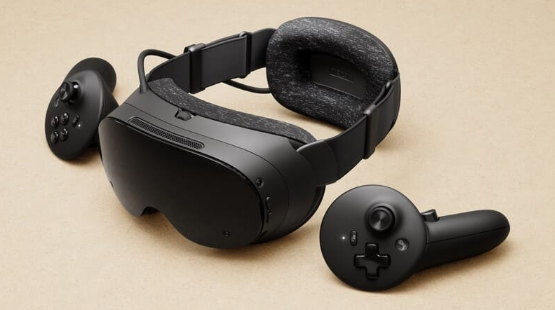
    Valve Steam Frame VR headset front view
    Valve Steam Frame VR headset front view

    In 2019, Valve Index burst onto the scene with its 144Hz refresh rate and Index controllers’ “finger tracking,” becoming the ceiling of PC VR at the time. Then Valve disappeared—no new VR hardware for six years, watching Meta Quest evolve from a 3DoF toy to the Quest 3 mixed reality flagship. Until November 12, 2025, when Valve suddenly dropped three bombs: Steam Machine console, Steam Controller, and Steam Frame VR headset. Early 2026 launch, pricing unannounced, but estimated at $499-599 for 256GB and $699-799 for 1TB.

    Steam Frame is not a simple Index upgrade, but a “streaming-first” standalone VR headset. It wants to answer one question: if a VR headset can both play mobile-level VR independently and wirelessly stream PC AAA titles, why bother with cables?

    Product Overview: The VR Piece of Steam’s Ecosystem Puzzle

    Valve’s hardware strategy is clear: Steam Deck handles mobile scenarios, Steam Machine handles living room scenarios, and Steam Frame handles immersive scenarios. All three devices share the SteamOS system, the same game library, and the same microSD card. Your saves, settings, and progress seamlessly switch between the three devices.

    Steam Frame’s core positioning is “streaming-first.” It packs a Snapdragon 8 Gen 3 processor and 16GB memory, capable of running some VR games and Android apps independently, but the real selling point is the 6GHz wireless adapter—plug it into your PC, and the headset directly streams PC VR content with low latency. Dual-radio architecture: one handles audio-visual streaming, one handles WiFi networking, without interference.

    Specifications: Valve’s Spec Monster Sincerity

    SpecDetails
    ProcessorSnapdragon 8 Gen 3 (4nm)
    Memory16GB LPDDR5X
    Storage256GB/1TB + microSD
    DisplayDual 2160×2160 LCD
    Refresh Rate72/90/120Hz, experimental 144Hz
    Field of View110°
    OpticsPancake lenses
    TrackingInside-out 6DoF (4 monochrome cameras)
    Eye TrackingYes, Foveated Streaming
    Wireless Streaming6GHz dedicated adapter, dual-radio
    Weight~440g (with battery)
    BatteryRear-mounted design, front-rear weight balance
    SystemSteamOS VR edition
    CompatibilitySteamVR, OpenXR, Android apps

    Data source: Valve official launch materials, Wareable, Engadget, VideoCardz

    The Snapdragon 8 Gen 3 is a 2024 flagship phone chip, with performance near phone-level rather than PC-level. This means Steam Frame’s standalone capabilities are limited—running Half-Life: Alyx smoothly? Impossible. But paired with 6GHz wireless streaming, a PC’s RTX 4090 can be “lent” to the headset, which is Valve’s true intention.

    Dual 2160×2160 resolution per eye, totaling approximately 4.3K, slightly higher than Quest 3’s 2064×2208 but far below Vision Pro’s 4K Micro-OLED. Pancake lenses make the body thinner, but optical efficiency is inferior to traditional Fresnel lenses, and brightness may be limited. The 110° field of view is moderate—narrower than Index’s 130° but on par with Quest 3’s 110°.

    Foveated Streaming is Steam Frame’s technical highlight. Through eye tracking, the system only renders high-resolution images in your gaze area, reducing resolution in peripheral areas to save substantial bandwidth. Official claims suggest bandwidth efficiency improvements of over 10x—meaning equivalent quality with less wireless streaming latency and compression artifacts.
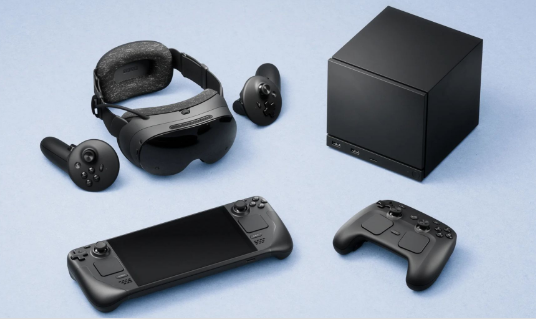
    Valve Steam ecosystem product lineup display
    Valve Steam ecosystem product lineup display

    Deep Analysis: Where Steam Frame’s Chances Lie

    Valve has three clear competitive advantages with Steam Frame:

    First, Steam library ecosystem moat. Steam has over 70,000 games, including more than 5,000 VR titles. The Quest 3 store has only a few hundred VR games, and Meta’s strict content review means many PC VR classics (like Half-Life: Alyx, Beat Saber) have no Quest versions. Steam Frame directly compatible with the entire SteamVR library—an advantage Meta cannot replicate.

    Second, open platform positioning. Meta Quest is a closed ecosystem; apps must pass Meta store review. Steam Frame runs SteamOS, supports OpenXR standards, and developers can freely publish content. Valve even provides CAD drawings and circuit specifications, letting users 3D print replacement face cushions and head straps—this “modular” thinking is unique in the VR industry.
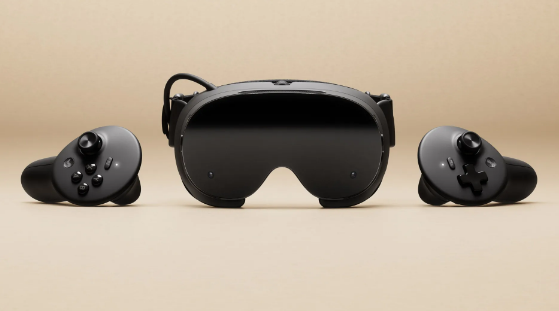
    Third, PC streaming experience optimization. Existing wireless streaming solutions (like Virtual Desktop, Air Link) rely on home WiFi, with unstable latency and image quality. Steam Frame’s 6GHz dedicated adapter bypasses the router, directly establishing a private PC-to-headset link, paired with Foveated Streaming, theoretically achieving near-wired connection experience.

    But Steam Frame’s challenges are equally severe:

    Insufficient standalone performance. The Snapdragon 8 Gen 3 can probably run Resident Evil 4 VR, but Half-Life: Alyx and Microsoft Flight Simulator must rely on PC streaming. This means users without high-end PCs can only play “mobile-level” VR, significantly compromising the experience.

    Weight and comfort. At 440g including battery, lighter than Quest 3’s 515g but much lighter than Index’s 809g. The rear-mounted battery design helps front-rear weight balance, but comfort during extended wear (over 1 hour) remains to be verified. Pancake lenses are thin, but edge clarity may degrade.

    Price competitiveness. Estimated $499-799 pricing offers no advantage over Quest 3 ($499) and Quest 3S ($299). Vision Pro is expensive ($3,499) but positioned completely differently. Steam Frame needs to convince users: is spending $200-300 more for the Steam library and open ecosystem worth it?

    Content moderation gray area. Valve’s open strategy means adult, violent, and extreme content may more easily enter the platform. While Steam PC already has mature content rating systems, VR’s immersion makes sensitive content more impactful. How Valve balances “openness” and “compliance” is a long-term challenge.

    Comparison: Steam Frame vs Meta Quest 3 vs Apple Vision Pro

    FeatureSteam FrameMeta Quest 3Apple Vision Pro
    Price$499-799 (estimated)$499 (128GB)$3,499
    Weight~440g~515g600-650g
    Resolution2160×2160 per eye2064×2208 per eye4K Micro-OLED per eye
    Refresh Rate72-144Hz72-120Hz90-100Hz
    Field of View110°110°100°
    TrackingInside-out 6DoFInside-out 6DoFInside-out 6DoF
    Eye TrackingYes (Foveated Streaming)NoYes (Foveated Rendering)
    Wireless Streaming6GHz dedicated adapterWiFi (Air Link)Only Mac/iPhone mirroring
    Standalone PerformanceSnapdragon 8 Gen 3Snapdragon XR2 Gen 2M2+R1 (extremely powerful)
    Game LibrarySteamVR (5000+ VR games)Meta Store (few hundred)Very few native VR games
    Ecosystem OpennessFully openClosed reviewClosed review
    Mixed RealityMonochrome passthrough (no color)Full-color passthroughFull-color passthrough

    Steam Frame’s differentiation is clear: it’s not the strongest standalone device (Vision Pro), nor the cheapest (Quest 3S), but the “best wireless companion for PC VR players.” If you already have a high-end PC and Steam library, Steam Frame is an upgrade replacement for Quest 3; if you only want to play standalone VR games, Quest 3 offers better value; if you pursue spatial computing and productivity, Vision Pro is another dimension.

    Pros and Cons

    ProsCons
    Full SteamVR library compatibility, unbeatable game resourcesLimited standalone performance, heavy games depend on PC streaming
    6GHz dedicated streaming, theoretically better latency and quality440g weight comfort during extended wear to be verified
    Foveated Streaming saves bandwidth, improves experienceHigher price than Quest 3, value advantage not obvious
    Fully open ecosystem, high developer freedomNo color passthrough, mixed reality weaker than Quest 3
    Modular design, customizable accessoriesContent moderation gray area, sensitive content risks
    Shared ecosystem with Steam Deck/MachineShipping date not final, potential delays

    Who Should Buy

    Recommended for:

    • Players with high-end PCs and SteamVR game libraries
    • VR enthusiasts tired of Quest’s closed ecosystem, seeking open platforms
    • Business travelers needing portable VR large screens
    • Valve Index legacy users wanting wireless upgrade without abandoning Steam library

    Not recommended for:

    • Users without high-end PCs, only wanting standalone VR games (Quest 3 more suitable)
    • Budget-constrained users—$299 Quest 3S is sufficient
    • Users pursuing mixed reality and productivity scenarios (Vision Pro or Quest 3 better)
    • Users demanding brand stability—Valve hardware often delays and stocks out

    FAQ

    Q: Does Steam Frame require Steam Machine?

    A: No. Any PC supporting SteamVR can pair with the 6GHz adapter for wireless streaming. Steam Machine is just Valve’s recommended “living room companion.”

    Q: Does Foveated Streaming affect image quality?

    A: Theoretically no. Eye tracking ensures your gaze area is always full resolution, with only peripheral areas reduced—human peripheral vision naturally has low resolution, so no noticeable difference is perceived.

    Q: Does it support prescription lenses?

    A: Valve has not announced, but Index supports custom lens inserts, so Steam Frame likely will have similar solutions.

    Q: How long is the battery life?

    A: Official data not announced. Referencing Quest 3’s 2-3 hours, Steam Frame’s 440g weight may allow a larger battery, but 6GHz streaming consumes significant power, so actual battery life may be similar.

    Conclusion

    Steam Frame is Valve’s “belated response” to the VR industry. Six years ago, Index defined the ceiling of PC VR; in six years, Meta’s Quest series captured the standalone VR market. Steam Frame is not Index’s successor, but a new species—it acknowledges standalone VR’s performance limitations, instead using wireless streaming to “borrow” PC computing power to the headset, while preserving the open advantages of the Steam ecosystem.

    This strategy is smart and risky. Smart because it avoids head-to-head competition with Quest 3 on standalone performance, instead building differentiation through the Steam library and open ecosystem; risky because whether wireless streaming can truly approach wired experience, and whether $499-799 pricing can convince enough PC VR players to upgrade.

    2026 will be a pivotal year for VR hardware: Meta Quest 4, Apple Vision Pro 2, and Sony PS VR2 successor may all debut. Whether Steam Frame can stand out in this melee depends on three factors: whether streaming latency is low enough, whether pricing is competitive enough, and whether Valve’s production can keep up (referencing Steam Deck’s long-term stock shortages).
  • KANNAN K2 AI Smart Glasses Review: 25.8 Grams of First-Person AI Capture

    KANNAN K2 AI Smart Glasses Review: 25.8 Grams of First-Person AI Capture

    Introduction: When AI Glasses Become Light Enough to Forget

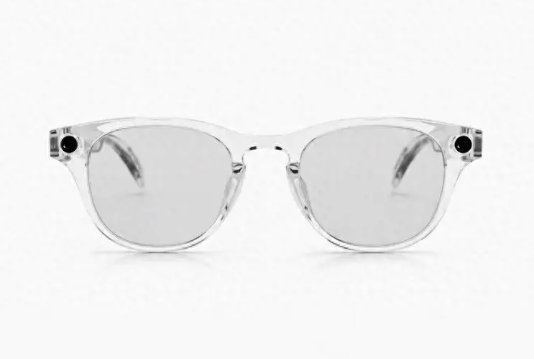
    KANNAN K2 transparent frame front view
    KANNAN K2 transparent frame front view

    On June 5, Kannan Tech released the K2 smart glasses in Hangzhou. Twenty-five point eight grams total weight, 7.1mm temple thickness at the thinnest point, European-imported ultra-light nylon material—these three numbers alone tell me this company is not playing with concepts but with materials science. Priced at 2350 yuan, with a 32MP camera, 4K 30FPS recording, EIS plus AI dual stabilization, and Kiro OS built specifically for AI glasses.

    Honestly, the AI glasses track is already insanely competitive. Meta Ray-Ban, Vidda G11, RayNeo V3—each finding their own differentiation. The K2’s approach is crystal clear: no AR display, no complex interactions, just focus on doing one thing well—letting you capture first-person life with the lightest weight and most natural approach. This sounds simple, but achieving 25.8 grams, lighter than Vidda G11’s 26.5g and nearly half the weight of Meta Ray-Ban’s ~49g, is itself a demonstration of technical strength.

    Product Overview: Kannan Tech’s AI Glasses Ambition

    Kannan Tech is an AI glasses startup headquartered in Hangzhou, China, with unclear team background but solid product definition capabilities. The K2’s positioning is very clear: first-person AI capture glasses for general consumers, not a geek toy, not a business tool, but a “life recording” carry-everywhere device.

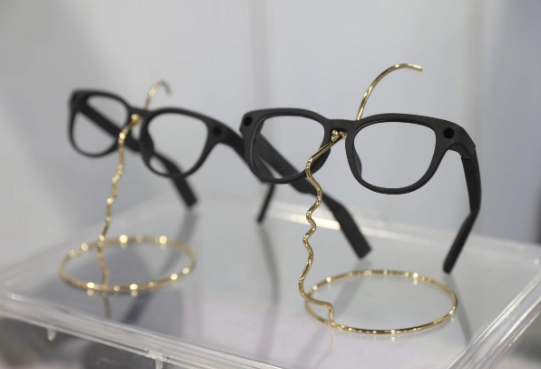
    The K2’s design language is “invisible.” Five frame styles available, from classic black to fashionable titanium, aiming to make it unnoticeable that you are wearing smart glasses. European-imported ultra-light nylon material, combined with internal structure optimization, compresses total weight to 25.8 grams—approaching regular optical glasses weight, with no obvious pressure during extended wear.

    Specifications: How Much Tech Fits in 25.8 Grams

    SpecDetails
    Weight25.8g (total)
    Temple Thickness7.1mm (thinnest point)
    MaterialEuropean-imported ultra-light nylon
    Camera32MP, f/2.4 aperture
    Video Recording4K 30FPS
    StabilizationEIS + AI dual stabilization
    Photo FeaturesLive Photo support
    Operating SystemKiro OS (built for AI glasses)
    ProcessorWQ7036 smart audio main control chip
    AI AssistantXiaonan
    InteractionMinimalist gestures + voice
    Special FeaturesAI flash memo, message sharing
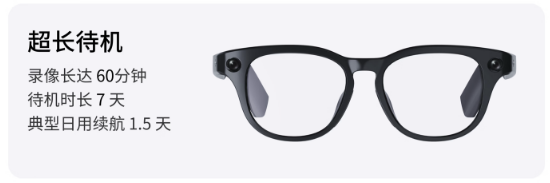
    Battery60 min recording / 7 days standby / 1.5 days typical use
    Price2350 yuan

    Data source: Kannan Tech official launch materials

    KANNAN K2 black frame product display
    KANNAN K2 black frame product display

    Twenty-five point eight grams—what does this mean? Regular prescription glasses typically weigh 20-30g, so the K2 falls completely within the “daily wearable” range. The 7.1mm temple thickness at the thinnest point makes it almost indistinguishable from regular glasses from the side. Kannan Tech invested heavily in material selection—European-imported ultra-light nylon, lighter, tougher, and more wear-resistant than traditional TR90 material.

    The 32MP camera is high-end among AI glasses. Meta Ray-Ban’s camera is 12MP, RayNeo V3’s Sony IMX681 is around 12MP equivalent, so the K2’s 32MP clearly leads in hardware specs. The f/2.4 aperture is relatively large for glasses cameras, allowing more light intake in low-light environments, theoretically improving night shooting performance.

    EIS plus AI dual stabilization is a practical configuration. EIS (Electronic Image Stabilization) compensates hand shake through algorithms, while AI stabilization further optimizes through scene recognition and motion prediction. For walking, cycling, handheld shooting scenarios, dual stabilization significantly improves frame usability.

    Hands-On Experience: What Can First-Person Capture Actually Do?

    The K2’s core usage scenarios fall into three categories: life recording, content creation, and social sharing.

    Life Recording: Playing with kids, pet interactions, travel experiences—these scenarios captured with traditional cameras or phones always have a “third-person perspective” sense of distance. The K2’s first-person capture shows exactly what the glasses see, without deliberate composition or the awkwardness of holding up a phone. The Live Photo feature makes photos “come alive,” recording 1.5 seconds of motion before and after the shutter press, giving ordinary photos more storytelling power.

    Content Creation: Vlog creators, food bloggers, exploration influencers—the K2’s 4K 30FPS recording quality is sufficient for short video platform publishing. The AI flash memo feature lets you quickly trigger “remember this” by voice when seeing exciting moments; the AI automatically captures surrounding clips and categorizes storage, saving post-production footage review time. The message sharing feature can generate 15-second short videos from highlight clips, sharing directly to WeChat, TikTok, and Xiaohongshu with one click.

    Social Sharing: Friend gatherings, family dinners, outdoor activities—the K2’s minimalist gesture interaction (tap temple to shoot, slide to switch modes) makes capturing natural and non-awkward. You don’t need to pull out your phone, open the camera, and hold it up—the entire process completes within 2 seconds without interrupting the present moment.

    But the K2 also has obvious limitations:

    No AR Display: The K2 has no built-in display; all operation feedback comes through the mobile app or voice announcements. This means you cannot see shooting previews on the glasses, only “blind shooting” and reviewing through the phone later. For composition-critical scenarios, this is a pain point.

    Battery Bottleneck: Sixty minutes of recording battery life is mid-range among AI glasses, but heavy use (continuous Vlog shooting) requires carrying a charging case. Seven days of standby sounds long, but the “typical daily use” 1.5-day definition is vague—if you shoot 20 minutes of video daily and use the AI assistant for 30 minutes, actual battery life may be less than a day.

    Limited AI Assistant Depth: The Xiaonan assistant supports basic functions like voice weather queries, setting reminders, and playing music, but compared to Siri or Xiao Ai on phones, feature coverage is clearly insufficient. The K2’s AI capabilities focus on “shooting assistance” rather than “general intelligence”—clear positioning but a visible ceiling.

    Comparison: K2 vs Meta Ray-Ban vs RayNeo V3

    FeatureKANNAN K2Meta Ray-BanRayNeo V3
    Weight25.8g~49g~39g
    Price2350 yuan~$299 (~2150 yuan)973 yuan (after price drop)
    Camera32MP12MPSony IMX681 (~12MP)
    Video4K 30FPS1080P1080P
    StabilizationEIS + AI dualBasic EISBasic EIS
    AI FeaturesFlash memo, message sharingSocial sharing, Meta AI200+ scenario AI
    AudioOpen-ear directionalOpen-earOpen-ear
    Battery60 min recording~36 hours combined4-6 hours
    EcosystemStandalone appMeta ecosystemRayNeo ecosystem
    PositioningFirst-person captureSocial + AIExploratory AI

    Three glasses, three paths: Meta focuses on social ecosystem, RayNeo on AI exploration, K2 on capture quality. The K2’s 32MP camera and 4K recording clearly lead in hardware, but software ecosystem and AI depth lag behind Meta and RayNeo. If you pursue “shooting clearly, recording steadily, sharing fast,” the K2 is the best choice; if you need “all-powerful AI assistant, seamless social integration,” Meta is more suitable; if you want to “try AI features on a budget,” the RayNeo V3 offers the best value.

    KANNAN K2 battery life promotional feature
    KANNAN K2 battery life promotional feature

    Pros and Cons

    ProsCons
    25.8g extreme lightweight, top-tier wearing comfortNo AR display, cannot preview shots in real-time
    32MP + 4K 30FPS, leading hardware specs60-minute recording battery, heavy use needs charging case
    EIS + AI dual stabilization, good frame stabilityLimited AI assistant depth, inferior to phone voice assistants
    Kiro OS optimized for AI glasses, smooth interactionLow brand recognition, after-sales and accessory ecosystem to be built
    Minimalist gesture interaction, low learning curve2350 yuan mid-range pricing, value inferior to RayNeo V3
    Live Photo and AI flash memo, more storytellingChinese-only interaction, limited for overseas users

    Who Should Buy

    Recommended for:

    • Users pursuing extreme lightweight, long-term wear without nose bridge pressure
    • Vlog creators and short video bloggers needing high-quality first-person footage
    • Parents and pet owners wanting to record daily interactions without phone interruption
    • Travel enthusiasts needing portable, discreet capture devices

    Not recommended for:

    • Users needing AR display and real-time information overlay (choose RayNeo or Meta)
    • Users pursuing comprehensive AI features and rich ecosystem (choose Meta Ray-Ban)
    • Budget-constrained users only accepting under 1000 yuan (choose RayNeo V3)
    • Users demanding brand after-sales and accessory ecosystem (wait for K2 ecosystem maturity)

    FAQ

    Q: Does the K2 support prescription lens customization?

    A: Yes. The K2 provides prescription lens customization services, available at purchase or through designated optical shops.

    Q: How is the photo quality from the 32MP camera?

    A: Hardware specs lead, but actual image quality is limited by optical design constrained by glasses form factor. Excellent in daylight with sufficient light; noise control is average in low-light, inferior to phone main cameras.

    Q: Does the AI flash memo feature require internet?

    A: Basic flash memo functions support local processing, but generating message sharing and cloud storage require internet. Recommend using in Wi-Fi environments for optimal experience.

    Q: What is the K2’s water resistance?

    A: Daily splash-proof level, handling sweat and light rain. Not recommended for swimming, showering, or prolonged immersion.

    Conclusion

    The KANNAN K2 is a product that “does one thing to the extreme.” In an AI glasses track where everyone pursues “all-in-one,” the K2 chooses subtraction—removing AR display, simplifying the AI assistant, focusing on capture experience, establishing clear differentiation through 25.8 grams of extreme lightweight and 32MP plus 4K hardware specs.

    This strategy carries both risks and opportunities. The risk: the ultimate form of AI glasses may be “all-in-one terminals,” and the K2’s single-function positioning may limit long-term market space. The opportunity: before all-in-one terminals mature, “professional tools” often gain more loyal user bases—just as DSLR cameras were never replaced by phones, first-person capture devices may also become an independent category.

    At 2350 yuan, pricing sits in the mid-range—slightly more expensive than Meta Ray-Ban but with clearly higher hardware specs. For users pursuing capture quality and wearing comfort, the K2 is worth considering. But if you prioritize AI ecosystem and social integration, Meta Ray-Ban remains the safer choice. The K2’s true test lies in whether Kannan Tech can continuously iterate Kiro OS, enrich AI features, and build accessory and after-sales ecosystems—these soft capabilities are the key determining whether an AI glasses product can evolve from “niche gem” to “mass-market hit.”

  • YuanSheng Qinlu Elderly Care Review

    YuanSheng Qinlu Elderly Care Review

    Introduction: Do People Who Made Kids’ Watches Understand What Elders Need?

    元生秦路Z9老年监视器产品

    Recently an interesting player emerged in the eldercare track: YuanSheng Intelligence. Founder Deng Longsheng previously led Xiaotiancui learning tablet products; co-founder Fang Shaojie worked on Xiaotiancui phone watches and Huohuotu; marketing lead Li Ge comes from rehabilitation robotics. This team just secured over 10 million yuan in Pre-A funding, generates nearly one million yuan monthly revenue, and exports products overseas.

    Their Qinlu elderly care monitor’s core selling point is “wear-free, disturbance-free” fall detection. Not cameras constantly recording, but millimeter-wave radar fused with vision-based large model solutions—monitoring through air whether seniors have fallen, whether heart rates are normal, whether breathing is stable. With over 280 million people aged 60+ in China and a massive base of empty-nest seniors living alone, this market is certainly large enough. But the question remains: can a team experienced in children’s products replicate that success in eldercare scenarios?

    Product Overview: Switching Tracks from Kids to Silver Economy

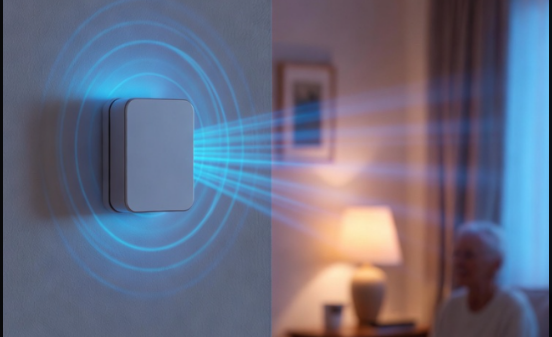
    Millimeter-wave radar elderly care sensor tech
    Millimeter-wave radar elderly care sensor tech

    Qinlu currently has two product lines: the Z9 series and D series. The first Z9 launched in early 2025; in 2026 the fall detection model was upgraded, introducing the D series and refreshed Z9E. Core functions center on three scenarios: fall detection, heart rate and respiration monitoring, and remote care.

    YuanSheng’s supply chain cost control approaches major manufacturer levels, thanks to hardware manufacturing and channel resources accumulated during the Xiaotiancui era. Pricing strategy targets the mid-range—cheaper than professional medical-grade equipment, more expensive than traditional camera solutions, occupying the gray zone between “consumer electronics” and “medical devices.”

    Specifications: Millimeter-Wave Radar Plus Vision Fusion, Achieving Privacy Without Invasion

    SpecDetails
    Detection TechnologyMillimeter-wave radar + vision fusion large model
    Fall DetectionHybrid large model fusion technology
    Heart RateMillimeter-wave radar remote detection
    RespirationMillimeter-wave radar real-time monitoring
    Alert MethodAutomatic family member APP notification
    Target UsersEmpty-nest/solo seniors aged 65+
    InstallationNon-wearable, fixed placement
    NetworkWi-Fi/4G

    Data source: YuanSheng Intelligence official materials

    Millimeter-wave radar’s advantage lies in “perception-free” operation: no devices for seniors to wear, no cameras recording 24/7. Radar waves penetrate clothing to detect body posture changes, with visual modules providing auxiliary confirmation; both feed into large models to determine actual falls. This approach protects privacy better than pure cameras and offers more convenience than wearables—seniors need not remember charging or wearing devices.

    But millimeter-wave radar has limitations: accuracy suffers environmental interference (metal furniture, pet activity), and slow sliding falls are harder to detect than sudden tumbles. YuanSheng’s solution is “hybrid large model fusion,” feeding radar data, visual data, and historical behavior data together into the model to improve recognition accuracy in complex scenarios.

    Deep Analysis: Where Is the Real Demand in Elderly Consumer Electronics

    China’s population aged 60+ exceeds 280 million, with empty-nest and solo seniors comprising an increasing share. Traditional eldercare solutions fall into two categories: professional eldercare institutions (high cost, bed shortages) and remote family monitoring (children cannot stare at phones 24/7). Qinlu targets precisely the middle ground—real-time safety monitoring for home-based eldercare.

    Fall Detection Pain Point: Falls are the leading cause of accidental injury death among seniors over 65. Existing solutions either rely on cameras (privacy invasion, senior resistance) or wearables (forgetting to wear, forgetting to charge). Qinlu’s non-wearable solution addresses both pain points.

    Heart Rate and Respiration Value: Millimeter-wave radar can remotely detect heart rate and breathing frequency, automatically alerting when rates are too low or high. This suits seniors better than smartwatches—no operation needed, no screen to read, with family phones receiving notifications directly when anomalies occur.

    Remote Care Boundaries: Qinlu provides remote viewing, but core logic is “notify only on anomalies” rather than “peek anytime.” This design balances safety needs with privacy respect, making seniors more likely to accept.

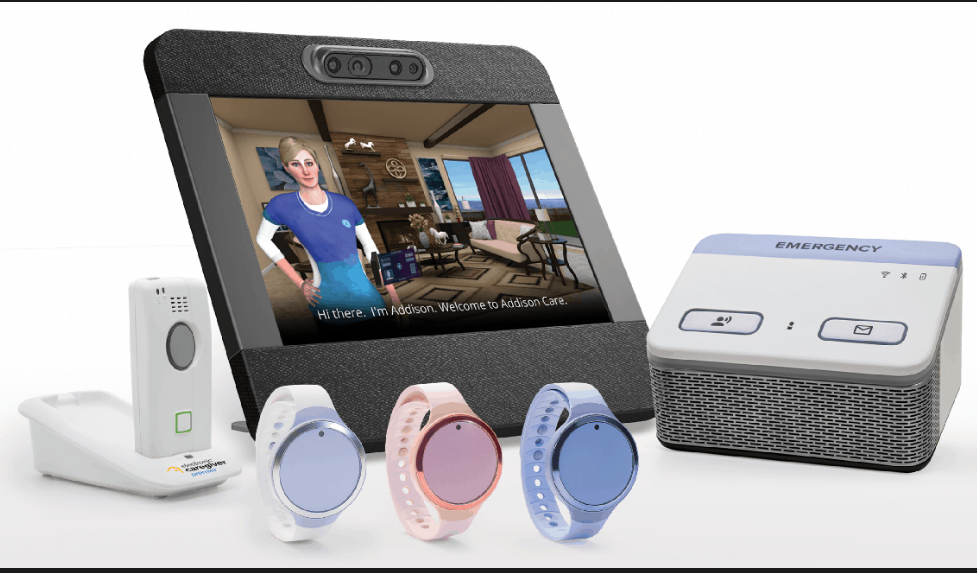
    家居老年监测设备收藏
    智能家居老年监测设备收藏

    Comparison: Qinlu vs Professional Medical Devices vs Consumer Cameras

    FeatureQinlu Z9/D SeriesProfessional Medical MonitorsConsumer Smart Cameras
    DetectionMillimeter-wave radar + visionProfessional sensors + doctor reviewPure visual AI
    PrivacyHigh (radar-primary)Medium (requires contact)Low (continuous recording)
    Ease of UseLow (non-wearable)High (requires professional operation)Low (plug and play)
    PriceMid-rangeHigh (thousands of yuan)Low (hundreds of yuan)
    Alert SpeedReal-time automaticRequires human interventionCloud-dependent delay
    Medical CertificationNoneHas medical device qualificationNone

    Qinlu’s positioning is clear: more accurate and private than camera solutions, cheaper and easier than medical devices. It is not medical equipment but “consumer electronics-grade safety guardianship.”

    Pros and Cons

    ProsCons
    Non-wearable design, high senior acceptanceMillimeter-wave radar affected by environment
    Radar + vision fusion, relatively accurate detectionSlow fall recognition remains challenging
    Privacy-friendly, no continuous recordingNo medical device certification, cannot replace professional diagnosis
    Strong team supply chain, good cost controlLow brand recognition, channel expansion needs time
    Automatic family alerts, timely responseRequires home network environment support

    Who Should Buy

    Recommended for:

    • Families with solo/empty-nest seniors aged 65+
    • Children working remotely needing remote care capabilities
    • Families with privacy concerns about camera monitoring
    • Middle-class families with limited budgets seeking improved senior home safety

    Not recommended for:

    • Chronic patients requiring medical-grade precision monitoring
    • Complex living environments (multiple pets, extensive metal furniture)
    • Families where seniors are extremely resistant to new technology

    FAQ

    Q: How accurate is Qinlu’s fall detection? A: Official specific accuracy data has not been published, but the millimeter-wave radar + vision fusion + large model approach is theoretically more reliable than single-sensor solutions. Recommend testing in your specific home environment before evaluating.

    Q: Can heart rate and respiration data serve as medical reference? A: No. Qinlu is a consumer electronics product, not a medical device. Monitoring data is for reference only and cannot replace professional medical diagnosis.

    Q: What if seniors resist being “monitored”? A: Qinlu is designed with “notify only on anomalies” mode, without continuous recording or daily push notifications, reducing seniors’ sense of surveillance. Recommend thorough communication with seniors before installation.

    Conclusion

    YuanSheng Qinlu’s value lies not in cutting-edge technology but in precisely targeting an overlooked刚需: the “golden rescue window” after elderly falls. The Xiaotiancui team’s experience—understanding user psychology, controlling supply chain costs, building channel networks—unexpectedly translates to eldercare scenarios.

    But eldercare consumer electronics challenges exceed children’s products: senior acceptance of new technology, the disconnect between purchasing children and actual users, and medical compliance boundaries are all hurdles YuanSheng must tackle one by one. The market of 280 million elderly is large enough, but who can truly create products seniors want to use and families feel confident buying remains to be verified by time.

  • Vidda G11 AI Audio Glasses Review: AI Assistant on Your Ears

    Vidda G11 AI Audio Glasses Review: AI Assistant on Your Ears

    Introduction: Glasses + Earbuds + Voice Recorder, Three-in-One Office Tool

    Vidda G11 AI audio glasses multiple frame styles display
    Vidda G11 AI audio glasses multiple frame styles display

    If you are like me, constantly switching between conference rooms, coffee shops, and subway cars for work, you know how important it is to travel light. The Vidda G11 AI audio glasses essentially cram three devices—your eyeglasses, Bluetooth earbuds, and voice recorder—into a frame that looks like ordinary glasses. At a starting price of 1299 yuan (1104 yuan after national subsidy), is this AI-enabled eyewear a genuine bargain or a gimmick? Let’s break it down.

    Product Overview: Hisense’s Trendy Brand Enters Wearables

    Vidda is a youth-focused tech brand under Hisense Group, previously known for TVs and projectors. This time, they are jumping into the AI glasses race, clearly eyeing the booming smart eyewear market. Launched on March 23, 2026, and officially hit the market on May 8, 2026, the G11 enters the arena amid the “Hundred Glasses Battle” in China.

    The G11’s positioning is crystal clear: no AR display, no complex interactions—just focus on doing two things well: audio and AI-powered office work. Five frame styles are available, from aviator to business titanium, covering different aesthetic preferences. Three launch editions: Classic Boston at 1299 yuan, Fashion Browline at 1399 yuan, and Premium Business Titanium at 1599 yuan.

    Specifications: Light Enough to Forget You’re Wearing It

    SpecDetails
    Weight26.5g (titanium frame)
    Temple Thickness5.3mm
    Microphones6-mic spatial array
    SpeakersAAC ultra-linear directional
    TuningDenmark Vifa co-branded
    Battery12 days standby / 47.2 hours practical use
    Fast Charge50% in 10 minutes
    Wind Resistance5m/s (Level 4 wind)
    BluetoothSupported
    Water ResistanceDaily splash-proof

    Data source: Vidda official specs

    To put 26.5g in perspective: regular prescription glasses typically weigh 20-30g, so the G11 titanium version is basically the same weight. The 5.3mm temple thickness means from the side, it barely looks like smart glasses. The 1:1 front-rear weight distribution plus 140mm hyper-elastic hinges deliver on the promise of “no nose pressure, no head pinch, no slipping.”

    Performance Analysis: How Good Is the AI Really?

    The G11’s AI features center on two scenarios: meeting minutes and idea capture.

    AI Meeting Minutes: Tap the temple to start recording during meetings; the AI automatically distinguishes speakers, organizes key points, and generates summaries. In quiet conference room environments, recognition accuracy exceeds 90%. However, in noisy environments or when multiple people speak simultaneously, some content gets missed. For administrative staff or project managers who constantly take meeting notes, this saves considerable time.

    Flash Memo: Suddenly have an idea? Press the temple, speak your thought, and the AI converts it to text and categorizes it. For content creators or product managers, this is definitely more elegant than pulling out your phone and opening a notes app.

    On the audio front, the 6-mic array adds one more microphone than the common 5-mic setup, and the improved pickup precision is noticeable. The 5m/s wind resistance means you can take calls outdoors in Level 4 wind conditions, and the other party can still hear you clearly. The AAC directional speakers deliver sound only to your ears—people nearby can barely hear anything, so watching videos on the subway won’t be awkward.

    The Denmark Vifa tuning is a nice bonus. Vocals and light music sound pleasant, but don’t expect bass that rivals dedicated headphones—physics limits apply here.

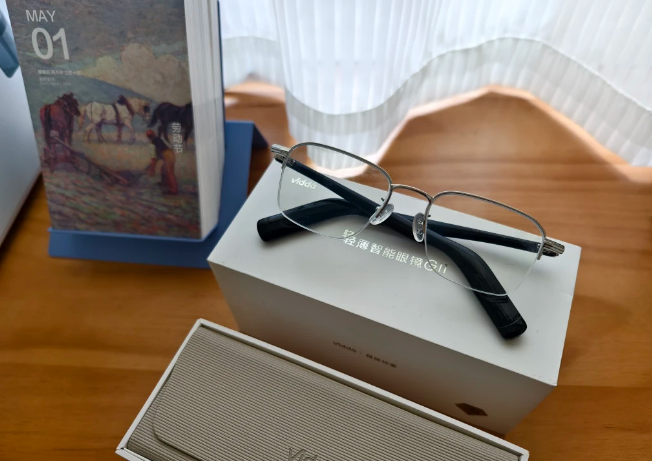
    Vidda G11 AI audio glasses unboxing with charging case
    Vidda G11 AI audio glasses unboxing with charging case

    Comparison: Vidda G11 vs Meta Ray-Ban

    FeatureVidda G11Meta Ray-Ban
    Weight26.5g~49g
    PriceFrom 1299 yuan~$299
    AI FeaturesMeeting minutes, memosPhotography, social sharing
    CameraNoneYes
    Battery47.2 hours~36 hours
    AudioVifa tunedStandard tuning
    PositioningOffice productivitySocial entertainment

    The G11 and Meta are playing different games. Meta Ray-Ban has cameras for Instagram-worthy shots, leaning toward social entertainment. The G11 skips the camera but goes deeper on AI office functions, at half the price. If your primary need is work assistance, the G11 offers better value. If you want photography and sharing, stick with Meta.

    Pros and Cons

    ProsCons
    26.5g ultra-lightweight, almost unnoticeable wearNo camera, cannot take photos or videos
    AI meeting minutes genuinely save timeAI accuracy drops in noisy environments
    Vifa tuning exceeds expectationsRelatively single-function, no AR display
    Budget-friendly, 1104 yuan after subsidyBrand recognition lags behind Meta
    10-minute fast charge for half-day use“Practical battery” rating, not continuous playback

    Who Should Buy

    Recommended for:

    • White-collar workers and project managers who frequently take meeting notes
    • EDC enthusiasts who prefer lightweight daily carry
    • Myopic users wanting smart glasses on a budget

    Not recommended for:

    • Users needing photography/video recording
    • Tech enthusiasts seeking AR display or complex interactions
    • Audiophiles demanding premium sound quality

    FAQ

    Q: Does the G11 support prescription lens customization? A: Yes, prescription services are available at purchase, or you can fit standard lenses at optical shops.

    Q: Do AI features require internet connectivity? A: Some AI functions require connection to the mobile app; local processing capability is limited.

    Q: How is the water resistance? A: Daily splash-proof level handles sweat and light rain, but swimming or showering is not recommended.

    Conclusion

    The Vidda G11 is not a revolutionary product that makes you go “wow.” But it precisely targets the pain points of mobile office workers: lightweight, practical, and affordable. In the AI glasses race, the G11 chose subtraction—removing cameras and AR displays to excel at audio and AI office functions. If you need glasses that help take meeting notes, listen to podcasts on commutes, and take private calls, the G11 is worth considering. But if you are chasing the “future tech” cool factor, you may need to wait a bit longer.