Category: AI for Work

AI Work Hardware refers to consumer-grade devices and peripherals—driven primarily by artificial intelligence—that deeply embed capabilities for perception, comprehension, reasoning, decision-making, and continuous learning into their core system architecture and operational logic. Designed for use in personal, home, and small-office environments, these tools serve to support daily workflows such as AI generation, creative production, office tasks, and learning.

  • xTool WonderPress Launch: 5-in-1 Heat Press for $279

    xTool WonderPress Launch: 5-in-1 Heat Press for $279

    One-sentence verdict: If xTool can replicate its laser engraver dominance in the heat press market, the WonderPress may become the next must-have desktop tool for makers and POD sellers—and at $279, it undercuts most single-function industrial machines by a factor of ten.
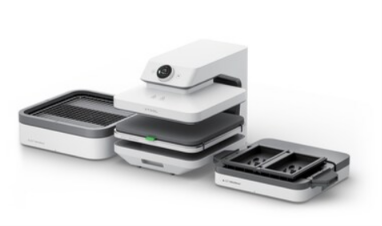
    xTool WonderPress 5-in-1 modular heat press
    xTool WonderPress five module heat press system

    Quick Summary

    On June 17, 2026, xTool officially opened domestic pre-orders for the WonderPress modular multi-function creative heat press workstation. The device integrates five capabilities through swappable modules: automatic flat heat pressing, 3D heat transfer, vacuum thermoforming, professional DTF curing, and multi-function baking. Built-in preset material parameters enable zero-experience operation. The product previously raised $4.61 million on Kickstarter from over 8,169 backers within days of launch. Domestic pricing starts at 2,799 RMB ($387), with early bird Kickstarter pricing at $279. xTool holds 47% market share in consumer laser engravers and filed for Hong Kong IPO in January 2026.


    What Happened

    xTool built its reputation by doing one thing exceptionally well: making industrial-grade laser engraving accessible to consumers. Its laser engravers command 47% of the consumer segment—six times the share of its nearest competitor. The WonderPress represents the company’s attempt to replicate this formula in an adjacent category.

    The product architecture centers on modularity. Five distinct functions occupy the same desktop footprint through interchangeable modules:

    Automatic flat heat pressing handles T-shirts, bags, hats, mouse pads, and Perler beads. The machine automatically matches temperature and time parameters; users load items and retrieve finished products without manual calibration.

    3D heat transfer extends capability to curved surfaces. A dedicated module presses patterns onto phone cases, mug exteriors, and irregular objects—functions impossible with conventional flat-bed machines.

    Vacuum thermoforming heats and softens plastic sheets, then vacuum-seals them against molds. The integrated heating-pressuring-shaping workflow produces custom packaging prototypes and small-batch molds within seconds.

    Professional DTF curing completes the Direct-to-Film workflow. Users print patterns onto specialized film, then use the WonderPress to heat-cure and activate adhesive properties. This supports single-piece orders without plate-making—currently the hottest process in apparel customization circles.

    Multi-function baking provides precise temperature-controlled heating for polymer clay curing, shrink plastic processing, and mug sublimation. The 80×398×158mm chamber accommodates three standard mugs simultaneously.

    The unifying intelligence is a preset material parameter library. Load an item, the machine identifies material type, and automatically configures temperature, duration, and pressure. This “microwave simplicity” approach eliminates the traditional heat press learning curve where novices ruin dozens of garments calibrating settings.


    Why It Matters

    The heat press market suffers from a fundamental segmentation problem. Industrial machines cost thousands of dollars, occupy workshop space, and require trained operators. Consumer alternatives are typically single-function devices with crude temperature controls that frustrate beginners. The gap between “professional results” and “accessible price” has remained largely unbridged.
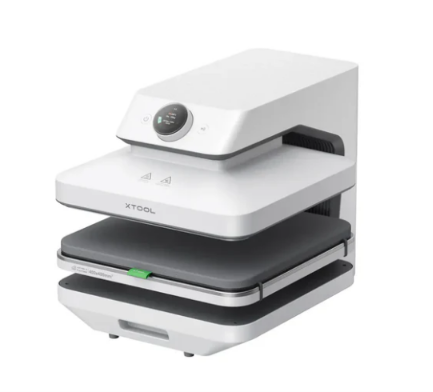
    xTool WonderPress auto heat press front view
    xTool WonderPress auto heat press front detail

    xTool’s WonderPress targets this gap directly. At $279-387, it costs roughly what a mid-range smartphone commands, yet replaces five separate pieces of equipment. For Print on Demand sellers—who list customized products on e-commerce platforms and produce only after receiving orders—this consolidation matters enormously. A typical POD operation might separately purchase a flat press ($300), mug press ($200), vacuum former ($500), DTF oven ($400), and polymer clay oven ($150). The WonderPress bundles equivalent capability at roughly one-third the combined cost and one-fifth the workspace.

    The Kickstarter performance validates demand. Crossing $1 million within four hours and ultimately reaching $4.61 million indicates strong pre-market validation. For context, most hardware Kickstarter campaigns struggle to reach $100,000. The 8,169 backer count suggests this is not merely speculative investment but genuine purchase intent from makers and small business operators.


    Impact Analysis

    Market impact: China’s heat press market reached approximately 3.9-4.5 billion RMB in 2026 with 8-19% annual growth. The WonderPress could accelerate this expansion by expanding the user base from professional workshops to individual creators and small e-commerce sellers. If xTool achieves even 10% of its laser engraver market penetration in heat presses, it would capture significant share of a rapidly growing category.

    Consumer impact: Individual makers gain access to production capabilities previously requiring industrial equipment. A hobbyist can now produce professional-quality custom apparel, promotional items, and prototypes without outsourcing. For POD sellers, the reduced equipment footprint and simplified workflow directly improve unit economics—less space rent, faster turnaround, lower defect rates from misconfigured parameters.

    Industry impact: The “modular multi-function” approach may influence broader desktop manufacturing equipment design. Rather than purchasing separate machines for each process, users increasingly expect swappable modules that transform base hardware. This trend, already visible in 3D printing (tool changers) and CNC (spindle modules), now extends to thermal processing equipment.
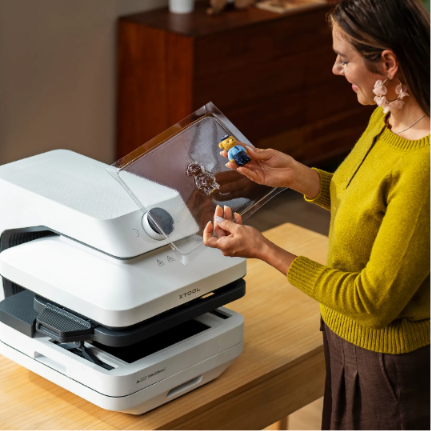
    xTool WonderPress user crafting scene
    xTool WonderPress user crafting custom items

    What’s Next

    Several variables will determine whether the WonderPress achieves sustained market traction:

    First, module durability and interchangeability. Frequent module swapping must not degrade connection precision or heating uniformity. Early user reports on connector wear and temperature consistency will be critical.

    Second, material library expansion. The preset parameter database currently covers common materials, but specialty substrates (metallic films, reflective fabrics, composite plastics) may require user calibration. How quickly xTool expands official library coverage affects the “zero-experience” promise.

    Third, domestic versus overseas performance divergence. xTool generates 85% of revenue from Europe and America through direct-to-consumer channels. The WonderPress domestic launch tests whether Chinese consumers—who face different POD ecosystem maturity and e-commerce platform structures—respond equally strongly.

    Fourth, IPO implications. With Hong Kong listing application submitted in January 2026, WonderPress sales performance becomes a narrative element for investor presentations. Strong numbers validate the “platform expansion beyond laser engraving” growth story; weak numbers raise questions about category extension capabilities.
  • Revopoint POP 4 Review: AI-Powered 3D Scanner with 3DGS Modeling

    Revopoint POP 4 Review: AI-Powered 3D Scanner with 3DGS Modeling

    One-sentence verdict: If you need a scanner that works in direct sunlight and turns physical objects into game-ready assets, the POP 4 is among the most compelling productivity tools to watch in 2025.

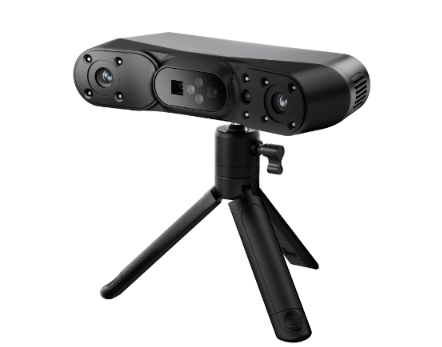
    Revopoint POP 4 dual-band scanner front view
    Revopoint POP 4 dual-band scanner front view

    Introduction

    3D scanners have long occupied an awkward position in the tech landscape. Industrial-grade units cost a fortune, while consumer-level devices struggle with accuracy. Revopoint’s POP series has been chipping away at this divide, and the POP 4 takes the most aggressive swing yet—packing AI algorithms and 3D Gaussian Splatting (3DGS) into a handheld form factor. The Kickstarter campaign raised over $2.6 million from more than 3,000 backers. For a specialized professional tool, those numbers signal genuine market demand.

    The POP 4 targets a clear audience: engineers, designers, cultural heritage professionals, and 3D content creators who need a complete “scan-and-go” solution. It refuses to be a toy, yet it does not want to stay trapped in a lab either.


    Product Overview

    The POP 4 represents Revopoint’s fourth-generation handheld scanner. The most significant evolution from previous models is the integration of AI-driven intelligent segmentation and 3DGS modeling capabilities. The device employs a dual-band optical system: blue multi-line laser handles high-precision detail work, while infrared structured light manages medium-to-large scenes and human body scanning.

    On the hardware front, the POP 4 features a dedicated depth computation chip, with laser scanning frame rates reaching up to 105 fps. Single-frame accuracy hits 0.03 mm, with volumetric accuracy at 0.03 mm + 0.05 mm × L(m). In practical terms, this means the device captures hair-width details while maintaining overall geometric fidelity.

    For fieldwork, the scanner includes a 5500 mAh removable battery grip delivering approximately 4 hours of continuous operation. Wi-Fi 6 wireless transmission enables real-time connectivity with PCs or mobile devices, eliminating the need to drag cables across outdoor job sites.

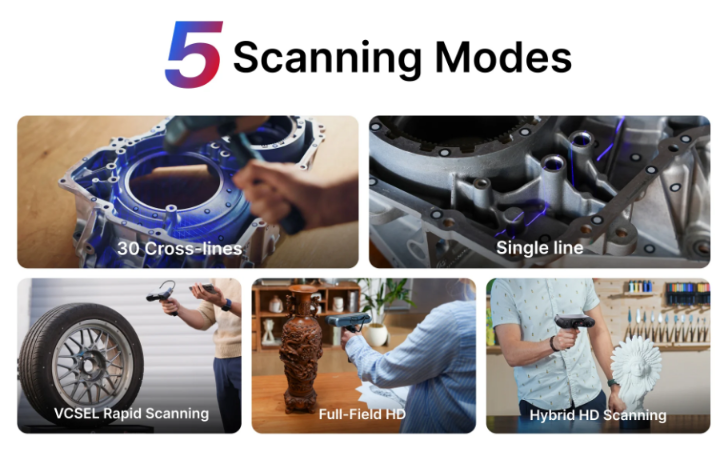
    POP 4 five scanning modes for diverse materials
    POP 4 five scanning modes for diverse materials

    Technical Specifications and Scanning Modes

    The POP 4 offers five distinct scanning modes covering everything from precision components to full-body capture:

    ModeLight SourceApplicationKey Feature
    Blue Laser StandardBlue multi-line laserDark objects, metal surfacesNo powder coating required
    Blue Laser FineBlue multi-line laserHigh-detail small objectsHigher precision, slower speed
    IR Full-Field HDInfrared structured lightMedium-to-large objects, human bodyFull coverage, high frame rate
    IR Hybrid HDIR + laser fusionComplex structuresAuto-switching, smooth tracking
    VCSEL Fast ScanVCSEL infraredBright environments, large scenes100,000 lux resistance, 30 fps

    The intelligent aspect of this design is that users need not become optics experts. The device automatically selects optimal parameters for each scene. The Hybrid HD mode deserves particular attention—it dynamically fuses both light sources during scanning, preventing data discontinuities caused by manual mode switching.


    AI and 3DGS: Beyond Spec Sheet Improvements

    The POP 4’s AI capabilities are not marketing fluff. Embedded algorithms recognize target objects in real time, automatically filtering background point clouds to output clean object data. For scanning novices, this eliminates hours of post-processing cleanup. For professionals, it means on-site quality confirmation rather than discovering corrupted data back at the office.

    More significantly, the 3DGS modeling capability changes the output pipeline. Traditional 3D scanning produces point clouds or mesh models requiring specialized software for texture mapping and rendering optimization before game or metaverse deployment. The POP 4’s patented 3DGS modeling technology converts point cloud and RGB data directly into Gaussian models, exportable in .splat format. This compresses the workflow from “scan → repair → bake → import engine” to “scan → export → use directly.”

    For game development and digital twin applications, this efficiency gain translates to substantially lower digital asset production costs. Cultural heritage digitization benefits equally—high-precision 3D documentation of artifacts no longer demands complex post-processing to achieve photorealistic presentation.


    Competitive Comparison

    FeatureRevopoint POP 4EinScan H2Artec Leo
    Accuracy0.03 mm0.05 mm0.1 mm
    Max Frame Rate105 fps60 fps80 fps
    Light Resistance100,000 lux50,000 lux80,000 lux
    WirelessWi-Fi 6Wired primaryWi-Fi 5
    3DGS SupportNativeNoNo
    Price Range~$800-900~$1,200~$30,000

    The POP 4’s pricing strategy is particularly interesting. The standard edition runs approximately $800, with the advanced edition around $900—occupying the empty space between consumer and professional tiers. Against industrial-grade devices like the Artec Leo, the POP 4 delivers comparable accuracy at less than 3% of the cost. Against the EinScan H2, it holds clear advantages in frame rate and AI functionality.


    Pros and Cons

    ProsCons
    AI auto-segmentation dramatically reduces post-processing timeAdvanced features still carry a learning curve
    Native 3DGS support enables direct digital asset usageExtremely reflective materials still need auxiliary treatment
    Dual-band system covers extensive application scenariosBrand recognition trails established Western manufacturers
    Wireless design enhances outdoor workflow freedom4-hour battery life falls short for full-day operations
    Price-to-performance ratio is exceptionally competitive in the professional segmentSoftware ecosystem remains a work in progress

    Buying Guide

    Recommended for:

    • Reverse engineering engineers: sufficient accuracy, friendly pricing, wireless design suits workshop environments
    • 3D printing service providers: shortest scan-to-print pipeline, AI cleanup saves labor costs
    • Indie game developers: 3DGS output goes directly into engines, bypassing intermediate steps
    • Cultural heritage digitization teams: outdoor scanning capability plus photorealistic modeling suits fieldwork

    Consider carefully if:

    • You require sub-micron precision for semiconductor or ultra-precision manufacturing: the POP 4’s accuracy is solid for professional use but falls short of metrology-grade equipment
    • You expect pure plug-and-play operation as a complete beginner: while AI lowers the barrier, selecting among five modes still requires some learning
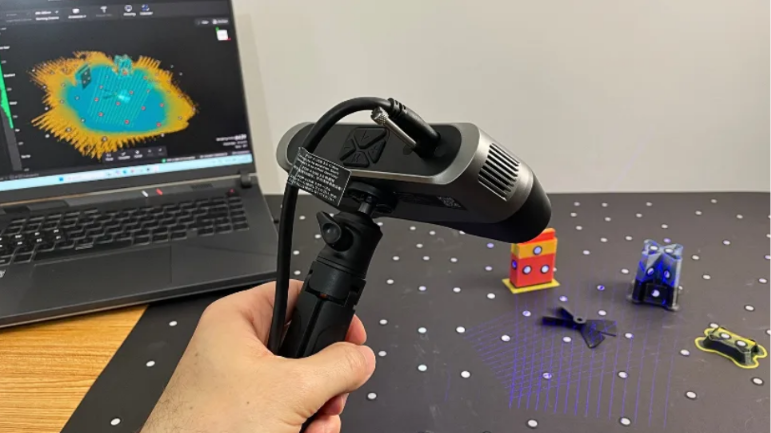
    POP 4 handheld scan with live preview
    POP 4 handheld scan with live preview

    FAQ

    Q: Can POP 4’s 3DGS models import directly into Unity or Unreal?

    A: The .splat export format is supported by plugins available for major engines.

    Q: Does human body scanning require special preparation?

    A: Infrared mode supports body scanning. Wear non-reflective materials and maintain steady or slow movement.

    Q: Which operating systems does the software support?

    A: Revo Scan 6 runs on Windows, macOS, Android, and iOS, with export compatibility to mainstream 3D design software.


    Conclusion

    The Revopoint POP 4 is not a perfect scanner—battery life and brand recognition have room for improvement. But it precisely targets a market gap: professional users who need industrial-grade precision without paying industrial-grade premiums; content creators who need photorealistic digital assets without drowning in technical complexity.

    The addition of AI segmentation and 3DGS modeling transforms this device from “a faster, more accurate scanner” into “a production tool that outputs usable digital assets.” Behind the $2.6 million crowdfunding achievement lies market validation for this efficiency revolution.

    If you are searching for a scanner that handles both precision inspection and digital content production, the POP 4 deserves the top spot on your shortlist.

  • Dangbei S7 Ultra Pro AI Projector Review

    Dangbei S7 Ultra Pro AI Projector Review

    Introduction: Projector AIization, From “Watchable” to “Usable”

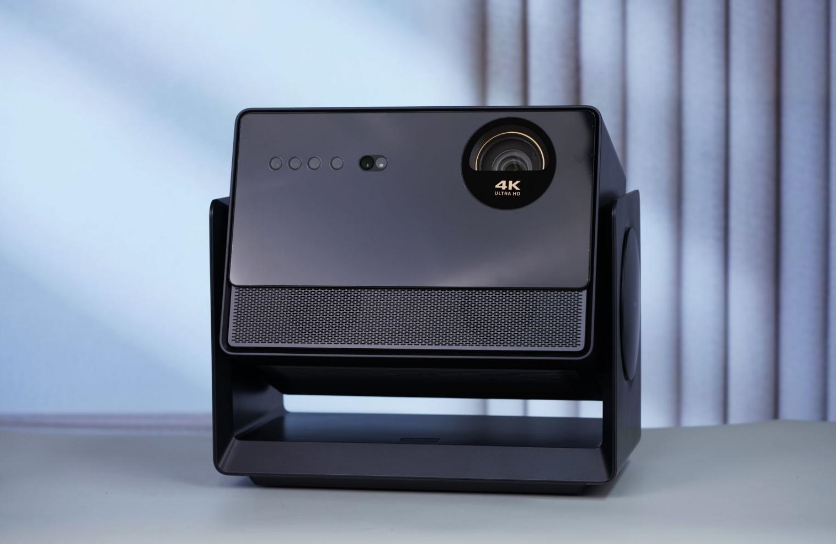
    Dangbei S7 Ultra Pro AI projector front view
    Dangbei S7 Ultra Pro AI projector front view

    On October 9, 2025, Dangbei released the S7 Ultra Pro—a flagship AI smart projector with maxed-out specifications. 4500 CVIA lumens, native 4K, 8000:1 native contrast ratio, Dangbei Super AI OS 6.0, AI super assistant, 360° motorized AI gimbal, full-link liquid cooling, and 24dB noise level. Priced at approximately 9496 yuan, positioned as a premium home cinema.

    Honestly, the projector market has been competitive for years. XGIMI, JMGO, Hisense Vidda, Dangbei—all competing on brightness, resolution, and intelligence. The S7 Ultra Pro’s strategy is clear: establish a “image quality ceiling” with hardware specs, build an “experience moat” with AI OS, and solve “usage pain points” with liquid cooling and gimbal.

    The question is: is 9496 yuan for a projector worth it?

    Product Overview: Dangbei’s Flagship Ambition

    Who is Dangbei? One of China’s top smart projector brands, originally known for “Dangbei Market” and “Dangbei OS,” later entering hardware with a focus on “high brightness + intelligence.” The S7 Ultra Pro is Dangbei’s absolute flagship, with all technical reserves fully deployed.

    Core selling points can be summarized as “three hardware, three software”:

    Three Hardware: 4500 CVIA lumens ultra-high brightness, native 4K resolution, 8000:1 native contrast ratio (dynamic 65000:1).

    Three Software: Dangbei Super AI OS 6.0, customizable AI super assistant, 360° horizontal + 180° vertical motorized AI gimbal.

    Specifications: The Sincerity of Flagship Projector Spec Stacking

    SpecDetails
    Brightness4500 CVIA lumens
    ResolutionNative 4K (3840×2160)
    Contrast8000:1 native / 65000:1 dynamic
    ChipMT9681 flagship chip
    Memory4GB+128GB
    Operating SystemDangbei Super AI OS 6.0
    AI InteractionFar-field voice, light-tracking pointer, gesture control
    AI AssistantAI Super Assistant (customizable)
    CoolingFull-link liquid cooling
    Noise24dB
    Gimbal360° horizontal + 180° vertical motorized AI gimbal
    Optics0.98-1.6:1 optical zoom
    Speckle EliminationEight-layer speckle elimination module, 99.999% removal
    CertificationDolby Vision, HDR10+
    EcosystemMijia interconnection
    Price~9496 yuan

    Data source: Dangbei official launch materials, SMZDM

    What does 4500 CVIA lumens mean? CVIA is a brightness standard established by the China Video Industry Association, stricter than traditional ANSI lumens (typically CVIA value ≈ ANSI value × 0.8-0.9). 4500 CVIA is approximately equivalent to 5000-5600 ANSI lumens, belonging to “top-tier brightness” among projectors—watchable during daytime without closing curtains, unaffected by room lights at night.

    Native 4K resolution means physical pixels are genuinely 3840×2160, not “wobulated 4K” or “XPR technology 4K.” Paired with 8000:1 native contrast ratio, image depth and dark detail performance far exceed “wobulated 4K” products. The dynamic 65000:1 is achieved through dynamic iris, making dark scenes darker and bright scenes brighter when watching movies.

    The MT9681 is MediaTek’s flagship projector chip, with performance comparable to flagship smartphone SoCs. The 4GB+128GB storage configuration is “top-tier” among projectors—most projectors still use 2GB+16GB or 3GB+32GB.

    Deep Analysis: What Does AI OS Actually Change?

    Dangbei Super AI OS 6.0 is the S7 Ultra Pro’s core differentiator. Traditional projector OS simply “plays videos,” while Dangbei’s AI OS aims to be a “smart entertainment center.”

    AI Super Assistant: Users can customize the AI assistant’s wake word, voice, personality, and even set up exclusive knowledge bases. For example, you can create a “movie expert” assistant specializing in film recommendations, director style explanations, and shot language analysis. This assistant runs on an edge-side AI model, enabling basic conversation without internet connectivity.

    Far-Field Voice: No need to press the remote to speak; simply call out “Dangbei Dangbei” to wake it up. Supports multi-turn dialogue and context understanding, such as “recommend a sci-fi movie,” “directed by Nolan,” “not Batman”—the AI can understand.

    Light-Tracking Pointer: The remote emits a light beam; the projector camera tracks the light point position, displaying a cursor on screen. This is much faster than traditional directional buttons for selecting content, especially when inputting text or browsing web pages.

    Gesture Control: Raise hand to pause, wave to flip pages, clench fist to confirm. Suitable for eating without touching the remote, or exercising while operating from a distance.

    360° Motorized AI Gimbal: This is hardware-level AIization. The gimbal built-in gyroscope and AI algorithms automatically recognize projection angles and wall positions, achieving “point and project.” You can place the projector on nightstands, coffee tables, or bookshelves—AI automatically corrects the image (keystone correction, focusing, obstacle avoidance, screen fitting). The 360° horizontal rotation means you can project onto the ceiling, side walls, or even turn around to project onto the wall behind you.

    Mijia Interconnection: Access to the Xiaomi ecosystem, enabling projector control of Mijia devices, or using Xiao Ai to control the projector. For example, saying “cinema mode” while watching movies automatically dims the projector, closes curtains, and changes ambient lighting colors.

    Comparison: S7 Ultra Pro vs XGIMI RS10 Ultra vs JMGO N1S Ultra

    FeatureDangbei S7 Ultra ProXGIMI RS10 UltraJMGO N1S Ultra
    Brightness4500 CVIA3500 CVIA3000 CVIA
    ResolutionNative 4KNative 4KNative 4K
    Contrast8000:1 nativeUnannounced (estimated ~3000:1)1600:1
    ChipMT9681MT9669MT9669
    Memory4GB+128GB4GB+128GB4GB+64GB
    AI OSDangbei Super AI OS 6.0GMUI 6.0Bonfire OS
    Gimbal360° motorized AI gimbalNone (requires stand)None (requires stand)
    CoolingLiquid cooling 24dBAir cooling (~30dB)Air cooling (~28dB)
    Optical Zoom0.98-1.6:11.2:1 fixed1.2:1 fixed
    Speckle EliminationEight-layer 99.999%StandardStandard
    Price~9496 yuan~9999 yuan~8999 yuan

    All three are flagship projectors in the 10,000-yuan range, but differentiation is clear. The Dangbei S7 Ultra Pro wins on “brightness + AI gimbal + liquid cooling noise control,” the XGIMI RS10 Ultra wins on “brand recognition + content ecosystem,” and the JMGO N1S Ultra wins on “tri-color laser color + value for money.”

    If you pursue “watchable during daytime” ultimate brightness, automatic gimbal without stand hassle, and quiet liquid cooling, Dangbei is the best choice. If you prioritize brand after-sales and content integration, XGIMI is more reliable. If you have limited budget but want tri-color laser color performance, JMGO is more suitable.

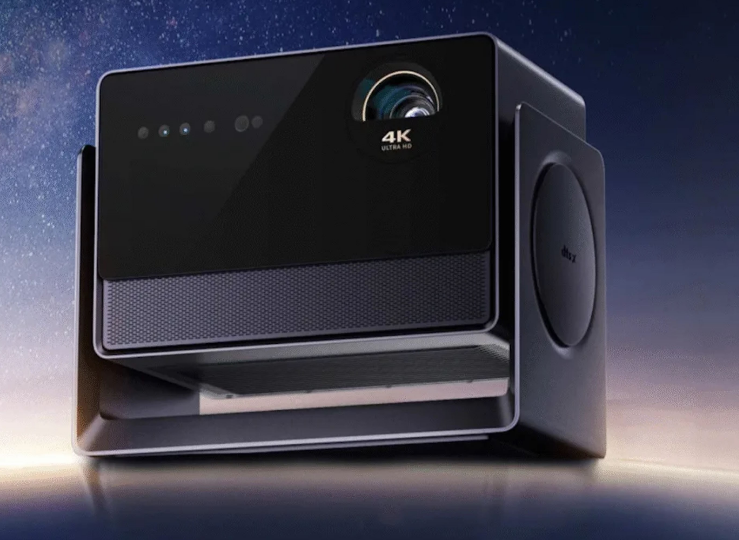
    Dangbei S7 Ultra Pro 4K projector official render
    Dangbei S7 Ultra Pro 4K projector official render

    Pros and Cons

    ProsCons
    4500 CVIA lumens, daytime viewing without pressure9496 yuan price is high, high barrier for entry users
    Native 4K + 8000:1 contrast, top-tier image qualityLarger size, less portable than slim projectors
    AI gimbal auto-correction, free placementLiquid cooling system adds weight and complexity
    Liquid cooling 24dB noise, viewing without disturbanceRich AI OS features but higher learning curve
    Light-tracking pointer + gesture control, novel interactionLight-tracking pointer may fail in strong light environments
    Mijia interconnection, strong ecosystem expansionLimited ecosystem value for non-Mijia users
    Eight-layer speckle elimination, cleaner imageMany competitors at flagship level, choice paralysis

    Who Should Buy

    Recommended for:

    • Families pursuing ultimate image quality with dedicated home theater or living room cinema needs
    • Users sensitive to noise who want near-silent projector operation
    • Mijia ecosystem users needing projectors as smart home hubs
    • Tech enthusiasts willing to pay for AI interaction and gimbal features

    Not recommended for:

    • Users with limited budgets where under 5000 yuan meets needs
    • Renters/frequent movers needing portable slim projectors
    • Pragmatists indifferent to AI features who only need “video playback”
    • Families already owning high-end TVs (such as OLED 77-inch+), where projector improvement is limited

    FAQ

    Q: Can 4500 CVIA lumens be watched during daytime without closing curtains?

    A: Yes, but effects are inferior to nighttime. Recommend using high brightness mode during daytime, or pairing with an ambient light rejecting screen. Any projector struggles under direct sunlight.

    Q: How accurate is the AI gimbal’s auto-correction?

    A: Official claims support “millisecond-level” auto-correction, but complex walls (such as wallpaper, uneven surfaces) may affect results. Recommend projecting onto flat white walls or screens when possible.

    Q: Does liquid cooling require maintenance?

    A: The liquid cooling system is a closed loop, theoretically requiring no maintenance. But after long-term use (3-5 years), professional inspection may be needed. Recommend confirming warranty policies at purchase.

    Q: Can the AI super assistant connect to third-party large models?

    A: Currently only supports Dangbei’s built-in AI model and custom knowledge bases. Official announcements on whether ChatGPT, Wenxin Yiyan, or other third-party models will be supported are pending.

    Conclusion

    The Dangbei S7 Ultra Pro is a “parameter ceiling” level flagship projector. 4500 CVIA lumens, native 4K, and 8000:1 contrast ratio—these three hard metrics have virtually no rivals in the 10,000-yuan projector segment. The AI gimbal, liquid cooling, and light-tracking pointer also genuinely solve traditional projector usage pain points.

    But the 9496 yuan pricing makes it destined to be not a “mass-market blockbuster” but an “enthusiast toy.” For ordinary families, projectors around 5000 yuan are sufficient; but for users pursuing ultimate audiovisual experience and willing to pay for every parameter improvement, the S7 Ultra Pro is one of the most worth-considering options on the market.

    Dangbei’s challenge lies in: how to build true brand moats beyond “hardware spec stacking.” XGIMI has content ecosystem and offline channels, JMGO has the technical label of tri-color laser, and whether Dangbei’s “AI OS” differentiation can maintain leadership depends on subsequent iteration speed and ecosystem expansion capabilities.

  • MSI LuckyClaw: The “App Store Moment” for AI Agents at COMPUTEX 2026

    MSI LuckyClaw: The “App Store Moment” for AI Agents at COMPUTEX 2026

    Introduction: The “AI Agent Year” at COMPUTEX 2026

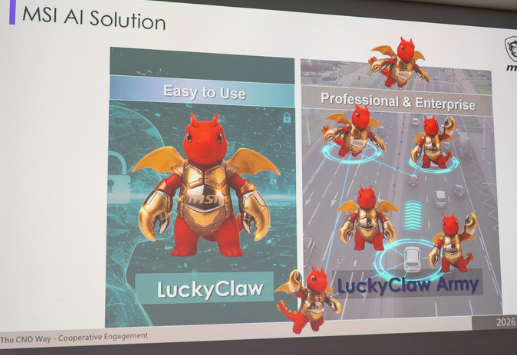
    MSI LuckyClaw AI agent presentation demo screen
    MSI LuckyClaw AI agent presentation demo screen

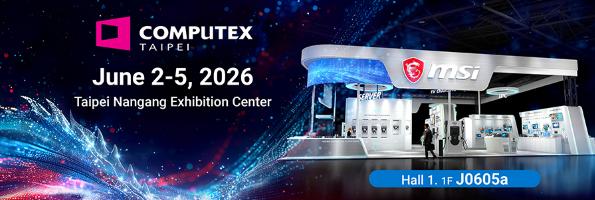
    On June 2, 2026, at the Taipei Nangang Exhibition Center. COMPUTEX 2026 officially opened. This year’s theme is not graphics cards, not motherboards—but AI Agents.

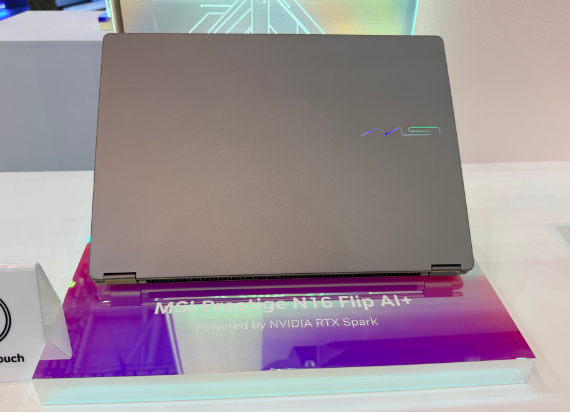
    MSI showcased LuckyClaw, a platform designed specifically for Windows-side AI Agent deployment. At the same time, MSI is among the first manufacturers to display NVIDIA RTX Spark laptops and desktops.

    Product Overview: What Is LuckyClaw?

    LuckyClaw’s core positioning: let Windows users deploy AI Agents as easily as installing apps.

    Feature highlights:

    • LLM Calculator: Built-in large language model computing tool, supporting local inference
    • Cloud/Edge Hybrid: Cloud + local hybrid architecture, automatically allocating compute based on task complexity
    • NVIDIA hardware acceleration: Supports RTX Spark, RTX 40/50 series GPU acceleration
    • Windows native: Deeply integrated with Windows system, not a virtual machine solution

    MSI simultaneously showcased hardware:

    • RTX Spark laptops: 14mm thickness, Blackwell GPU + 20-core ARM CPU
    • RTX Spark desktops: Flagship configurations, 128GB unified memory
    • AI workstations: Dual RTX 5090, designed specifically for AI training
    MSI COMPUTEX 2026 booth at Nangang hall
    MSI COMPUTEX 2026 booth at Nangang hall

    Killer Feature #1: The “App Store Moment” for AI Agents

    The core problem LuckyClaw attempts to solve: AI Agent deployment is too complex.

    Currently deploying a local AI Agent requires:

    • Installing Python environment
    • Configuring CUDA and GPU drivers
    • Downloading model weights (tens of GB)
    • Writing launch scripts
    • Debugging compatibility issues

    LuckyClaw’s solution: one-click deployment. Users select needed Agent functions (document analysis, code generation, image processing), and the platform automatically downloads models, configures environments, and optimizes parameters.

    This is similar to how the early App Store made mobile app installation simple—LuckyClaw wants to make AI Agent installation equally simple.

    Killer Feature #2: Cloud/Edge Hybrid, Intelligent Compute Allocation

    LuckyClaw’s Cloud/Edge Hybrid architecture:

    • Simple tasks: Local execution (document summaries, email replies, code completion)
    • Complex tasks: Cloud handoff (video generation, large model training, multimodal analysis)
    • Auto-switching: Intelligent decision-making based on task type, local compute, and network conditions

    This means:

    • Thin-and-light laptop users can also run AI Agents, with complex tasks automatically going to cloud
    • Desktop users with sufficient local compute complete all tasks locally
    • No manual configuration needed, platform auto-optimizes

    Killer Feature #3: MSI Hardware Ecosystem Closed Loop

    MSI Prestige N16 Flip RTX Spark laptop
    MSI Prestige N16 Flip RTX Spark laptop

    MSI does not just make software. LuckyClaw is deeply bound to MSI hardware:

    • Laptops: Stealth, Raider, Vector series with RTX Spark
    • Desktops: Infinite, Codex, Trident series supporting dual GPUs
    • Monitors: AI-assisted color calibration, auto-adapting to content type
    • Peripherals: Keyboard shortcuts for one-key AI Agent wake-up

    This hardware-software integration is MSI’s core advantage over pure software Agent platforms.

    Specs Comparison: LuckyClaw vs OpenAI GPTs vs Anthropic Claude Desktop

    FeatureMSI LuckyClawOpenAI GPTsAnthropic Claude Desktop
    DeploymentLocal + Cloud hybridPure cloudLocal + Cloud
    Hardware RequiredNVIDIA GPUNoneNone
    Hardware Acceleration✅ RTX Spark/40/50❌ None❌ None
    Offline Capability✅ Core functions offline❌ Needs network❌ Needs network
    Ecosystem BindingMSI hardware ecosystemOpenAI ecosystemAnthropic ecosystem
    Target UsersWindows gamers/creatorsGeneral usersDevelopers/professionals

    LuckyClaw’s differentiation is razor-sharp: it is the only AI Agent platform deeply bound to NVIDIA hardware, supporting local high-performance inference, and targeting Windows gamers and creators.

    Caveats to Note

    • Feature maturity: First showcased June 2, functional demo stage, official version pending release
    • Ecosystem limitation: Deeply bound to MSI hardware, compatibility with non-MSI devices unverified
    • Model sources: Supported model list not announced, whether mainstream open models (Llama, Qwen, DeepSeek) are included unknown
    • Privacy concerns: Cloud/Edge Hybrid means some data uploads to cloud, enterprise users may hesitate
    • Competitive pressure: OpenAI, Anthropic, and Google’s cloud Agent features are stronger, is LuckyClaw’s local advantage enough to attract users?

    Who Should Watch LuckyClaw?

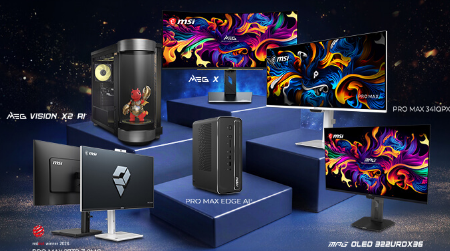
    MSI 40th anniversary product lineup on display
    MSI 40th anniversary product lineup on display

    Highly Recommended:

    • MSI laptop/desktop users (hardware ecosystem加成)
    • NVIDIA graphics card users (RTX 40/50 series can accelerate)
    • Windows gamers (want to use AI assistants while gaming)
    • Content creators (local video/image AI processing)

    Consider Waiting:

    • Mac users (no Windows version planned)
    • Pure cloud users (OpenAI/Anthropic already sufficient)
    • Enterprise users (waiting for security compliance certification)

    Future Outlook: The “Windows Moment” for AI Agents

    LuckyClaw represents an important trend: AI Agents are shifting from “cloud services” to “local applications”.

    If LuckyClaw succeeds:

    1. Lower AI Agent barriers: Let ordinary users deploy without technical background
    2. Activate NVIDIA ecosystem: RTX Spark + LuckyClaw forming hardware + software closed loop
    3. Push Windows on Arm: RTX Spark’s Arm architecture needs Windows native Agent support
    4. Drive new hardware demand: Users willing to upgrade GPUs for better Agent performance

    For MSI, LuckyClaw is not just a software product, but a catalyst for hardware sales—just as NVIDIA’s DLSS drove RTX graphics card sales.


    Rating: 7.6/10 (Promising Concept)

    Bottom Line: LuckyClaw could be the bridge that brings AI Agents from tech enthusiasts to mainstream Windows users. But it needs to ship before the hype fades.