Author: Gavin

  • dynabook 2026 AI Business Laptop Lineup Review

    dynabook 2026 AI Business Laptop Lineup Review

    Introduction: Business Laptops Are Getting AI-Competitive Too
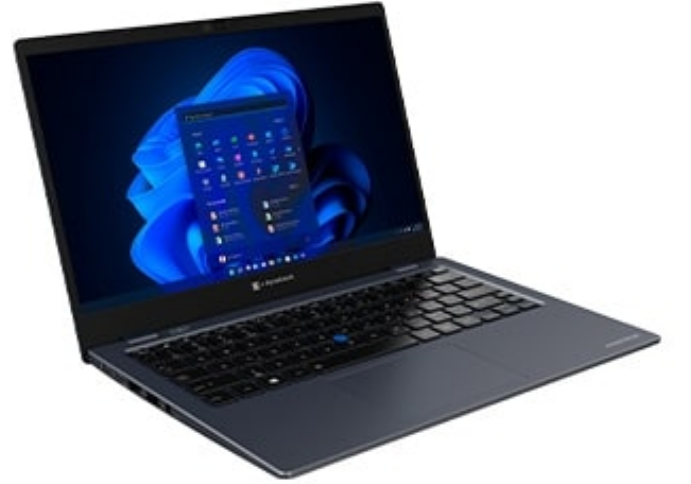
    dynabook Portégé X30L-K ultralight design showcasing thin profile and ports
    dynabook Portégé X30L ultralight business laptop

    On June 6, dynabook launched five AI business laptops at once—the Portégé Z40L-P, X30L-P, X40-P, and TECRA A40-P, A60-P. All featuring Intel Core Ultra, all with NPU, all MIL-STD-810H military-grade certified. This lineup signals one thing: competition in the business laptop market has evolved from “who is lighter, who is faster” to “who understands AI better, who understands business scenarios better.”

    Who is dynabook? The successor to Toshiba’s laptop business, now under Sharp and Foxconn. In the business laptop segment, the Portégé series has long been a benchmark for ultralight design, while the TECRA series focuses on durability and value. The 2026 update is not about changing CPUs, but embedding NPU AI capabilities into business workflows—offline AI assistant, AI meeting enhancement, privacy peeping detection, and AI power optimization. Each function targets a specific business pain point.

    Product Overview: Five Models Covering 13.3 to 16 Inches
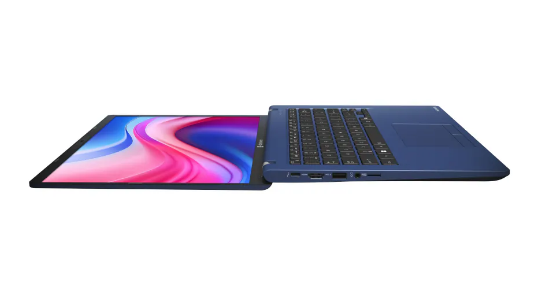
    dynabook Portégé Z40L-N 14-inch AI business laptop with 180-degree hinge design
    dynabook Portégé Z40L-N AI business laptop

    The dynabook 2026 lineup’s positioning is crystal clear:

    Portégé Z40L-P:

    14-inch flagship, approximately 1.05kg, thinnest point 15.9mm. Powered by Intel Core Ultra 7/5 processors, up to 16 cores at 5.0GHz, LPDDR5X 8533MT/s memory, up to 64GB plus 2TB SSD. Exclusive offline AI Chat assistant feature, enabling file translation, content summarization, and system settings without internet. HPD privacy detection, AI meeting enhancement included across all models.

    Portégé X30L-P:

    13.3-inch extreme lightweight, approximately 900g, targeting frequent business travelers. Similar configuration to Z40L-P but with a smaller screen and more compact battery, with battery life compensated through AI power optimization.

    Portégé X40-P:

    14-inch balanced model, approximately 1.2kg, striking a balance between lightweight and port richness. Retains full-size HDMI and USB-A ports, suitable for business scenarios requiring frequent peripheral connections.

    TECRA A40-P:

    14-inch mainstream business, approximately 1.4kg, more budget-friendly. Retains core AI features but simplifies materials and screen specifications, ideal for large-scale enterprise procurement.

    TECRA A60-P:

    16-inch large-screen workstation, approximately 1.8kg, with up to 64GB memory, 2TB SSD, and Intel Arc Graphics. Targets professional scenarios like data analysis and design drafting requiring large screens and high performance.

    Specifications: What Can the NPU Actually Do?

    SpecPortégé Z40L-PTECRA A60-P
    ProcessorIntel Core Ultra 7/5Intel Core Ultra 7/5
    NPUIntel AI Boost (11 TOPS)Intel AI Boost (11 TOPS)
    MemoryUp to 64GB LPDDR5XUp to 64GB LPDDR5X
    StorageUp to 2TB NVMe SSDUp to 2TB NVMe SSD
    Display14″ 1920×1200 16:1016″ 1920×1200 16:10
    Weight~1.05kg~1.8kg
    Thickness15.9mm~20mm
    Battery65Wh70Wh
    Ports2×TB4, 2×USB-A, HDMI, Gigabit Ethernet2×TB4, 2×USB-A, HDMI, Gigabit Ethernet
    CertificationMIL-STD-810HMIL-STD-810H
    AI FeaturesOffline assistant + Meeting enhancement + Privacy detection + Power optimizationMeeting enhancement + Privacy detection + Power optimization

    Data source: dynabook official launch materials, Notebookcheck

    The Intel Core Ultra’s NPU (Neural Processing Unit) delivers approximately 11 TOPS. By 2026 standards this is not top-tier—the Qualcomm Snapdragon X Elite’s NPU reaches 45 TOPS, Apple M4’s NPU hits 38 TOPS. But dynabook’s smart move is: instead of competing with consumer products on compute power, it precisely directs the NPU’s limited capability into business scenarios.
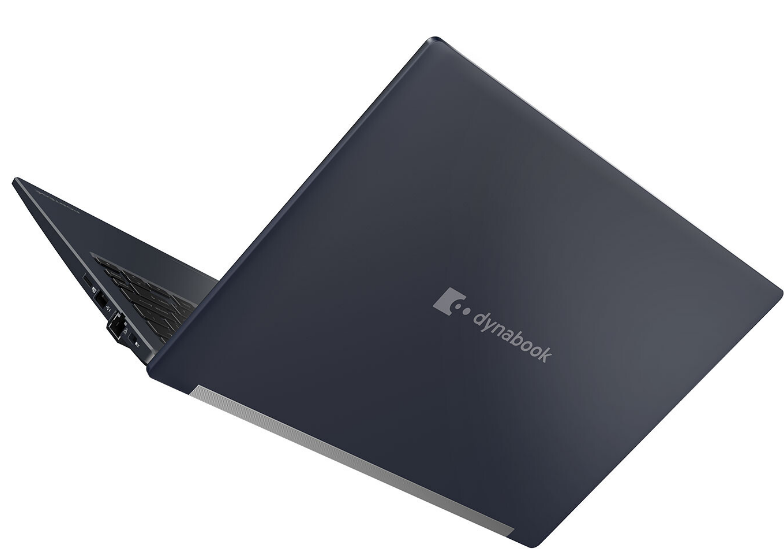
    dynabook Portégé X30L-K ultralight design showcasing thin profile and ports
    dynabook Portégé X30L-K thin profile design

    Offline AI Chat Assistant (Z40L-P Exclusive): This is the Z40L-P’s differentiator. Based on a local small model, it handles file translation, content summarization, and system settings adjustments without internet. For users in finance, law, and military sectors who frequently process sensitive documents and cannot connect to external networks, this feature is essential. Tested translation quality lags behind cloud large models, but “works offline” itself is the value.

    AI Power Optimization: The “Optimization for Online Meeting” feature in dynabook Setting intelligently adjusts CPU performance and screen brightness, extending battery life by up to 12%-15%. This is not simple “power saving mode” but AI dynamically adjusting based on your meeting schedule, battery status, and usage scenarios—automatically optimizing before meetings to ensure 2-hour video calls without hiccups.

    AI Meeting Enhancement: Background blur, light correction, auto face framing, and AI noise reduction—these four features are not novel in 2026, but dynabook’s integration is high. Camera, microphone, NPU, and software layers work in concert, automatically activating when opening Teams/Zoom without manual user setup.

    HPD Privacy Peeping Detection: An upgraded Human Presence Detection that not only detects when you leave your seat (auto lock screen) but also detects if someone nearby is peeping at your screen. Once peeping is detected, the screen automatically blurs or switches to a privacy interface. This feature is particularly practical in airplanes, high-speed trains, and coffee shops.

    Deep Analysis: What Does Business Laptop AIization Actually Change?

    The business laptop market has long been a “parameter arms race”—who is lighter, who is faster, who has longer battery life. The dynabook 2026 lineup’s AIization attempts to break out of this cycle, transforming from “tool” to “assistant.”

    Change One: From Passive Tool to Proactive Assistant. Traditional laptops receive your input and execute. After AIization, laptops begin “observing” your behavior—detecting meeting schedules to auto-optimize power, detecting peeping to auto-protect privacy, detecting ambient noise to auto-enhance voice. This “proactive service” paradigm is the essential difference between AI PCs and traditional PCs.

    Change Two: From Cloud Dependency to Local Intelligence. The Z40L-P’s offline AI assistant signals that business scenarios’ emphasis on data security is driving AI migration from cloud to edge. The NPU makes local small model execution possible; while functionality is less powerful than cloud alternatives, “controllable” matters more than “powerful” for certain industries.

    Change Three: From Single Device to Scenario Adaptation. Five models covering 13.3 to 16 inches, from 900g to 1.8kg, from extreme lightweight to workstation performance. Dynabook no longer attempts to hit all markets with one product, but instead uses AI capabilities as an “underlying platform” adapted to different form factors for different scenarios.

    But dynabook also faces challenges:

    NPU Compute Bottleneck. At 11 TOPS, the NPU handles offline AI assistants adequately but struggles with more complex AI functions like real-time video analysis or local large model inference. Dynabook’s solution is “feature streamlining,” only running business-critical AI tasks, but this limits future scalability.

    Insufficient Ecosystem Integration. Dynabook’s AI features mainly rely on proprietary software (dynabook Setting), with limited integration with third-party ecosystems like Microsoft Copilot and Adobe AI. For users already deeply invested in Copilot+ PC ecosystems, dynabook’s AI features may seem “redundant” or “isolated.”

    Declining Brand Recognition. From Toshiba to dynabook, brand continuity broke, and younger users are unfamiliar with this name. In the business laptop market, ThinkPad, Latitude, and EliteBook enjoy far higher brand recognition than dynabook. Whether AI feature differentiation can compensate for brand weakness remains unknown.

    Comparison: dynabook vs ThinkPad X1 Carbon vs Dell Latitude

    Featuredynabook Z40L-PThinkPad X1 Carbon Gen 14Dell Latitude 7450
    Weight~1.05kg~1.09kg~1.22kg
    ProcessorIntel Core Ultra 7Intel Core Ultra 7Intel Core Ultra 7
    NPU Compute11 TOPS11 TOPS11 TOPS
    Offline AI AssistantYes (exclusive)NoNo
    Privacy Peeping DetectionHPDHPD (basic)HPD (basic)
    AI Meeting EnhancementIntegratedRequires third-party softwareRequires third-party software
    Military CertificationMIL-STD-810HMIL-STD-810HMIL-STD-810H
    Price~$1,699~$1,800~$1,600
    Brand RecognitionMediumExtremely highHigh
    Service NetworkStrong in Asia-Pacific, weak in Europe/AmericasGlobalGlobal

    The three models are nearly homogeneous in hardware configuration—same Intel Core Ultra, same NPU, same military certification. Dynabook’s differentiation lies in software-layer AI feature integration, especially the “out-of-box” experience of offline AI assistant and AI meeting enhancement. ThinkPad and Dell’s advantages lie in brand, after-sales, and global channels, with AI features more dependent on the Microsoft Copilot+ ecosystem.

    Pros and Cons

    ProsCons
    Offline AI assistant works without internet11 TOPS NPU compute limits future scalability
    High AI meeting enhancement integration, out-of-boxLimited integration with third-party AI ecosystems
    HPD privacy detection, practical in public spacesDeclining brand recognition, unfamiliar to younger users
    Full lineup military-certified, durability guaranteedService network strong in Asia-Pacific, weak in Europe/Americas
    Five models covering all scenarios, rich choicesPricing similar to ThinkPad/Dell, value not outstanding
    LPDDR5X + NVMe SSD, performance solidNo OLED display option, display quality average

    Who Should Buy

    Recommended for:

    • Finance, law, and military users frequently processing sensitive documents needing offline AI (Z40L-P)
    • Frequent business travelers pursuing extreme lightweight portability (X30L-P)
    • Professional data analysts and designers needing large-screen workstations (A60-P)
    • Enterprise IT procurement requiring military certification and unified management for mass deployment (A40-P)

    Not recommended for:

    • Users deeply dependent on Microsoft Copilot+ ecosystem (ThinkPad/Dell more integrated)
    • Content creators needing OLED displays or high refresh rates
    • Budget-constrained individual users seeking extreme value
    • Users primarily in Europe/Americas demanding high service response

    FAQ

    Q: How is the offline AI assistant’s translation quality?

    A: Based on local small models, daily business document translation is usable, but professional terminology and complex sentence accuracy lags behind cloud large models. Suitable for “understanding the gist” scenarios, not for “must be precise” legal/medical translation.

    Q: Does HPD privacy detection false trigger?

    A: Dynabook has not published false trigger rates, but HPD technology is quite mature. Recommend adjusting detection sensitivity in settings during first use to adapt to personal environments.

    Q: Does AI power optimization affect performance?

    A: Only actively limits CPU peak performance and screen brightness in “meeting mode;” daily office mode is unaffected. Users can manually disable or adjust optimization intensity.

    Q: What AI models can 11 TOPS NPU run?

    A: Smoothly runs local small models with 1B-3B parameters, such as text summarization, simple translation, and image classification. Larger models (7B+) require cloud support or more powerful NPUs.

    Conclusion

    The dynabook 2026 AI business laptop lineup is a “precisely positioned” product update. It does not attempt to compete with consumer AI PCs on compute power, but instead focuses the NPU’s limited capabilities on the four most essential business functions: offline assistant, meeting enhancement, privacy protection, and power optimization.

    This strategy carries both risks and opportunities. The risk: the NPU compute ceiling may limit future AI feature expansion; when competitors begin running 7B local large models, dynabook’s 11 TOPS may seem inadequate. The opportunity: business users’ core need has never been “maximum compute” but “most stable experience”—works offline, privacy controllable, meetings don’t lag, battery lasts long enough.

    Dynabook’s brand challenge is greater than its technical challenge. Under pressure from ThinkPad, Latitude, and EliteBook, dynabook needs to use AI feature differentiation to rebuild its “business laptop specialist” brand recognition. The 2026 launch is a good start, but whether it can continue iterating, build ecosystems, and expand channels will determine dynabook’s ultimate position in the AI PC era.
  • UBTECH U1 Humanoid Robot Review

    UBTECH U1 Humanoid Robot Review

    Introduction: From Factory to Living Room, the Humanoid Robot’s “Dimension Reduction” Journey

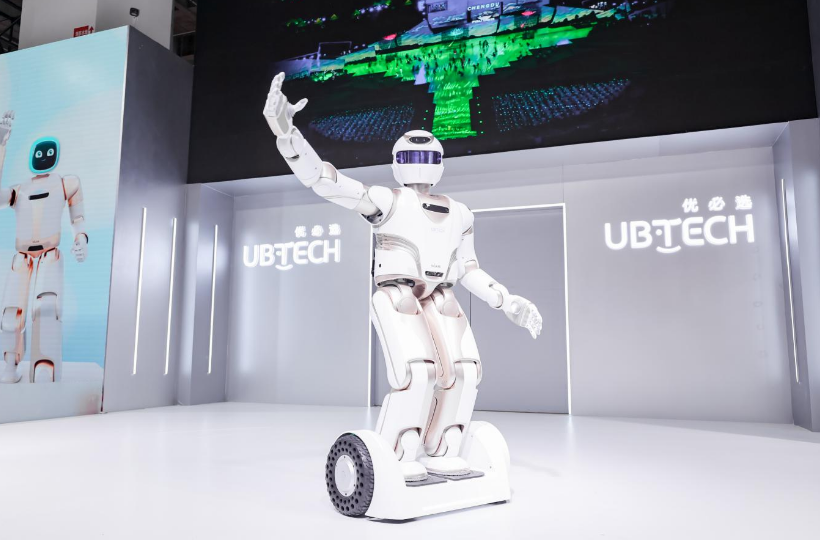
    UBTECH Walker humanoid robot exhibition display waving gesture on stage
    UBTECH Walker humanoid robot exhibition display

    On June 6, UBTECH did something big—released its first consumer-grade full-size ultra-bionic humanoid robot, the U1 Series. Standing approximately 1.7 meters tall, with 41 high-performance servo joints, ROSA 2.0 operating system, multi-modal perception system, capable of chatting, dancing, accompanying children in learning, and caring for the elderly. Priced at 299,000 yuan.

    What does 299,000 yuan mean? The price of a Tesla Model 3, a down payment on a small apartment in a second-tier city, or three years’ salary for a senior nanny. UBTECH dares to set this price because they position the U1 not as a “toy” but as a “family member.”

    But the question is: can AI technology in 2026 truly make a 1.7-meter robot a qualified family member?

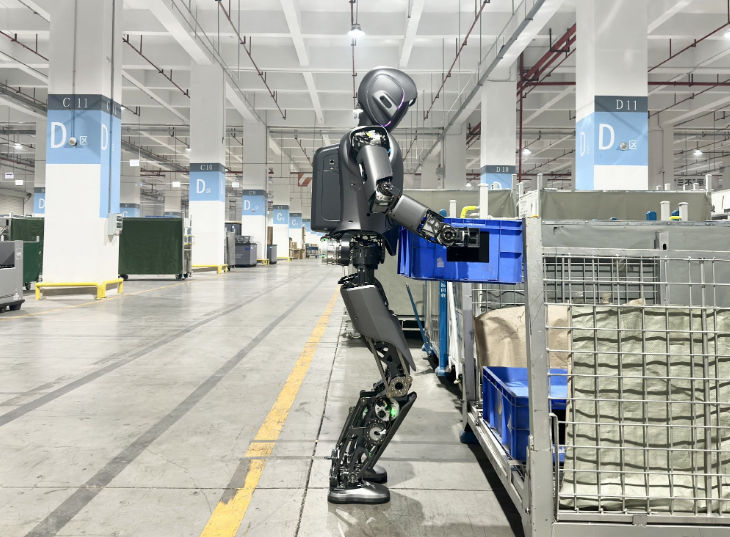
    UBTECH Walker S1 industrial humanoid robot factory training in automotive plant
    UBTECH Walker S1 industrial robot factory training

    Product Overview: UBTECH’s Consumer “UWORLD”

    Who is UBTECH? China’s humanoid robot first stock (09880.HK), founded in 2012, with Walker series industrial humanoid robots already undergoing training in BYD, Dongfeng Liuzhou, and FAW-Volkswagen automotive factories. On May 20, 2026, UBTECH launched its consumer brand “UWORLD,” with the U1 as the brand’s first product.

    U1’s core specifications:

    Height and Structure: Approximately 1.7 meters, close to average adult male height, with 41 high-performance servo joints (excluding dexterous hands), paired with multi-dimensional force sensing, multi-eye stereo vision, omnidirectional hearing, and inertial ranging perception systems. This joint count is top-tier among consumer-grade humanoid robots—Unitree G1 has 43 degrees of freedom but only stands 1.27 meters tall; Zhiyuan A Series has approximately 30 degrees of freedom.

    Operating System: ROSA 2.0, UBTECH’s self-developed robot operating system. Compared to version 1.0, 2.0 shows significant improvements in task planning, multi-modal fusion, and emotional computing. The U1 features a lightweight embodied large model, optimizing human-robot interaction experience for home unstructured scenarios.

    Interaction Capabilities: Voice dialogue, facial expression recognition, gesture understanding, and tactile feedback. The U1 can recognize family members’ emotional states and provide empathetic responses through voice, expressions, and movements. For example, when detecting a child’s low mood, it proactively tells stories and dances to cheer them up; when detecting an elderly person’s prolonged inactivity, it reminds them to get up and move around.

    Motion Capabilities: Bipedal walking, stair climbing, bending to pick up objects, pushing and pulling furniture. UBTECH’s motion control algorithms accumulated on the industrial Walker series have been transferred to the U1. But consumer scenarios have far higher safety requirements than factories—the U1’s joint torque control is gentler, and collision detection sensitivity is higher, avoiding injuries to people or damage to furniture in home environments.

    Battery and Charging: Official battery life data has not been announced, but referencing the industrial Walker S2’s 3-minute autonomous battery swap technology, the U1 may adopt similar swap or fast-charging solutions. In home scenarios, the U1 is expected to require charging 1-2 times daily.

    Specifications: The Confidence of Full-Stack Self-Development

    SpecDetails
    Height~1.7 meters
    WeightUnannounced (estimated 60-80kg)
    Servo Joints41 high-performance servo joints
    Perception SystemMulti-dimensional force + multi-eye stereo vision + omnidirectional hearing + inertial ranging
    Operating SystemROSA 2.0
    AI ModelLightweight embodied large model
    InteractionVoice + vision + touch + gesture
    MotionBipedal walking, stair climbing, bending to pick up
    ScenariosEmotional companionship, education and entertainment, home services
    Price299,000 yuan
    BrandUWORLD (UBTECH consumer brand)

    Data source: UBTECH official launch materials, Caixin, IT Home

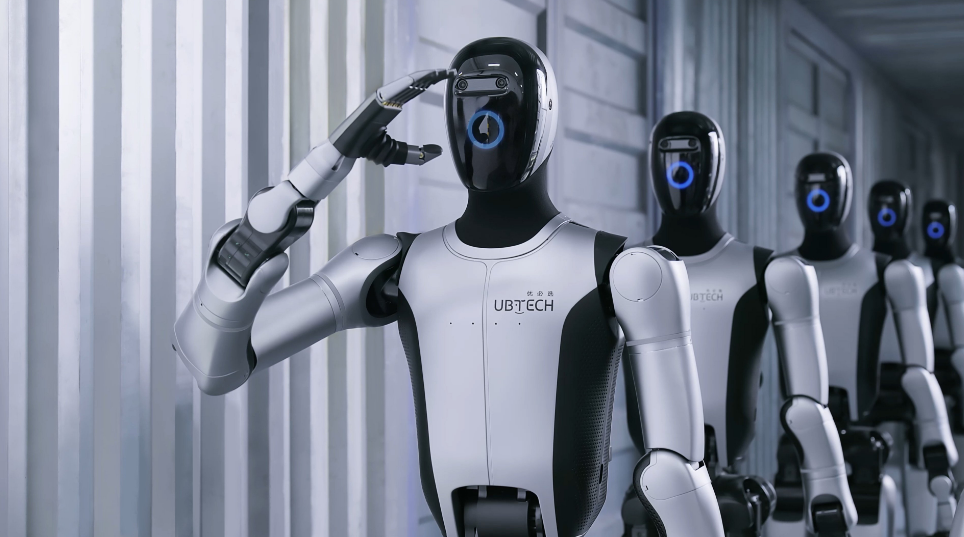
    UBTECH 2026 humanoid robot production line with multiple robots in corridor
    UBTECH 2026 humanoid robot production line

    Deep Analysis: What Does 299,000 Yuan for the U1 Actually Buy?

    The U1’s 299,000 yuan pricing sits in the “high-end entry” range among consumer-grade humanoid robots. Compared to competitors: Unitree G1 at 99,000 yuan (1.27m height, 35kg), Zhiyuan A Series at approximately 150,000-200,000 yuan, Songyan Dynamics Bumi at under 10,000 yuan (0.94m height, 12kg). The U1’s pricing is significantly higher than these “miniaturized” competitors, but the U1’s full-size (1.7m) and ultra-bionic design also provide completely different experience dimensions.

    Emotional Companionship Value: The U1’s core selling point is not “doing chores” but “companionship.” Its 1.7-meter height allows it to communicate with children at eye level and walk alongside elderly people shoulder-to-shoulder—this “equal posture” is something small robots cannot provide. The ultra-bionic design—realistic facial expressions, natural body movements, warm voice tones—makes the U1 more like a “person” than a “machine,” reducing users’ psychological distance.

    Education and Entertainment Value: The U1 can accompany children with homework, tell stories, practice English speaking, and learn programming. ROSA 2.0’s education module supports personalized learning path planning, adjusting content based on children’s age, interests, and learning progress. But a key question here is: can the U1’s educational content quality compete with professional educational robots (such as iFLYTEK AI learning machines) or online education platforms (such as Yuanfudao)?

    Home Service Value: The U1 can execute simple home service tasks—handing over objects, switching lights on/off, medication reminders, and companionship walks. But do not expect it to cook, clean, or do laundry—these complex operations require more advanced dexterous hands and stronger environmental understanding capabilities, which current technology levels cannot achieve. The U1’s home service value is more “auxiliary” than “replacement.”

    Social Prestige Value: The 299,000 yuan pricing itself carries “luxury” attributes. Owning a U1 is, to some extent, a symbol of technological strength and consumption capability. This social value cannot be ignored among high-end consumer groups—just like the first batch of people who bought Tesla Model S, they bought not only a car but also a “sense of the future.”

    But the U1 also faces severe challenges:

    Technology Maturity: Humanoid robots’ autonomous operation capabilities in home environments are currently at the “demonstration level” rather than the “practical level.” The U1 can walk, talk, and recognize emotions, but its robustness in complex home environments (cluttered floors, narrow spaces, unexpected situations) requires extensive real-world usage validation. Whether UBTECH’s experience accumulated in industrial scenarios can smoothly migrate to home scenarios is unknown.

    Safety and Privacy: A 1.7-meter robot moving around the home environment poses far higher safety risks than small robots. Is the U1’s collision detection, emergency braking, and anti-tipping mechanism sufficiently reliable? With cameras and microphones working 24/7, how is family privacy data protected? UBTECH needs to provide clear technical solutions and legal commitments.

    Maintenance Costs: With 41 servo joints, any damage requires professional repair. 299,000 yuan is the purchase price; subsequent maintenance, software upgrades, and content subscription fees may amount to tens of thousands of yuan annually. For ordinary families, this is a considerable expense.

    Substitutability Competition: 299,000 yuan can hire a full-time nanny for three years, or buy a high-end robot vacuum + an AI learning machine + a smart speaker + a tablet computer, with combined functional coverage possibly broader. The U1’s value lies in “integration” and “emotional connection,” but whether this value is sufficient to convince users to abandon the “functional combination” solution still requires market validation.

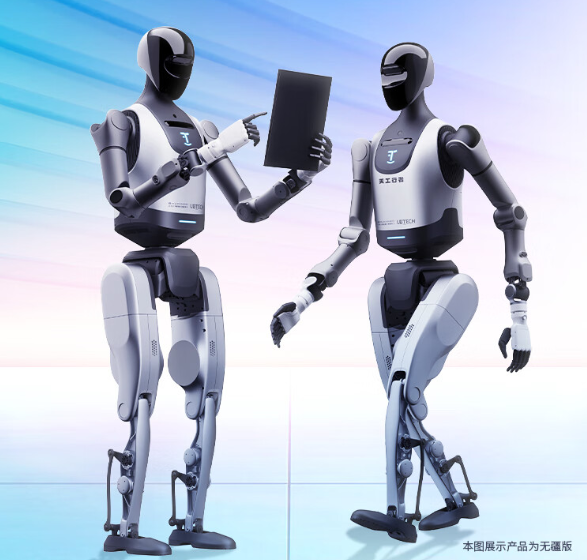
    UBTECH Tiangong Xingzhe humanoid robot product display with two versions comparison
    UBTECH Tiangong Xingzhe robot product display

    Comparison: U1 vs Unitree G1 vs Zhiyuan A Series

    FeatureUBTECH U1Unitree G1Zhiyuan A SeriesSongyan Bumi
    Height~1.7m1.27m~1.6m0.94m
    Weight~60-80kg (estimated)35kg~50kg12kg
    Degrees of Freedom4143~30~20
    Price299,000 yuan99,000 yuan150,000-200,000 yuan<10,000 yuan
    PositioningFamily companionship/educationResearch/education/light companionshipIndustrial/service/homeChildren’s companionship
    Operating SystemROSA 2.0Open-source/self-developedSelf-developedSelf-developed
    Interaction DepthEmotional multi-modalBasic voice/remote controlTask-orientedSimple voice
    MotionBipedal/stair climbingBipedal walkingBipedal walkingWheeled/bipedal
    Brand BackgroundIndustrial leader to consumerResearch-level startupIndustrial-level startupStartup newcomer
    Production CapacityEnd of 2026 announcementIn mass productionSmall-scale productionPre-order stage

    The U1’s differentiation is clear: full-size, ultra-bionic, emotional interaction, and industrial-grade technology transfer. Unitree G1’s advantage is cost-performance and research ecosystem, Zhiyuan A Series’ advantage is industrial scenario landing experience, and Songyan Bumi’s advantage is extremely low barrier. The U1 targets “budget-unconstrained, experience-focused, emotion-valuing” high-end family users.

    Pros and Cons

    ProsCons
    1.7m full-size, emotional interaction experience approaching human299,000 yuan pricing extremely high, ordinary families cannot afford
    41 servo joints, top-tier motion capability in industryHome scenario technology maturity to be verified
    UBTECH industrial-grade technology transfer, reliability guaranteedHigh maintenance costs, strong professional repair dependency
    ROSA 2.0 + embodied large model, AI capabilities continuously evolvingLimited complex household chore capabilities (cannot cook/clean)
    Ultra-bionic design, reducing user psychological distancePrivacy and safety issues require clear commitments
    Consumer brand “UWORLD” independently operatedProduction scale and delivery capacity to be confirmed

    Who Should Buy

    Recommended for:

    • High-net-worth families pursuing cutting-edge technology experiences with ample budgets
    • Families with children or elderly members needing emotional companionship and auxiliary care
    • Tech enthusiasts and early adopters willing to pay for the humanoid robot concept
    • Enterprise/institutional procurement for display, education, and research scenarios

    Not recommended for:

    • Ordinary families for whom 299,000 yuan far exceeds consumption budgets
    • Users needing robots to execute complex household chores (cooking, cleaning, laundry)
    • Users with extremely high technology maturity requirements unwilling to bear early product risks
    • Families with living spaces under 80 square meters where a 1.7-meter robot’s movement is restricted

    FAQ

    Q: Can the U1 do household chores?

    A: The U1 currently can execute simple auxiliary tasks such as handing over objects, switching devices, and reminders, but cannot execute complex household chores like cooking, cleaning, or laundry. These functions require more advanced dexterous hands and environmental understanding capabilities, expected to gradually achieve realization in 2027-2028.

    Q: What is the U1’s battery life?

    A: Official battery life data has not been announced. Referencing the industrial Walker S2’s 3-minute autonomous battery swap technology, the U1 may adopt swap or fast-charging solutions. In home scenarios, daily charging 1-2 times is expected.

    Q: Is the U1 safe? Could it injure children or elderly people?

    A: The U1’s joint torque control is gentler than the industrial version, and collision detection sensitivity is higher, but the 1.7m/60-80kg form factor still poses risks in home environments. Recommend first use under adult supervision, avoiding letting young children interact with the U1 alone.

    Q: Are subsequent maintenance costs high?

    A: Maintenance costs for 41 servo joints are not low. UBTECH has not announced specific maintenance plans, but referencing industrial robot maintenance costs, annual maintenance expenses may range from 10,000-30,000 yuan. Recommend confirming maintenance policies and parts pricing before purchase.

    Conclusion

    The release of UBTECH’s U1 marks China’s humanoid robot industry formally moving from “industrial experimentation” to “consumer landing.” The 299,000 yuan pricing is a “brave” signal in the 2026 humanoid robot market—UBTECH believes there are already enough high-end families willing to pay for an “AI family member.”

    But the U1’s success does not depend on how spectacular the launch demonstration is, but on its real performance after entering homes: can it give appropriate comfort when a child cries? Can it promptly alert when an elderly person falls? Can it walk stably in complex home environments without bumping into furniture? Can it maintain reliability over long-term use without frequent failures?

    Answers to these questions require revelation after first-batch user deliveries at the end of 2026. UBTECH has established clear production ramp-up plans—2026 industrial humanoid robot annual production capacity target of 5,000 units, expanding to 10,000 units in 2027. The U1’s consumer-grade production scale and delivery rhythm will directly impact market confidence.

    Humanoid robots entering homes is the “moon landing moment” of the AI era. The U1 may be the first “AI member” of Chinese families, or it may be another “concept ahead of product” expensive toy. The 299,000 yuan price buys not just a robot, but a vote for “future lifestyle.” Are you willing to cast this vote?

  • Monako Glass AI Coding Glasses Review

    Monako Glass AI Coding Glasses Review

    Introduction: When Glasses Become a Linux Computer

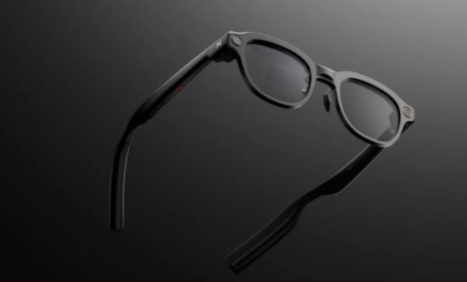
    Monako Glass AI coding glasses side view
    Monako Glass AI coding glasses side view

    On June 3, an obscure Chinese startup named Monako dropped a bombshell: Monako Glass, the world’s first wearable Linux computer in glasses form. Not an AI assistant hanging on your glasses—the glasses themselves are a complete computer. MonoOS system, Lua application layer, Claude Code and OpenAI Codex running locally. Forty-eight grams, $399, $19 reservation.

    Founder Candy Yue said something striking in the launch video: “I used to grind at the keyboard, but nowadays I just tell the computer what I want, and the AI builds it for me.” This sentence precisely captures Monako Glass’s ambition—not letting you operate a computer with glasses, but making the glasses themselves your AI coding workstation.

    Product Overview: A Niche Geek’s Crazy Experiment

    Monako is a Chinese startup with unclear team background, but its product vision is crystal clear: jump out of the homogeneous AI glasses track of “camera + music + voice assistant” and directly target developers and researchers. Candy Yue’s demo video on X shows users generating applications, executing research tasks, creating presentations, and even converting handwritten formulas to LaTeX code in real-time through voice commands.

    This positioning is extremely niche yet extremely precise. In the era when AI agents evolve from “code completion” to “autonomous debugging, code review, and automated workflows,” developers do need a more lightweight way to supervise AI completing tasks. Monako Glass wants to move this “supervision desk” from the desktop to your nose bridge.

    Specifications: How Much Crazy Fits in 48 Grams

    SpecDetails
    Operating SystemMonoOS (custom Linux)
    Application LayerLua (200-500KB memory footprint)
    Weight48g
    DisplayWaveguide display
    CameraHD camera
    SpeakerBuilt-in speaker
    MicrophoneBone-conduction (nasal vibration capture)
    Gesture InteractionVision Engine (0.5 TOPS NPU)
    AI SupportClaude Code, OpenAI Codex
    InteractionVoice commands + gestures + heads-up display
    Price$399 ($19 reservation)
    Estimated ShippingJuly-August 2026

    Data source: Monako official launch materials, Digital Trends, Times of AI

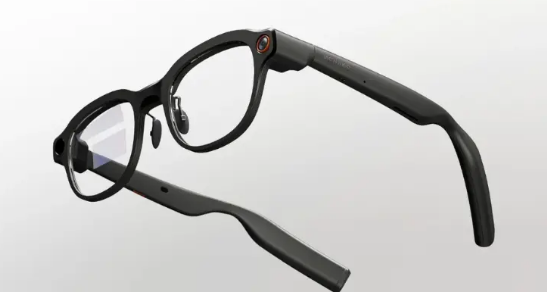
    Monako Glass AI smart glasses front view
    Monako Glass AI smart glasses front view

    MonoOS is Monako’s self-developed Linux distribution, with a core feature of being lightweight—the Lua application layer uses only 200-500KB of memory. This means applications can still run smoothly on resource-constrained embedded devices. In comparison, a typical Android app consumes dozens of MB of memory, making MonoOS’s lightweight design enable running complex AI agents on glasses.

    The bone-conduction microphone design is clever: placed near the nose rather than the ear, capturing voice through vibrations of bones near the nasal cavity. This design effectively separates user voice from background noise in noisy environments like coffee shops and offices, more precise than traditional microphone arrays.

    The Vision Engine gesture system relies on a 0.5 TOPS NPU, supporting operations like raising hand to summon menus, tapping to select apps, and sliding to adjust volume. Half a TOPS is not powerful, but sufficient for simple gesture recognition, and the power consumption is low enough—crucial for battery-sensitive glasses devices.

    Deep Analysis: Can It Actually Write Code?

    Monako Glass’s core selling point is “AI agent running 24/7.” The official demo shows several enticing scenarios:

    Voice-Driven Development: Say “create a to-do app,” and the AI agent generates code, debugs, and builds in the background, notifying you via vibration or voice prompt when done. You can check progress on the heads-up display and intervene via voice when necessary. This workflow eliminates the need to sit in front of a computer screen, suitable for “asynchronous programming” during commutes, waiting in lines, or even walking.

    Handwritten Formula to LaTeX: Researchers write formulas with pen and paper; the glasses camera captures and converts them to LaTeX code in real-time. For math, physics, and engineering researchers, this saves significant manual input time.

    Cross-Device Collaboration: Monako Glass is not an isolated device. It can serve as a “front end” for Mac or PC, with agents running on cloud or local servers while the glasses only handle input, output, and status display. This “light front-end + heavy back-end” architecture solves the glasses’ computing power limitation.

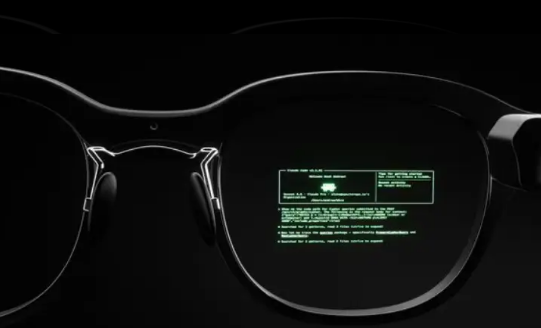
    Monako Glass waveguide display Linux interface
    Monako Glass waveguide display Linux interface

    But problems are equally obvious:

    Battery Life Unannounced: The 48-gram weight suggests an extremely limited battery. If AI agents run 24/7, battery life might be only 1-2 hours. The fact that official battery specs remain unannounced is a red flag.

    Chip and Storage Unknown: Processor model, memory size, and storage capacity are all unannounced. Running Linux plus AI agents requires at least 4GB memory and a mid-range Arm chip—whether the 48-gram body can fit these hardware components is questionable.

    Display Quality Uncertain: A waveguide display in a 48-gram body likely has limited resolution and brightness. Will reading code for long periods cause eye fatigue? Is it readable in bright outdoor light? All unknown.

    Privacy Paradox: Monako emphasizes “privacy first” because AI agents run locally without data leaving the device. But the camera on the glasses always exists. Wearing a Linux computer with a camera in public spaces raises social acceptance issues. Monako has not yet clarified whether the camera has physical遮挡 or LED indicators.

    Comparison: Monako Glass vs Meta Orion vs Apple Vision Pro

    FeatureMonako GlassMeta Orion ARApple Vision Pro
    Weight48g100g (prototype)600-650g
    Price$399Unannounced (premium expected)$3,499
    PositioningAI coding workstationSocial + AR displaySpatial computing platform
    OSMonoOS (Linux)Custom AndroidvisionOS
    AI CapabilityClaude Code/Codex localCloud AICloud + local hybrid
    DisplayWaveguide70°FOV transparent4K Micro-OLED
    CameraYes (privacy policy unclear)YesYes
    Target UsersDevelopers, researchersGeneral consumersProfessional users + early adopters

    Monako Glass takes a completely different path. Meta and Apple are building “next-generation general computing platforms,” while Monako is building “specialized tools for specific scenarios.” At $399—one-ninth the price of Vision Pro and one-thirteenth the weight—but functionality is also much narrower. It doesn’t do AR games, spatial video, just one thing: letting developers supervise AI agents writing code anytime, anywhere.

    This strategy is smart. In the AI agent era, “human-computer interaction” is shifting from “humans operating software” to “humans supervising AI completing tasks.” Monako Glass bets that: in the future, not everyone needs a high-performance computer, but every developer needs a lightweight “agent supervision terminal.”

    Pros and Cons

    ProsCons
    World’s first glasses-form Linux computer, concept ahead of its timeCore specs like battery, chip, storage unannounced
    48g relatively lightweight for extended wearWaveguide display quality uncertain, code reading experience unknown
    Local AI agent execution, good privacy protectionCamera privacy issues not clearly addressed
    Bone-conduction microphone, clear voice in noisy environments$399 pricing relatively high for a startup brand
    Voice + gesture interaction, hands-freeExtremely weak ecosystem, nearly zero third-party apps
    Precise targeting of developer pain pointsShipping July-August, actual experience to be verified

    Who Should Buy

    Recommended for:

    • Developers who frequently need “asynchronous programming” (advancing projects during commutes or waiting)
    • Researchers needing to capture inspiration and convert formulas anytime
    • Early AI agent adopters willing to try new interaction forms
    • Privacy-sensitive users who don’t want code data on the cloud

    Not recommended for:

    • Professional developers needing long immersive coding sessions (screen too small)
    • Users demanding brand stability and after-sales service (startup risk)
    • Budget-constrained users—$399 can buy a decent laptop
    • Socially sensitive users unwilling to wear camera-equipped glasses

    FAQ

    Q: Can Monako Glass replace my laptop?

    A: No. It is better suited as an “agent supervision terminal” rather than a “primary workstation.” Complex debugging, large-screen code review, and multi-window operations still require returning to a desktop environment.

    Q: Can MonoOS install regular Linux software?

    A: Official compatibility is unclear. MonoOS is based on the Linux kernel, but the Lua application layer means regular Linux applications need porting or redevelopment.

    Q: Is the $19 reservation a deposit or full payment?

    A: The $19 is a reservation fee, not full payment. Specific final payment timing and refund policies need to be confirmed with official channels.

    Q: Does it support prescription lenses?

    A: Official information has not been announced. The 48-gram body has limited space, and custom lenses may add weight and thickness.

    Conclusion

    Monako Glass is a device where “concept exceeds product.” It raises a highly forward-looking question: when AI agents can autonomously complete most coding tasks, what hardware do developers need to “supervise” this process? The answer may not be bigger screens or stronger CPUs, but a lightweight pair of glasses that keeps you connected to your agent in any scenario.

    But a forward-looking concept doesn’t mean a mature product. Battery, display, ecosystem, privacy—these fundamental questions remain unanswered by Monako. At $399, the pricing carries no small risk for a first-generation product from a startup.

    If you are a developer willing to pay for future interaction forms, Monako Glass is worth a try. But if you need a reliable “works right now” productivity tool, I recommend waiting for first-batch user feedback in July-August before deciding.

  • Steam Frame VR Headset Review

    Steam Frame VR Headset Review

    Introduction: Valve Finally Returns

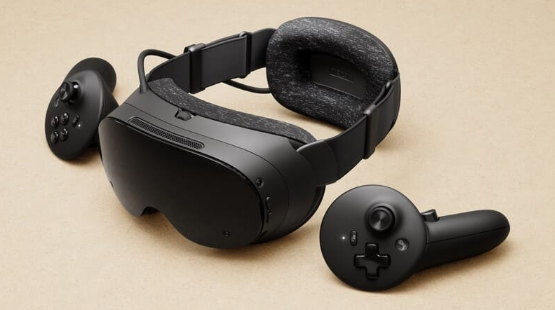
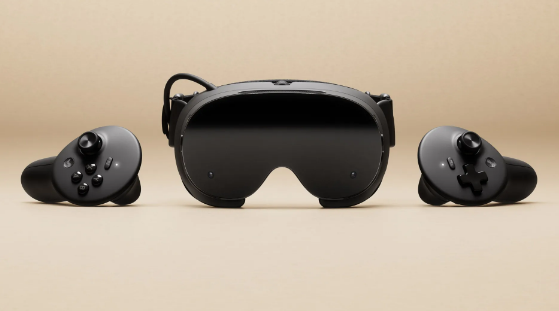
    Valve Steam Frame VR headset front view
    Valve Steam Frame VR headset front view

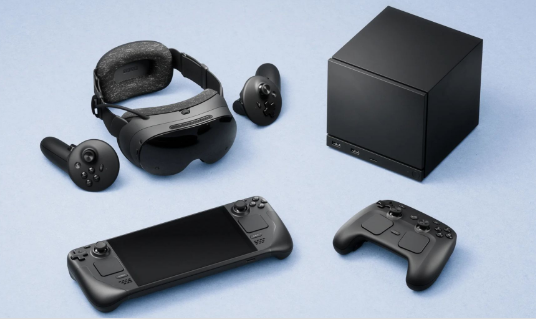
    In 2019, Valve Index burst onto the scene with its 144Hz refresh rate and Index controllers’ “finger tracking,” becoming the ceiling of PC VR at the time. Then Valve disappeared—no new VR hardware for six years, watching Meta Quest evolve from a 3DoF toy to the Quest 3 mixed reality flagship. Until November 12, 2025, when Valve suddenly dropped three bombs: Steam Machine console, Steam Controller, and Steam Frame VR headset. Early 2026 launch, pricing unannounced, but estimated at $499-599 for 256GB and $699-799 for 1TB.

    Steam Frame is not a simple Index upgrade, but a “streaming-first” standalone VR headset. It wants to answer one question: if a VR headset can both play mobile-level VR independently and wirelessly stream PC AAA titles, why bother with cables?

    Product Overview: The VR Piece of Steam’s Ecosystem Puzzle

    Valve’s hardware strategy is clear: Steam Deck handles mobile scenarios, Steam Machine handles living room scenarios, and Steam Frame handles immersive scenarios. All three devices share the SteamOS system, the same game library, and the same microSD card. Your saves, settings, and progress seamlessly switch between the three devices.

    Steam Frame’s core positioning is “streaming-first.” It packs a Snapdragon 8 Gen 3 processor and 16GB memory, capable of running some VR games and Android apps independently, but the real selling point is the 6GHz wireless adapter—plug it into your PC, and the headset directly streams PC VR content with low latency. Dual-radio architecture: one handles audio-visual streaming, one handles WiFi networking, without interference.

    Specifications: Valve’s Spec Monster Sincerity

    SpecDetails
    ProcessorSnapdragon 8 Gen 3 (4nm)
    Memory16GB LPDDR5X
    Storage256GB/1TB + microSD
    DisplayDual 2160×2160 LCD
    Refresh Rate72/90/120Hz, experimental 144Hz
    Field of View110°
    OpticsPancake lenses
    TrackingInside-out 6DoF (4 monochrome cameras)
    Eye TrackingYes, Foveated Streaming
    Wireless Streaming6GHz dedicated adapter, dual-radio
    Weight~440g (with battery)
    BatteryRear-mounted design, front-rear weight balance
    SystemSteamOS VR edition
    CompatibilitySteamVR, OpenXR, Android apps

    Data source: Valve official launch materials, Wareable, Engadget, VideoCardz

    The Snapdragon 8 Gen 3 is a 2024 flagship phone chip, with performance near phone-level rather than PC-level. This means Steam Frame’s standalone capabilities are limited—running Half-Life: Alyx smoothly? Impossible. But paired with 6GHz wireless streaming, a PC’s RTX 4090 can be “lent” to the headset, which is Valve’s true intention.

    Dual 2160×2160 resolution per eye, totaling approximately 4.3K, slightly higher than Quest 3’s 2064×2208 but far below Vision Pro’s 4K Micro-OLED. Pancake lenses make the body thinner, but optical efficiency is inferior to traditional Fresnel lenses, and brightness may be limited. The 110° field of view is moderate—narrower than Index’s 130° but on par with Quest 3’s 110°.

    Foveated Streaming is Steam Frame’s technical highlight. Through eye tracking, the system only renders high-resolution images in your gaze area, reducing resolution in peripheral areas to save substantial bandwidth. Official claims suggest bandwidth efficiency improvements of over 10x—meaning equivalent quality with less wireless streaming latency and compression artifacts.

    Valve Steam ecosystem product lineup display
    Valve Steam ecosystem product lineup display

    Deep Analysis: Where Steam Frame’s Chances Lie

    Valve has three clear competitive advantages with Steam Frame:

    First, Steam library ecosystem moat. Steam has over 70,000 games, including more than 5,000 VR titles. The Quest 3 store has only a few hundred VR games, and Meta’s strict content review means many PC VR classics (like Half-Life: Alyx, Beat Saber) have no Quest versions. Steam Frame directly compatible with the entire SteamVR library—an advantage Meta cannot replicate.

    Second, open platform positioning. Meta Quest is a closed ecosystem; apps must pass Meta store review. Steam Frame runs SteamOS, supports OpenXR standards, and developers can freely publish content. Valve even provides CAD drawings and circuit specifications, letting users 3D print replacement face cushions and head straps—this “modular” thinking is unique in the VR industry.

    Third, PC streaming experience optimization. Existing wireless streaming solutions (like Virtual Desktop, Air Link) rely on home WiFi, with unstable latency and image quality. Steam Frame’s 6GHz dedicated adapter bypasses the router, directly establishing a private PC-to-headset link, paired with Foveated Streaming, theoretically achieving near-wired connection experience.

    But Steam Frame’s challenges are equally severe:

    Insufficient standalone performance. The Snapdragon 8 Gen 3 can probably run Resident Evil 4 VR, but Half-Life: Alyx and Microsoft Flight Simulator must rely on PC streaming. This means users without high-end PCs can only play “mobile-level” VR, significantly compromising the experience.

    Weight and comfort. At 440g including battery, lighter than Quest 3’s 515g but much lighter than Index’s 809g. The rear-mounted battery design helps front-rear weight balance, but comfort during extended wear (over 1 hour) remains to be verified. Pancake lenses are thin, but edge clarity may degrade.

    Price competitiveness. Estimated $499-799 pricing offers no advantage over Quest 3 ($499) and Quest 3S ($299). Vision Pro is expensive ($3,499) but positioned completely differently. Steam Frame needs to convince users: is spending $200-300 more for the Steam library and open ecosystem worth it?

    Content moderation gray area. Valve’s open strategy means adult, violent, and extreme content may more easily enter the platform. While Steam PC already has mature content rating systems, VR’s immersion makes sensitive content more impactful. How Valve balances “openness” and “compliance” is a long-term challenge.

    Comparison: Steam Frame vs Meta Quest 3 vs Apple Vision Pro

    FeatureSteam FrameMeta Quest 3Apple Vision Pro
    Price$499-799 (estimated)$499 (128GB)$3,499
    Weight~440g~515g600-650g
    Resolution2160×2160 per eye2064×2208 per eye4K Micro-OLED per eye
    Refresh Rate72-144Hz72-120Hz90-100Hz
    Field of View110°110°100°
    TrackingInside-out 6DoFInside-out 6DoFInside-out 6DoF
    Eye TrackingYes (Foveated Streaming)NoYes (Foveated Rendering)
    Wireless Streaming6GHz dedicated adapterWiFi (Air Link)Only Mac/iPhone mirroring
    Standalone PerformanceSnapdragon 8 Gen 3Snapdragon XR2 Gen 2M2+R1 (extremely powerful)
    Game LibrarySteamVR (5000+ VR games)Meta Store (few hundred)Very few native VR games
    Ecosystem OpennessFully openClosed reviewClosed review
    Mixed RealityMonochrome passthrough (no color)Full-color passthroughFull-color passthrough

    Steam Frame’s differentiation is clear: it’s not the strongest standalone device (Vision Pro), nor the cheapest (Quest 3S), but the “best wireless companion for PC VR players.” If you already have a high-end PC and Steam library, Steam Frame is an upgrade replacement for Quest 3; if you only want to play standalone VR games, Quest 3 offers better value; if you pursue spatial computing and productivity, Vision Pro is another dimension.

    Pros and Cons

    ProsCons
    Full SteamVR library compatibility, unbeatable game resourcesLimited standalone performance, heavy games depend on PC streaming
    6GHz dedicated streaming, theoretically better latency and quality440g weight comfort during extended wear to be verified
    Foveated Streaming saves bandwidth, improves experienceHigher price than Quest 3, value advantage not obvious
    Fully open ecosystem, high developer freedomNo color passthrough, mixed reality weaker than Quest 3
    Modular design, customizable accessoriesContent moderation gray area, sensitive content risks
    Shared ecosystem with Steam Deck/MachineShipping date not final, potential delays

    Who Should Buy

    Recommended for:

    • Players with high-end PCs and SteamVR game libraries
    • VR enthusiasts tired of Quest’s closed ecosystem, seeking open platforms
    • Business travelers needing portable VR large screens
    • Valve Index legacy users wanting wireless upgrade without abandoning Steam library

    Not recommended for:

    • Users without high-end PCs, only wanting standalone VR games (Quest 3 more suitable)
    • Budget-constrained users—$299 Quest 3S is sufficient
    • Users pursuing mixed reality and productivity scenarios (Vision Pro or Quest 3 better)
    • Users demanding brand stability—Valve hardware often delays and stocks out

    FAQ

    Q: Does Steam Frame require Steam Machine?

    A: No. Any PC supporting SteamVR can pair with the 6GHz adapter for wireless streaming. Steam Machine is just Valve’s recommended “living room companion.”

    Q: Does Foveated Streaming affect image quality?

    A: Theoretically no. Eye tracking ensures your gaze area is always full resolution, with only peripheral areas reduced—human peripheral vision naturally has low resolution, so no noticeable difference is perceived.

    Q: Does it support prescription lenses?

    A: Valve has not announced, but Index supports custom lens inserts, so Steam Frame likely will have similar solutions.

    Q: How long is the battery life?

    A: Official data not announced. Referencing Quest 3’s 2-3 hours, Steam Frame’s 440g weight may allow a larger battery, but 6GHz streaming consumes significant power, so actual battery life may be similar.

    Conclusion

    Steam Frame is Valve’s “belated response” to the VR industry. Six years ago, Index defined the ceiling of PC VR; in six years, Meta’s Quest series captured the standalone VR market. Steam Frame is not Index’s successor, but a new species—it acknowledges standalone VR’s performance limitations, instead using wireless streaming to “borrow” PC computing power to the headset, while preserving the open advantages of the Steam ecosystem.

    This strategy is smart and risky. Smart because it avoids head-to-head competition with Quest 3 on standalone performance, instead building differentiation through the Steam library and open ecosystem; risky because whether wireless streaming can truly approach wired experience, and whether $499-799 pricing can convince enough PC VR players to upgrade.

    2026 will be a pivotal year for VR hardware: Meta Quest 4, Apple Vision Pro 2, and Sony PS VR2 successor may all debut. Whether Steam Frame can stand out in this melee depends on three factors: whether streaming latency is low enough, whether pricing is competitive enough, and whether Valve’s production can keep up (referencing Steam Deck’s long-term stock shortages).