Category: AI Wearables

AI wearable hardware refers to smart wearable devices designed for everyday consumer use. These devices are worn directly on the body and utilize artificial intelligence algorithms to provide functions such as health monitoring, activity analysis, behavior perception, intelligent interaction, and daily life assistance. Features include: AI health analysis (heart rate, blood oxygen, sleep, stress, body temperature, etc.); AI activity recognition and data algorithms (automatic recognition of running, swimming, cycling, fitness, etc.); and AI voice assistant, noise reduction, real-time translation, and intelligent reminders.

  • Xu Rui’s Entry into MSL Marks A New Era for AI-Native Hardware

    Xu Rui’s Entry into MSL Marks A New Era for AI-Native Hardware

    Recently, global tech giant Meta officially announced a key personnel appointment: Xu Rui, a former core executive of Xiaomi and ByteDance’s hardware businesses, will head the newly formed AI hardware team at Meta’s Superintelligence Lab (MSL).

    Previously, Dreamer, an AI hardware startup founded by former Xiaomi Vice President Hugo Barra, was acquired by Meta in March of this year, with Xu Rui joining as a core member. This move not only signifies the completion of a key piece in Meta’s smart hardware strategy but also clearly signals a strategic shift in its R&D focus from “meta-universe infrastructure” to “AI-native devices.”

    Dreamer Team
    Dreamer Team

    As Meta’s newly established strategic engine, MSL is personally led by Alexandr Wang, a leading figure in the field of artificial intelligence infrastructure. The lab was established to address the urgent need for next-generation computing terminals driven by the explosion of generative AI.

    According to industry disclosures, MSL’s AI hardware team has initiated a deep structural restructuring, with a large number of senior engineers and product experts from Reality Labs smoothly transitioning to the new department, achieving full integration of software and hardware resources. Unlike traditional hardware R&D, which follows the logic of “specifications define products,” the MSL team’s core objective focuses on the underlying interaction paradigm of “AI native.”

    The team is dedicated to overcoming the challenge of deeply integrating large-scale model capabilities with physical carriers, exploring new device forms with proactive context awareness, multimodal natural interaction, and local privacy computing. Alexandr Wang previously clearly stated Meta’s long-term vision: to transcend the reliance on a single smartphone screen and build a distributed computing network centered on personalized AI agents. To this end, MSL will focus on optimizing edge AI computing power, low-power sensor arrays, and seamless cross-terminal collaboration protocols, striving to launch an AI hardware product line that truly reshapes the human-machine relationship within the next two to three years, making intelligent services as natural as air.

    Xu Rui, a senior hardware technology expert and serial entrepreneur, has previously worked at Intel, Lenovo, Xiaomi, and ByteDance. During his time at Xiaomi, he spearheaded the globalization of the TV business from zero to profitability. At ByteDance, he also created blockbuster hardware products with over a million units sold, possessing comprehensive industry experience spanning consumer electronics and cutting-edge AI hardware.

    Looking globally, the AI ​​hardware sector is experiencing an unprecedented inflection point. Over the past decade, the mobile internet, with its touchscreens and high-speed networks, has completely reshaped lifestyles. Now, standing at the forefront of the big data era, industry consensus is increasingly clear:

    The next generation of personal computing gateways will inevitably be AI-native. From Silicon Valley tech giants to innovative Chinese companies, the global industry chain is collectively focusing on hardware forms for the “post-smartphone” era.

    Simultaneously, with the continuous decline in the cost of large-scale inference on the edge, the commercialization of new solid-state batteries and flexible materials, and the vigorous evolution of open-source chip architectures, the bottlenecks of computing power, battery life, and cost that once constrained the widespread adoption of AI hardware are being broken down one by one. Future smart terminals will completely shed the label of “application container” and evolve into “digital extensions” with spatial understanding, emotional resonance, and autonomous decision-making capabilities. Z

    Meta’s integration of top talent and its ambitious MSL strategy not only represents a strategic upgrade to its own technology ecosystem but also points the way for the entire consumer electronics industry to evolve from “functional overlay” to “intelligent endogenous” transformation.

    It is foreseeable that the explosive growth of AI hardware will spawn a trillion-dollar incremental market and profoundly reshape the industrial logic of education, healthcare, office work, and entertainment.

    In the wave of technology democratization and open collaboration, hardware innovation is returning to its original “human-centered” focus. As leading global laboratories continue to push the boundaries of interaction, AI devices will deeply integrate into daily life in a lighter, more seamless, and more accessible manner.

    In this historical process of reshaping computing paradigms and productivity patterns, the deep integration of China’s well-developed hardware supply chain and cutting-edge global algorithms will undoubtedly provide a solid foundation for the large-scale deployment of AI hardware. The future is here; AI-native hardware is unstoppable in opening the door to a new era of human-machine symbiosis, creating a more efficient, convenient, and imaginative intelligent life for users worldwide.

  • Screenless Wave Sweeps Across Wearable Devices

    Screenless Wave Sweeps Across Wearable Devices

    The wearables industry is undergoing a profound paradigm shift. Whoop, an American sports and health start-up, recently completed a US$575 million Series G round of financing, with its valuation jumping to US$10.1 billion, becoming the latest “unicorn” in the field. At the same time, technology giant Google is using the Fitbit brand to develop screen-free fitness bracelets, and NBA star Stephen Curry has participated in product testing. The actions of the two major players jointly mark that “screen-free” has become a new battlefield in the field of health hardware.

    Fitbit
    Fitbit

    The rise of Whoop confirms the commercial potential of the “hardware free + subscription service” model in the field of health technology. The Boston-based company’s booking revenue in 2025 will reach US$1.1 billion, its global membership will exceed 2.5 million, and its monthly active user ratio will be as high as 83%, far exceeding the industry average. The core of its success lies in positioning the hardware as a pure data collection portal, providing users with in-depth health insights such as sports performance analysis and sleep quality monitoring through a monthly subscription service of US$30.

    Today, Whoop is accelerating its expansion into medical-grade health services. The company has recently added functions such as electrocardiogram monitoring, blood pressure trend insight, and biological age assessment, and integrated blood testing services to build a closed loop of “monitoring-analysis-intervention” health management. The financing was led by Middle East sovereign funds and medical giant Abbott. Top athletes such as football superstar Cristiano Ronaldo also joined as shareholders, which not only brought financial support to the company, but also further enhanced its brand influence.

    The entry of Google has injected the power of technology giants into this screenless wave. According to Bloomberg, citing people familiar with the matter, Google is developing a screen-free fitness bracelet under the Fitbit brand. The product will be deeply linked with the AI ​​personal health manager in the Fitbit app to support functions such as menstrual period analysis, mental health assessment, and nutrition tracking. This large-model-based health assistant has launched public beta in October 2025. Its core advantage is to use Google’s AI technology to conduct in-depth interpretation of continuous biological data collected by the device to provide users with personalized health recommendations.

    Whoop
    Whoop

    “Screenless is not a subtraction of functions, but an addition of value.” Industry analyst Sarah Chen said that compared with screen smartwatches such as Apple Watch, screenless devices eliminate redundant screen interactions and extend battery life to more than 14 days. At the same time, they are insensitive to wear and are more suitable for 7×24 hours of continuous monitoring of core health data such as sleep and heart rate variability. It accurately solves the core pain points of users such as frequent charging and uncomfortable wearing.

    Along with the innovation of business models, the technical architecture is also undergoing profound changes. As a pure data collection terminal, the value of the screenless bracelet no longer depends on the hardware parameters, but on providing high-quality and continuous biological data for the cloud AI model. This “device-side collection + cloud intelligence” architecture is gradually becoming the standard paradigm for the next generation of health wearable devices. It not only significantly reduces local computing power consumption, but also improves the accuracy of AI health services.

    Currently, the screenless wearable device market has formed three differentiated tracks: the subscription-based professional sports monitoring track represented by Whoop, the lightweight monitoring track in the form of smart rings, and the technology giant AI health service track represented by Google. Although the forms are different, the core logic of the three is highly consistent: hardware is just the carrier, and data and AI services are the real core of value.

    This trend marks the return of wearable devices from “notification center” to the nature of “health steward”. In the past, industry competition mostly focused on the accumulation of hardware parameters such as screen size and battery life; now, users pay more attention to the accuracy of data, the depth of services and the comfort of wearing, especially medical-grade precision health insights.

    Regarding the future of the industry, analysts predict that with the continued access to medical-grade functions, screen-less wearable devices are expected to become standard terminals for personal health management, and even expand into medical service fields such as insurance and chronic disease management, forming a cross-border health ecosystem. The exploration of Google and Whoop provides a clear development path for the industry: using hardware as the carrier, AI as the soul, and data as the core to build a trustworthy health service ecosystem.

    Google plans to officially release this screenless Fitbit bracelet later this year, and Whoop is accelerating its global expansion and plans to create more than 600 new positions. The layout of the two major players not only promotes wearable devices to officially enter the era of “cognitive intelligence” – devices can not only record data, but also understand and predict users’ health status, it also points out new value growth points for investors and developers.

    The unfolding of the screenless wave heralds a comprehensive transition of health hardware from tool attributes to service attributes, allowing technology to truly serve the quality of human life and reshape a new model of personalized health management in the future.

  • Hisense Vidda G11 : Slim AI Audio Glasses

    Hisense Vidda G11 : Slim AI Audio Glasses

    Foreword: Tech-savvy brands enter the market, bringing new players to smart glasses.

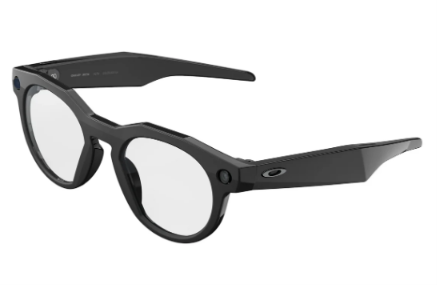
    In the wearable device market of 2026, smart glasses have moved from concept to practical use. Today, Vidda, a tech-savvy brand under Hisense focusing on young consumers, officially released its first G11 lightweight AI audio glasses. This product previously made a brief appearance at AWE 2026 in Shanghai, and has now finally been unveiled.

    Vidda G11 AI Audio Glasses
    Vidda G11 AI Audio Glasses

    Backed by Hisense Group’s powerful R&D and manufacturing system, Vidda has always focused on “value for money” and appealing to a younger demographic. Is the G11 merely a flashy tech toy, or a truly efficient everyday device? This article will provide an in-depth analysis from five dimensions: design, sound quality, AI features, battery life, and price, offering you a comprehensive buying guide.

    I. Design and Wearing: Pursuing a “Seamless” Experience

    The biggest pain points for smart audio glasses are often their weight and appearance. If the glasses are too heavy, it is difficult for users to wear them all day; if the design is too exaggerated, it is difficult to match them with everyday clothing.

    • Ultra-thin and lightweight: The Vidda G11 weighs only 26.5 grams, and the thinnest part of the temples is only 5.3 millimeters. This data is highly competitive among similar products, meaning that the burden of wearing it is similar to that of ordinary prescription glasses, avoiding the ear pressure caused by prolonged wear.
    • Material Upgrade: Some models feature a luxurious business-style titanium frame. Titanium alloy is not only high in strength but also skin-friendly and corrosion-resistant, making it a significant advantage for users with sensitive skin.
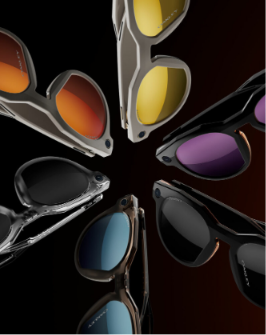
    • Diverse Options: To cater to different user aesthetics, the G11 offers five different frame styles. Whether you prefer the classic aviator or Boston style, the fashionable browline frame, or the business-oriented titanium frame, you can find an option that suits your face shape.

    Review opinion: The G11’s core advantage lies in its weight of 26.5 grams. For office workers who need to wear glasses for extended periods, this “unobtrusive” design is a key factor in their purchasing decision.

    II. Audio and Calls: The Power of a Six-Microphone Array

    The essence of audio glasses lies in “listening” and “speaking.” Whether one can hear clearly and be heard clearly in a noisy environment directly determines the usability of the product.

    • Upgraded sound pickup: Most smart glasses on the market use a 5-microphone array, while the Vidda G11 upgrades to a 6-microphone array. This extra microphone is not just for show; it provides more accurate sound source localization and a wider pickup range.
    • Wind noise reduction: Official data shows that this product can achieve a wind noise reduction effect of 5m/s. This means that even when riding or walking in winds of force 4, the voice quality remains clear and audible. This is a very practical feature for commuters.
    • Sound technology: It adopts AAC super-linear directional speakers, combined with AI noise reduction technology. Directional sound not only ensures the clarity of sound quality, but also reduces sound leakage to a certain extent, protecting user privacy.

    Review opinion: The 6-microphone array is a significant hardware upgrade. Combined with its wind noise reduction design, the G11 is expected to outperform most competitors in outdoor calling scenarios.

    III. AI Functions: More Than Just Listening to Music

    Since it is named “AI audio glasses”, its intelligent functions are the core that distinguishes it from ordinary Bluetooth glasses.

    • AI-powered Meeting Minutes: This is a powerful feature for professionals. It supports real-time recording and uses AI to intelligently summarize and generate written minutes. Imagine, after the meeting, key points are automatically generated – this will greatly improve work efficiency.
    • Instant note-taking: Inspiration often vanishes in an instant. Users can quickly jot down ideas via voice commands, and the system instantly generates a written summary, solving the problem of inconvenient mobile input.
    • AI Assistant: Built-in intelligent assistant, supports voice interaction, in line with the current trend of “using voice instead of hands”.

    Evaluation opinion: For students, journalists, and business people, AI-powered meeting minutes and quick notes are true “productivity tools,” not just entertainment features.

    IV. Battery Life and Charging: Say Goodbye to Battery Anxiety

    The battery life of wearable devices directly impacts the user experience. The Vidda G11 features special optimizations in battery technology.

    • Battery technology: Featuring a non-coaxial laser-welded steel casing battery, this structure helps to improve battery density and safety within a limited space.
    • Battery life: Official data shows an ultra-long standby time of 12 days, supporting 9 hours of continuous talk time or 12 hours of continuous listening. For most users, a single charge is sufficient to support a week’s worth of commuting.
    • Fast charging support: It adopts the 2C magnetic fast charging commonly used in audio glasses. A 10-minute charge can restore 50% of the battery. A quick charge while washing up in the morning can meet half a day’s usage needs.

    Evaluation opinion: The 12-day standby time and efficient fast charging mechanism basically eliminate users’ battery anxiety, making it a reliable everyday portable device.

    V. Price and Purchase Recommendations

    One of Vidda’s core strategies is “value for money.” Below is a reference price in US dollars, converted from the initial launch price (exchange rate estimated at 1 USD ≈ 7.2 CNY), for global users’ reference.

    Frame styleInitial Price (CNY)Estimated US Dollar Price (USD)Target audience
    Pilot model / Classic Boston model¥1,299~$180For general users who prefer classic and versatile styles
    Stylish eyebrow holder¥1,399~$194Fashionistas who pursue individual style
    Luxury Business Titanium Stand / Retro Round Titanium Stand¥1,599~$222Business professionals who appreciate materials and texture
    • Subsidies and discounts: With government subsidies, the starting price can be as low as ¥1,104 (approximately $153).
    • Release information: Pre-orders are now open on platforms such as JD.com, and sales will officially begin on April 8th at 20:00.
    • Horizontal comparison: In the current smart audio glasses market, similar products from internationally renowned brands are mostly priced between $250 and $350. The Vidda G11, with a starting price of around $180, offers high-end features such as a titanium frame and a 6-microphone array, making it a clear value proposition.

    VI. Final Buying Guide: Who Should Buy?

    To help you make your decision, we have summarized the following purchasing recommendations:

    ✅ Recommended for buyers

    Workplace efficiency seekers: Business professionals or media workers who need to attend frequent meetings and take minutes and hope to use AI functions to improve their work efficiency.

    Commuters: Users who need to maintain clear communication while cycling or walking outdoors and have a strong need for wind noise reduction.

    Heavy glasses user: Looking for a smart device that weighs about the same as regular glasses (26.5g) and can be worn all day without fatigue.

    Value-for-money seekers: Users with a budget under $200 who want high-end features such as titanium frames and long battery life.

    ❌ Carefully consider the target audience

    AR users: Please note that this is an audio glasses product and does not have AR display capabilities (such as navigation arrows, teleprompters, or other visual displays).

    Audiophiles: Although the sound quality is clear, the bass effect of open-back audio glasses cannot be compared with closed-back headphones, making them unsuitable for music appreciation scenarios with extremely high sound quality requirements.

    For users with special prescriptions: Although we support lens fitting, we recommend consulting customer service first to confirm whether the frames support your prescription range, so as to avoid being unable to fit lenses after purchase.

    Conclusion

    The release of the Hisense Vidda G11 marks the arrival of another strong contender in the smart audio glasses market. Leveraging the technological foundation of the Hisense Group, the G11 achieves leading performance in its price range in terms of lightweight design, call noise reduction, and AI productivity features.

    Especially considering its starting price of around $153 after subsidies, it could be one of the most cost-effective AI audio glasses in 2026. If you’re looking for a smart device that boosts efficiency without putting strain on your nose, the Vidda G11 is worth keeping an eye on when it goes on sale April 8th.

  • Spiro Smart Bracelet In-depth Product Review

    Spiro Smart Bracelet In-depth Product Review

    In 2026, the global AI wearable device industry is undergoing a crucial paradigm shift—from efficiency tools to emotional companions. Following the Taya smart pendant, which emphasizes privacy and sparked heated discussions about the “boundaries of recording” with its $89 price tag, Shenzhen-based Ten Mirror Technology’s Spiro smart bracelet further shifts the focus of industry competition to the emotional companionship track. This product, planned for launch on its North American independent website in April 2026 and mass production in June, attempts to answer a core question: Are consumers willing to relinquish some privacy boundaries for deeper AI emotional interaction?

    This article, combining Siro’s core technology, interaction design, and comparisons with other products in the same sector, provides an objective analysis for investors and consumers from three dimensions: business, technology, and ethics.

    Spiro Smart Bracelet
    Spiro Smart Bracelet

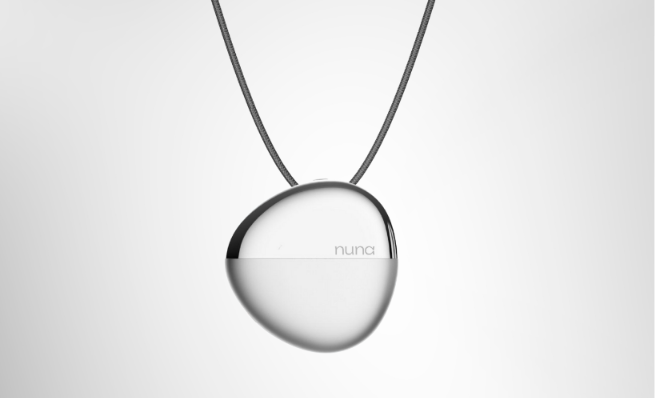
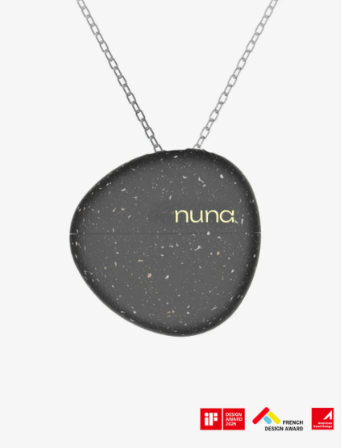
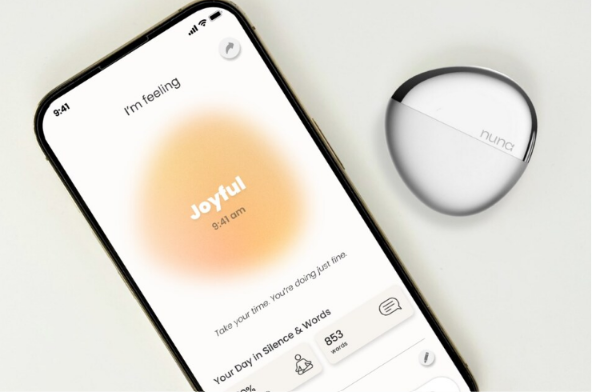
    I. Team and Background: A Serial Entrepreneur’s Emotional Hardware Bet In the hardware startup field, a team’s experience is often a core endorsement of a product’s ability to be successfully implemented. Founded in July 2025, TenMirrors Technology has secured tens of millions of RMB in angel round funding from Yuanhe Capital. Its core team members come from major hardware manufacturers such as DJI, Anker, and OPPO, possessing mature supply chain management and mass production experience. Founder Zhao Zhihe, a post-95s PhD from the Chinese University of Hong Kong, is a serial entrepreneur. He previously served as CEO of the smart wearable company Wuqi Technology, launching Nuna, the world’s first AI emotion pendant, achieving product validation from scratch in the field of “emotional computing.” This background imbues Spiro with a distinct “emotional hardware” gene from its inception.

    Spiro
    Spiro

    II. Product Form: The Business Logic Behind the Bracelet Selection
    Spiro’s most prominent innovation is its product form—avoiding highly functional categories like smartwatches, rings, and pendants, opting instead for the everyday bracelet form. This decision aligns perfectly with the Taya team’s positioning of the product as “jewelry,” reflecting a precise understanding of user psychology. 1. Unconscious Wearing: Lowering the Psychological Barrier for Users Zhao Zhihe believes that bracelets are the category of jewelry with the “lowest psychological burden.” Unlike smartwatches, which are labeled as “data monitoring,” Spiro can be changed according to clothing, just like a regular bracelet, reducing the decision-making cost for users when wearing it. At the same time, this “de-tooling” design allows users to ignore its presence, thus achieving 24-hour continuous data capture—the foundation for its core functionality. 2. Tactile Interaction: Imbuing Hardware with Emotional Warmth The core highlight of Spiro’s hardware design is a rotating “lucky bead” mechanism. When users feel anxious or need emotional support, spinning the dial once will pop up an AI card on their phone. Unlike random inspirational quotes, this card is generated based on the user’s past memory database, precisely matching their current emotions and situation, realizing the materialization of digital comfort. This tactile interaction is a key differentiator between Spiro and purely software AI products. III. Core Technology: The Moat of the Event

    Stream Memory Engine
    Spiro’s core technology lies in its “event stream” memory engine. Unlike traditional recording devices that aim for word-for-word transcription, this engine’s core goal is to “understand” user behavior and emotions, building a “mental model” of the user.

    1. Multimodal Data Acquisition
      The device is equipped with an IMU sensor and microphone, enabling 24/7 audio recording and segmenting the user’s daily activities into continuous “events” (such as entering a coffee shop, having a conversation, leaving, etc.). The system extracts multi-dimensional data such as ambient sound, tone of voice, dialogue content, and pause duration, providing support for mental modeling.
    2. Delivery of Three Core Functions
      AI Diary: Not simply recording and transcribing, but a stylized re-creation combined with emotional coloring, helping users review their emotional fluctuations throughout the day; Interpersonal Relationship Energy Map: Through visual analysis, it presents the user’s interaction patterns with different people, such as “more relaxed after talking to A, more prone to silence after being with B,” assisting users in optimizing their social circles; Emotional Feedback: This is the “luck-changing trigger” corresponding to immediate comfort, with the core being the provision of emotional value. IV. Competitive Comparison: Spiro vs. Taya – Different Paths

    To clearly position Spiro in the market, we compared it with the recently popular Taya smart pendant (priced at $89) across multiple dimensions. The differences between the two essentially represent a clash of two development paths for AI wearable devices.

    Key Differences Analysis

    • Privacy and Ethical Trade-offs: Taya’s core selling point is “no recording of others,” addressing anxiety about eavesdropping in social situations and precisely targeting privacy-sensitive groups. Spiro, to construct a complete context, requires recording ambient sounds and conversations, potentially raising ethical controversies in public use, requiring users to bear the social risks themselves, although the team emphasizes that the data is only used for personal modeling.
    • Functional Depth Differences: Taya’s functions are restrained, positioned as a private “digital tree hole,” focusing on personal recording and growth. Spiro’s functions are more complex, attempting to become an “external brain” understanding the user’s relationship with the world, offering deeper emotional interaction.
    • Wearing Scenarios Differences: The bracelet form makes Spiro more stable than a pendant in scenarios such as exercise and sleep, offering a greater advantage in continuous data collection. V. Risks and Challenges: Four Major Uncertainties Before Mass Production

    For investors and consumers, Spiro still faces four key risks that require close attention.

    1. Privacy Compliance Risk: Under the EU’s GDPR and the legal frameworks of some US states, recording conversations without consent may be illegal. If Spiro’s 24/7 recording function cannot resolve compliance issues before mass production, it may face the risk of being removed from the market, which is a core obstacle to its promotion in the North American market.
    2. Data Security Risk: Core data such as personal life and interpersonal relationships recorded by the device are stored in the cloud. Once leaked, the consequences are far greater than those of ordinary password leaks. Users need to focus on whether the manufacturer provides security solutions such as on-device processing and encrypted storage.
    3. Pricing Risk: Combining its sensor combination (IMU + microphone) and jewelry-craftsmanship positioning, Spiro’s price is likely to be higher than Taya’s $89. If the price exceeds $200, it will significantly increase the barrier to entry for users and affect market acceptance.
    4. Delivery Risk: The product is planned for mass production in June 2026 and is currently still in the pre-launch phase. In the hardware startup field, delays are common, and users who urgently need the product need to weigh the waiting costs. VI. Purchase Guide: Who Should Buy, and Who Should Wait? Price Reference: Based on hardware complexity estimates, Spiro is expected to be priced between $150 and $250, subject to official announcement.

    Recommended Buyers:

    Those with strong emotional needs: Feeling lonely and needing a “digital companion” that understands their emotions and provides immediate feedback;
    Those sensitive to interpersonal relationships: Hoping to optimize their social status and circle of friends through quantitative analysis;
    Jewelry enthusiasts: Preferring bracelets and hoping the technology product will seamlessly integrate into their daily outfits;
    Those who trust TenMirrors Technology: Recognizing founder Zhao Zhihe’s past experience in the field of emotional hardware. Not Recommended for:

    Privacy-sensitive users: Those who cannot tolerate the device recording ambient noise or conversations with others (it is recommended to choose Taya or turn off the microphone function); Business users: Users who need accurate meeting minutes, Spiro’s “emotional summarization” is not as accurate as a professional voice recorder; Users with limited budgets: If the $89 Taya exceeds the budget, Spiro’s high premium does not offer good value for money; Those who avoid legal risks: Those who work or live in areas with strict recording laws should use its 24/7 recording function with caution.

    VII. Conclusion: Balancing Emotional Assets and Privacy Boundaries
    In 2026, the AI ​​wearable device market has diverged into two clear paths: the “privacy-first” route represented by Taya, which focuses on protecting user boundaries; and the “context-first” route represented by Spiro, which uses deep emotional interaction as its selling point. The former is a “privacy shield” for users, while the latter is a “self-mirror” for users. Spiro’s core value lies not in recording a large amount of sound, but in quantifying a user’s “emotional assets” through data—telling you “who you are, who truly cares about you, and how you’re doing today.” This value is something traditional smart hardware cannot provide. For consumers, choosing Spiro essentially involves weighing the boundaries of privacy against self-understanding. If you’re willing to relinquish some privacy and trust TenMirrors’ data protection capabilities, then Spiro may become one of the most anticipated AI hardware devices of 2026. It’s recommended to pay close attention to its privacy policy and pricing when it launches on its North American independent website in April before making a final decision. In an algorithm-driven era, a “lucky charm” that understands you might be the outlet for many seeking emotional comfort—provided that this comfort doesn’t come at an excessive cost to your privacy.