Introduction: Business Laptops Are Getting AI-Competitive Too
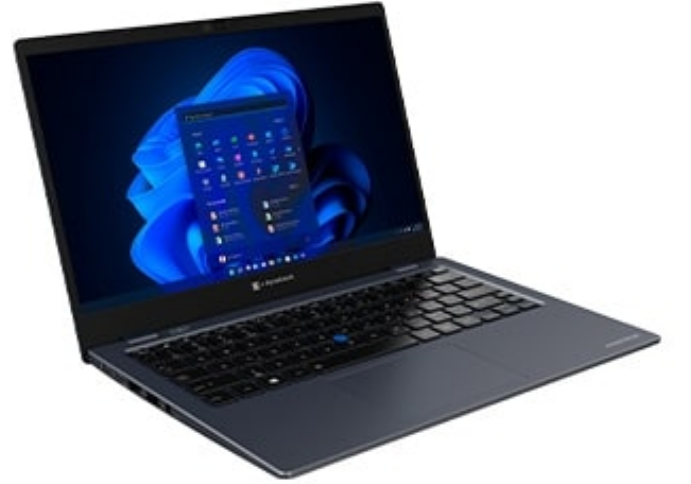
On June 6, dynabook launched five AI business laptops at once—the Portégé Z40L-P, X30L-P, X40-P, and TECRA A40-P, A60-P. All featuring Intel Core Ultra, all with NPU, all MIL-STD-810H military-grade certified. This lineup signals one thing: competition in the business laptop market has evolved from “who is lighter, who is faster” to “who understands AI better, who understands business scenarios better.”
Who is dynabook? The successor to Toshiba’s laptop business, now under Sharp and Foxconn. In the business laptop segment, the Portégé series has long been a benchmark for ultralight design, while the TECRA series focuses on durability and value. The 2026 update is not about changing CPUs, but embedding NPU AI capabilities into business workflows—offline AI assistant, AI meeting enhancement, privacy peeping detection, and AI power optimization. Each function targets a specific business pain point.
Product Overview: Five Models Covering 13.3 to 16 Inches
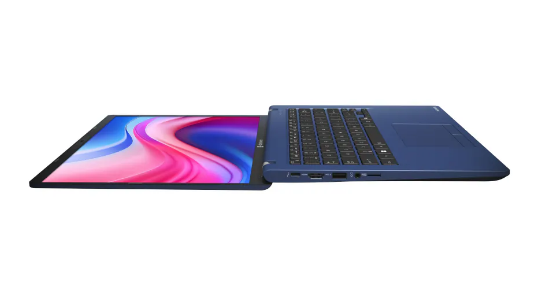
The dynabook 2026 lineup’s positioning is crystal clear:
Portégé Z40L-P:
14-inch flagship, approximately 1.05kg, thinnest point 15.9mm. Powered by Intel Core Ultra 7/5 processors, up to 16 cores at 5.0GHz, LPDDR5X 8533MT/s memory, up to 64GB plus 2TB SSD. Exclusive offline AI Chat assistant feature, enabling file translation, content summarization, and system settings without internet. HPD privacy detection, AI meeting enhancement included across all models.
Portégé X30L-P:
13.3-inch extreme lightweight, approximately 900g, targeting frequent business travelers. Similar configuration to Z40L-P but with a smaller screen and more compact battery, with battery life compensated through AI power optimization.
Portégé X40-P:
14-inch balanced model, approximately 1.2kg, striking a balance between lightweight and port richness. Retains full-size HDMI and USB-A ports, suitable for business scenarios requiring frequent peripheral connections.
TECRA A40-P:
14-inch mainstream business, approximately 1.4kg, more budget-friendly. Retains core AI features but simplifies materials and screen specifications, ideal for large-scale enterprise procurement.
TECRA A60-P:
16-inch large-screen workstation, approximately 1.8kg, with up to 64GB memory, 2TB SSD, and Intel Arc Graphics. Targets professional scenarios like data analysis and design drafting requiring large screens and high performance.
Specifications: What Can the NPU Actually Do?
| Spec | Portégé Z40L-P | TECRA A60-P |
|---|---|---|
| Processor | Intel Core Ultra 7/5 | Intel Core Ultra 7/5 |
| NPU | Intel AI Boost (11 TOPS) | Intel AI Boost (11 TOPS) |
| Memory | Up to 64GB LPDDR5X | Up to 64GB LPDDR5X |
| Storage | Up to 2TB NVMe SSD | Up to 2TB NVMe SSD |
| Display | 14″ 1920×1200 16:10 | 16″ 1920×1200 16:10 |
| Weight | ~1.05kg | ~1.8kg |
| Thickness | 15.9mm | ~20mm |
| Battery | 65Wh | 70Wh |
| Ports | 2×TB4, 2×USB-A, HDMI, Gigabit Ethernet | 2×TB4, 2×USB-A, HDMI, Gigabit Ethernet |
| Certification | MIL-STD-810H | MIL-STD-810H |
| AI Features | Offline assistant + Meeting enhancement + Privacy detection + Power optimization | Meeting enhancement + Privacy detection + Power optimization |
Data source: dynabook official launch materials, Notebookcheck
The Intel Core Ultra’s NPU (Neural Processing Unit) delivers approximately 11 TOPS. By 2026 standards this is not top-tier—the Qualcomm Snapdragon X Elite’s NPU reaches 45 TOPS, Apple M4’s NPU hits 38 TOPS. But dynabook’s smart move is: instead of competing with consumer products on compute power, it precisely directs the NPU’s limited capability into business scenarios.
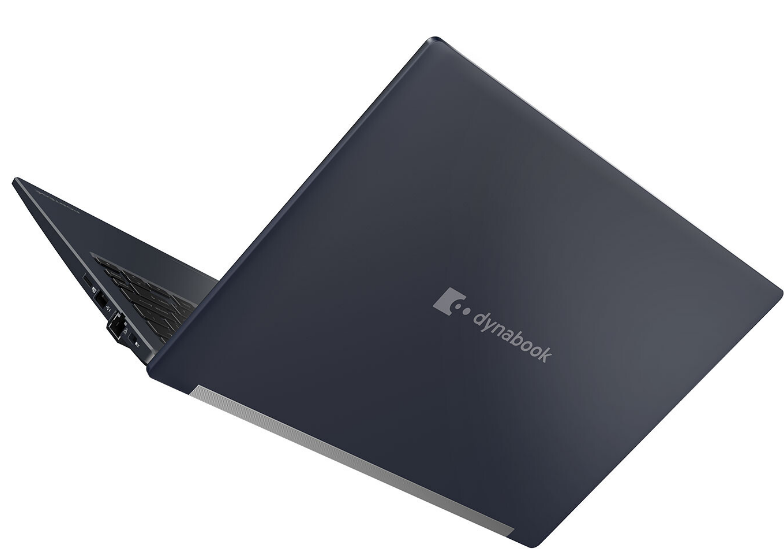
Offline AI Chat Assistant (Z40L-P Exclusive): This is the Z40L-P’s differentiator. Based on a local small model, it handles file translation, content summarization, and system settings adjustments without internet. For users in finance, law, and military sectors who frequently process sensitive documents and cannot connect to external networks, this feature is essential. Tested translation quality lags behind cloud large models, but “works offline” itself is the value.
AI Power Optimization: The “Optimization for Online Meeting” feature in dynabook Setting intelligently adjusts CPU performance and screen brightness, extending battery life by up to 12%-15%. This is not simple “power saving mode” but AI dynamically adjusting based on your meeting schedule, battery status, and usage scenarios—automatically optimizing before meetings to ensure 2-hour video calls without hiccups.
AI Meeting Enhancement: Background blur, light correction, auto face framing, and AI noise reduction—these four features are not novel in 2026, but dynabook’s integration is high. Camera, microphone, NPU, and software layers work in concert, automatically activating when opening Teams/Zoom without manual user setup.
HPD Privacy Peeping Detection: An upgraded Human Presence Detection that not only detects when you leave your seat (auto lock screen) but also detects if someone nearby is peeping at your screen. Once peeping is detected, the screen automatically blurs or switches to a privacy interface. This feature is particularly practical in airplanes, high-speed trains, and coffee shops.
Deep Analysis: What Does Business Laptop AIization Actually Change?
The business laptop market has long been a “parameter arms race”—who is lighter, who is faster, who has longer battery life. The dynabook 2026 lineup’s AIization attempts to break out of this cycle, transforming from “tool” to “assistant.”
Change One: From Passive Tool to Proactive Assistant. Traditional laptops receive your input and execute. After AIization, laptops begin “observing” your behavior—detecting meeting schedules to auto-optimize power, detecting peeping to auto-protect privacy, detecting ambient noise to auto-enhance voice. This “proactive service” paradigm is the essential difference between AI PCs and traditional PCs.
Change Two: From Cloud Dependency to Local Intelligence. The Z40L-P’s offline AI assistant signals that business scenarios’ emphasis on data security is driving AI migration from cloud to edge. The NPU makes local small model execution possible; while functionality is less powerful than cloud alternatives, “controllable” matters more than “powerful” for certain industries.
Change Three: From Single Device to Scenario Adaptation. Five models covering 13.3 to 16 inches, from 900g to 1.8kg, from extreme lightweight to workstation performance. Dynabook no longer attempts to hit all markets with one product, but instead uses AI capabilities as an “underlying platform” adapted to different form factors for different scenarios.
But dynabook also faces challenges:
NPU Compute Bottleneck. At 11 TOPS, the NPU handles offline AI assistants adequately but struggles with more complex AI functions like real-time video analysis or local large model inference. Dynabook’s solution is “feature streamlining,” only running business-critical AI tasks, but this limits future scalability.
Insufficient Ecosystem Integration. Dynabook’s AI features mainly rely on proprietary software (dynabook Setting), with limited integration with third-party ecosystems like Microsoft Copilot and Adobe AI. For users already deeply invested in Copilot+ PC ecosystems, dynabook’s AI features may seem “redundant” or “isolated.”
Declining Brand Recognition. From Toshiba to dynabook, brand continuity broke, and younger users are unfamiliar with this name. In the business laptop market, ThinkPad, Latitude, and EliteBook enjoy far higher brand recognition than dynabook. Whether AI feature differentiation can compensate for brand weakness remains unknown.
Comparison: dynabook vs ThinkPad X1 Carbon vs Dell Latitude
| Feature | dynabook Z40L-P | ThinkPad X1 Carbon Gen 14 | Dell Latitude 7450 |
|---|---|---|---|
| Weight | ~1.05kg | ~1.09kg | ~1.22kg |
| Processor | Intel Core Ultra 7 | Intel Core Ultra 7 | Intel Core Ultra 7 |
| NPU Compute | 11 TOPS | 11 TOPS | 11 TOPS |
| Offline AI Assistant | Yes (exclusive) | No | No |
| Privacy Peeping Detection | HPD | HPD (basic) | HPD (basic) |
| AI Meeting Enhancement | Integrated | Requires third-party software | Requires third-party software |
| Military Certification | MIL-STD-810H | MIL-STD-810H | MIL-STD-810H |
| Price | ~$1,699 | ~$1,800 | ~$1,600 |
| Brand Recognition | Medium | Extremely high | High |
| Service Network | Strong in Asia-Pacific, weak in Europe/Americas | Global | Global |
The three models are nearly homogeneous in hardware configuration—same Intel Core Ultra, same NPU, same military certification. Dynabook’s differentiation lies in software-layer AI feature integration, especially the “out-of-box” experience of offline AI assistant and AI meeting enhancement. ThinkPad and Dell’s advantages lie in brand, after-sales, and global channels, with AI features more dependent on the Microsoft Copilot+ ecosystem.
Pros and Cons
| Pros | Cons |
|---|---|
| Offline AI assistant works without internet | 11 TOPS NPU compute limits future scalability |
| High AI meeting enhancement integration, out-of-box | Limited integration with third-party AI ecosystems |
| HPD privacy detection, practical in public spaces | Declining brand recognition, unfamiliar to younger users |
| Full lineup military-certified, durability guaranteed | Service network strong in Asia-Pacific, weak in Europe/Americas |
| Five models covering all scenarios, rich choices | Pricing similar to ThinkPad/Dell, value not outstanding |
| LPDDR5X + NVMe SSD, performance solid | No OLED display option, display quality average |
Who Should Buy
Recommended for:
- Finance, law, and military users frequently processing sensitive documents needing offline AI (Z40L-P)
- Frequent business travelers pursuing extreme lightweight portability (X30L-P)
- Professional data analysts and designers needing large-screen workstations (A60-P)
- Enterprise IT procurement requiring military certification and unified management for mass deployment (A40-P)
Not recommended for:
- Users deeply dependent on Microsoft Copilot+ ecosystem (ThinkPad/Dell more integrated)
- Content creators needing OLED displays or high refresh rates
- Budget-constrained individual users seeking extreme value
- Users primarily in Europe/Americas demanding high service response
FAQ
Q: How is the offline AI assistant’s translation quality?
A: Based on local small models, daily business document translation is usable, but professional terminology and complex sentence accuracy lags behind cloud large models. Suitable for “understanding the gist” scenarios, not for “must be precise” legal/medical translation.
Q: Does HPD privacy detection false trigger?
A: Dynabook has not published false trigger rates, but HPD technology is quite mature. Recommend adjusting detection sensitivity in settings during first use to adapt to personal environments.
Q: Does AI power optimization affect performance?
A: Only actively limits CPU peak performance and screen brightness in “meeting mode;” daily office mode is unaffected. Users can manually disable or adjust optimization intensity.
Q: What AI models can 11 TOPS NPU run?
A: Smoothly runs local small models with 1B-3B parameters, such as text summarization, simple translation, and image classification. Larger models (7B+) require cloud support or more powerful NPUs.
Conclusion
The dynabook 2026 AI business laptop lineup is a “precisely positioned” product update. It does not attempt to compete with consumer AI PCs on compute power, but instead focuses the NPU’s limited capabilities on the four most essential business functions: offline assistant, meeting enhancement, privacy protection, and power optimization.
This strategy carries both risks and opportunities. The risk: the NPU compute ceiling may limit future AI feature expansion; when competitors begin running 7B local large models, dynabook’s 11 TOPS may seem inadequate. The opportunity: business users’ core need has never been “maximum compute” but “most stable experience”—works offline, privacy controllable, meetings don’t lag, battery lasts long enough.
Dynabook’s brand challenge is greater than its technical challenge. Under pressure from ThinkPad, Latitude, and EliteBook, dynabook needs to use AI feature differentiation to rebuild its “business laptop specialist” brand recognition. The 2026 launch is a good start, but whether it can continue iterating, build ecosystems, and expand channels will determine dynabook’s ultimate position in the AI PC era.
Leave a Reply