Category: AI in Education

AI-powered educational hardware is designed for students, parents, and ordinary families. It leverages artificial intelligence technology as its core capability, integrating functions such as intelligent tutoring, learning analysis, interactive learning, and content delivery. These lightweight, user-friendly, and cost-effective smart devices feature AI voice interaction, oral assessment, image/text error recognition, knowledge point analysis, intelligent question bank, learning path planning and learning analysis, adaptive learning, and intelligent Q&A.

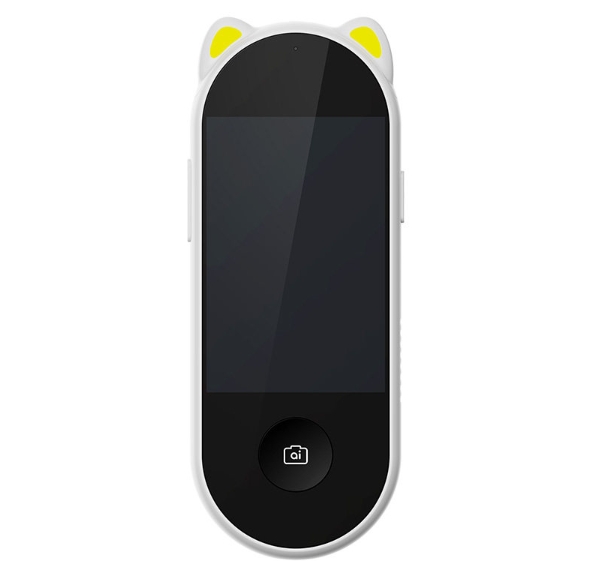
  • Skyworth’s New AI “Snap-to-Learn” Device: Learn Instantly with a Snapshot

    Skyworth’s New AI “Snap-to-Learn” Device: Learn Instantly with a Snapshot

    The market for smart hardware for children heats up every summer, with learning tablets, audio players, and smartwatches all vying for attention; however, there has been a lack of a lightweight, all-in-one device that combines outdoor exploration, homework assistance, early English learning, and a fun camera for kids. Skyworth recently launched its new AI “Snap-to-Learn” device. Powered by the Doubao large language model for children, it targets the 3–12 age demographic with a handheld, pocket-sized design that integrates object recognition, AI Q&A, and homework grading. Can a device priced in the 300-yuan range truly deliver such versatility? This article evaluates the product’s experience, strengths, and limitations through real-world testing across home, outdoor, and after-school study scenarios.

    I. Design and Hardware: Cute pocket-sized form factor, designed for small hands
    The Skyworth AI device features a vertical handheld body adorned with signature “cat-ear” accents and comes in white or yellow. Weighing just 110g, it is easy for children to hold with one hand; a lanyard is included, allowing it to be carried around or attached to the outside of a schoolbag.
    Screen: A 3.3-inch eye-protection color touchscreen with 320×480 resolution and hardware-level low-blue-light tuning. Its smaller size compared to smartphones helps reduce eye strain from prolonged use. Peak brightness is 300 nits; while clear indoors, visibility is average under strong outdoor sunlight.
    Camera: A dedicated shutter button sits in the center of the body, enabling one-touch activation without complex operations. It supports object recognition, question scanning, and image/text translation.
    Battery Life & Charging: Equipped with a built-in 1000mAh lithium battery and a universal Type-C charging port. It lasts about a day with intermittent daily use, though continuous high-frequency photography or AI interaction requires recharging after roughly half a day.
    Build Quality: Rounded edges with no sharp corners; the ABS casing withstands minor bumps. It is not waterproof, so care must be taken to avoid rain or water exposure during outdoor play.
    Clear Positioning: Distinct from bulky large-screen learning tablets or single-function “point-and-read” pens, this device emphasizes portability, serving as both a learning tool and a fun camera for children. II. Hands-on Testing of Core Capabilities: Powered by the Doubao Children’s Model, Covering Four Key Scenarios
    The product’s standout feature is its deep integration with the Doubao model specifically designed for children, combined with a content safety system for young users. It moves beyond the limitations of traditional hardware—which relies on pre-loaded audio and fixed question banks—to support open-ended Q&A.

    1. AI “Snap & Identify”: An Outdoor Exploration Classroom
      When encountering plants, insects, buildings, or vehicles while out and about, users can simply take a photo to identify them. The screen displays the name, bilingual (Chinese-English) definitions, and extended educational facts.
      Performance: High accuracy in identifying common flora and fauna, accompanied by child-friendly, accessible explanations; occasional errors occur with rare species. It is ideal for satisfying the curiosity of young children—answering their endless “whys”—and turning walks or field trips into real-world classrooms.
    2. After-School Homework Support: Photo-based Search & Smart Grading
      Covers all primary school subjects and supports image recognition for written exercises:
      ✅ Rapid grading (correct/incorrect) for mental math and multiple-choice questions;
      ✅ Step-by-step problem-solving logic and concept explanations for word problems;
      ✅ Recognition of Chinese characters, Chinese-English paragraph translation, and pronunciation practice for vocabulary.
      Includes built-in mechanisms to discourage answer-copying by prioritizing the explanation of the thought process over simply providing the result; parents can control when the photo-search function is available to prevent children from simply copying answers.
    3. Multi-Persona AI Voice Interaction: All-Day Companionship
      Features multiple AI personas for children and supports continuous, multi-turn conversations: English situational practice, Q&A on traditional Chinese culture, storytelling, and emotional support. The synthesized voice is gentle and suited to children’s hearing preferences; all interactions are filtered to block inappropriate online content.
      Free from complex games or short-video feeds; content focuses on early learning and development, minimizing the risk of addiction.
    4. Creative Camera for Kids: Capturing Fun Moments
      More than just a learning tool, it includes a dedicated camera mode with filters and fun special effects, allowing children to snap photos and document their daily lives. This camera feature significantly boosts the product’s appeal, making children more likely to use it voluntarily compared to dull, traditional “point-and-read” devices. Additional Practical Features
      Includes smart posture reminders, bilingual picture book read-alouds, a vast library of traditional Chinese cultural content, and graded English audio resources. All features are available without requiring a separate subscription or ongoing fees—a distinct advantage over similar products.

    III. Parental Control System
    Paired with a dedicated Skyworth parental control mini-program, key management capabilities include:
    Remotely setting usage schedules, including locking the device during class hours;
    Toggling features like “snap-to-search” (for homework questions), the camera, and voice interaction;
    Monitoring device usage duration and feature activity logs;
    Customizing filters to block topics unsuitable for young children.
    The control logic is intuitive and easy to understand, allowing even older family members to master it quickly.

    IV. Objective Limitations (Key Considerations Before Buying)
    This review remains neutral; please note the following clear shortcomings:
    No independent cellular module: The device requires Wi-Fi and does not support 4G. Without Wi-Fi (e.g., when outdoors), AI Q&A and “snap-to-search” functions are unavailable; only locally stored audio can be accessed.
    Small screen size: Viewing exercise explanations for extended periods can strain the eyes; it is better suited for short tutoring sessions and cannot replace a full-fledged dedicated learning tablet.
    No built-in fill light: Recognition efficiency for homework questions or objects drops significantly in low-light conditions; use in well-lit environments is recommended.
    No calling or GPS tracking functions: It cannot replace a children’s smartwatch or serve as a safety monitoring tool for the commute to and from school.
    Limited storage: Large numbers of photos require periodic exporting, and the device does not support high-capacity memory card expansion.

    V. Target Audience & Purchasing Recommendations
    ✅ Highly Recommended For:
    Preschoolers and lower-elementary students (ages 3–10);
    Families who enjoy outdoor trips or nature study and want a tool for real-world science education;
    Those needing simple after-school homework help and English language introduction, with a budget of 300–400 RMB;
    Parents who prefer not to give their child a smartphone but want a lightweight, portable learning device;
    Those who dislike ongoing subscription fees for learning hardware and prefer a one-time purchase model. ❌ Not the best fit if:
    You need to use AI features offline outdoors (where there is no Wi-Fi);
    Your core requirements are precise positioning, two-way calling, and safety alerts;
    The user is a middle school student needing in-depth tutoring for numerous exam papers and complex, long-form questions;
    You hope a single device can replace a large-screen learning tablet for attending online classes over the long term.

    Conclusion
    The current market for portable learning hardware for children is polarized: high-priced learning tablets offer comprehensive features but lack portability, while “point-and-read” pens offer limited functionality and lack open-ended interaction.
    The Skyworth AI “Snap-to-Learn” device strikes a middle ground: it leverages the Doubao large language model to address the lack of open-ended Q&A capabilities, integrates multiple functions—such as object recognition, problem scanning, and camera use—and lowers the barrier to entry with an accessible price point.
    While it falls short of being an all-in-one learning terminal—due to limitations like network dependency and screen size—it offers excellent value as a supplementary tool for home-based study support and outdoor exploratory learning. If you already own a children’s smartwatch and want to add a lightweight, engaging portable learning device, this product is worth considering; however, if you require all-day offline functionality and in-depth academic tutoring, it is best used in conjunction with a large-screen learning device.

  • In-depth Review of Mocomtech’s AI Education Hardware Suite

    In-depth Review of Mocomtech’s AI Education Hardware Suite

    On July 3, 2026, Mocomtech of South Korea officially launched its AI Teacher Four-Piece Kit for AI-integrated science labs in primary and secondary schools. This kit integrates AI large-scale models, VR/3D stereoscopic imaging, and intelligent observation hardware into a unified teaching solution, aligning with the upgrade needs of smart labs in primary and secondary schools worldwide. It emphasizes STEAM interdisciplinary immersive teaching and is a representative complete product in the recent commercial AI education hardware market from Mocomtech…. This review, based on three dimensions—on-site classroom trials, hardware hands-on operation, and curriculum adaptation—fully analyzes the advantages, pain points, and applicable scenarios of this equipment.

    SOLSTICE
    SOLSTICE

    I. Overall Product Positioning: A Commercial Lab Solution Differentiating It from Home Learning Devices

    Currently, most domestic AI education hardware focuses on consumer-facing products such as home learning tablets and error correction pens. However, the Mocomtech AI쌤 series precisely targets the public school AI smart science classroom market. The complete set includes four independent hardware components, which can be purchased individually or used to build a standardized lab:

    1. Multi-purpose AI-VR Teaching All-in-One Machine (Classroom Core Host)
    2. Multi-Power AI Smart Digital Microscope (Physics, Chemistry, and Biology Observation Terminal)
    3. EDU-3D Stereoscopic Holographic Teaching Experience Machine (Naked-eye 3D Interactive Device)
    4. VR NABI Immersive Subject Learning Terminal (Student Individual VR Device)

    The entire hardware system integrates a unified AI teaching backend, supporting unified teacher management, group student practice, and automatic data retention. It is fully compatible with AI-focused school and smart science classroom transformation policies promoted in various countries, fundamentally addressing three major pain points in traditional classrooms: difficulty in understanding abstract knowledge, inability to perform high-risk experiments, and insufficient precision of observation equipment.

    II. Hands-on Evaluation of Four Core Hardware Components

    1. Multi-purpose AI-VR Teaching All-in-One Machine | Central Intelligent Hub for the Classroom

    As the core control unit of the entire system, the all-in-one machine integrates four major capabilities: edge AI computing power, 4K high-definition output, electronic whiteboard, and VR signal relay. It can be directly connected to the classroom’s 105-inch ultra-large teaching screen, serving as the core operating platform for teachers.

    Highlights of the Test

    1. Native Integration of Multiple AI Large Models: Natively adapted to Gemini and general dialogue large models. In the classroom, teachers input knowledge points, formulas, and experimental requirements, and the device generates 3D animations, virtual experimental steps, and tiered exercises in real time, which can be projected to the entire classroom screen with one click; supports bilingual Q&A for all subjects, and is compatible with bilingual teaching classrooms like mocomtech….
    2. Synchronized VR Screen Broadcasting: When students wear VR NABI terminals, teachers can synchronize any student’s virtual operation screen to the main screen with a single click, enabling unified error correction and demonstration of standard operations. This addresses the limitation of traditional VR classrooms where teachers cannot simultaneously view student operations.
    3. Full-Scene Compatibility and Expansion: Dual-link transmission via WiFi and wired connections allows for integration with microscopes, 3D equipment, and campus recording systems. It features a built-in, latency-free digital whiteboard; hand-drawn functions, chemical structural formulas, and engineering drawings can be automatically organized by AI, and the whiteboard is automatically archived to generate classroom courseware.

    Practical Limitations

    The device comes pre-installed with a native Korean system; the English localization package is incomplete, requiring customized Chinese localization systems for use in domestic schools, increasing initial deployment costs. The overall size of the device is relatively large, occupying significant lectern space in small, ordinary classrooms.

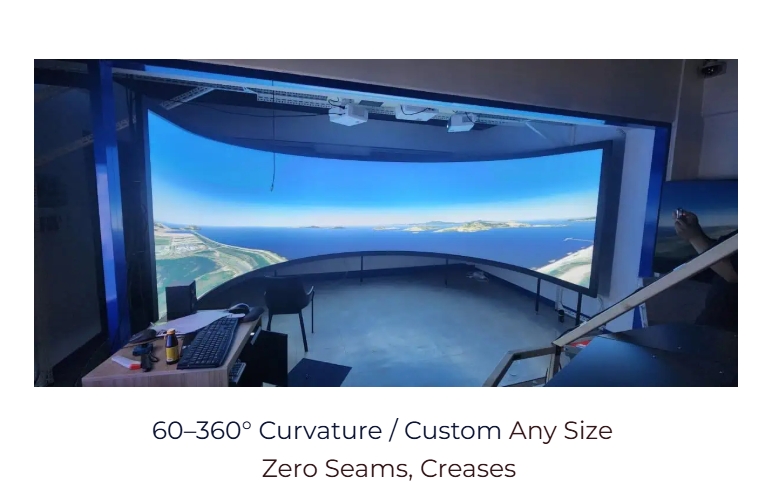
    Curved Projection Screen
    Curved Projection Screen

    2. Multi-Power AI Smart Digital Microscope | A Revolutionary Terminal for Biological/Chemical Observation

    Unlike traditional single-function student microscopes, this device integrates a biological microscope, a stereomicroscope, and dual digital imaging cameras, making it a core observation hardware for physics, chemistry, and biology experiments.

    Practical Highlights

    • AI Intelligent Image Recognition: When observing cells, minerals, or microscopic specimens, the device automatically identifies the sample type, displays pop-up annotations of cell structures and mineral composition, and simultaneously pushes relevant knowledge points; captured images are automatically categorized and stored in students’ personal learning files.
    • Dual-Mode Switching: One-click switching between microscopic biological slides and three-dimensional disassembly observation, without changing lenses; real-time wireless synchronization of the imaging image to a large screen allows the entire class to simultaneously see microscopic details, eliminating the chaos of traditional classrooms crowded around the microscope.
    • Safe Digital Experiments: Corrosive or minute hazardous specimens do not require close contact by the entire class; all observations are completed through digital imaging, reducing experimental safety risks.

    Practical Shortcomings

    The accompanying specimen library primarily consists of biological and geographical samples from South Korea, with limited specimen resources compatible with domestic primary and secondary school curriculum standards. Additional courseware materials need to be added later.

    3. EDU-3D Stereoscopic Holographic Teaching Experience Machine | Glasses-Free 3D Interactive Device

    The core differentiator of the entire device is its ability to achieve 3D model gesture interaction without a VR headset, suitable for synchronous teaching across the entire class.

    Practical Highlights

    1. Glasses-Free Stereoscopic Imaging + AI Gesture Recognition: Students stand in front of the device and use gestures to drag, rotate, and disassemble 3D models. Celestial bodies, human organs, mechanical structures, and geological strata are all 1:1 stereoscopically reproduced. AI automatically captures the operation actions and records the student’s model disassembly process.
    2. Interdisciplinary Coverage: Geography section disassembles geological strata, biology dissects human organs, physics displays mechanical structures, and history recreates ancient architecture. A single device covers abstract knowledge points from multiple disciplines, significantly reducing the cost of teaching aids.
    3. Group Collaboration Mode: Supports simultaneous independent operation by 4 groups of students. The system automatically records the operation data of each group and generates a classroom inquiry report after class, facilitating teacher process evaluation.

    Practical Shortcomings

    The naked-eye 3D viewing angle is limited, which may weaken the stereoscopic experience for students in the back rows. Synchronous projection on a large screen is necessary for the entire class to view the device simultaneously. The device has high power consumption, and slight overheating occurs during prolonged continuous use.

    4. VR NABI Immersive Subject Learning Terminal | Single-Student Virtual Training Equipment

    A lightweight, customized educational VR headset, distinct from commercial entertainment VR, with all content developed around virtual experiments for primary and secondary school subjects.

    Practical Highlights

    • Fully Safe Virtual High-Risk Experiments: Experiments that cannot be conducted offline, such as chemical explosions, high-temperature reactions, geological disasters, space travel, and human surgical anatomy, are fully simulated in VR. Students operate independently without safety hazards, and AI provides real-time error correction for each step.
    • Lightweight Design: Optimized for teenagers’ head shapes, it offers comfortable 40-minute wear without significant pressure on the face. It features a built-in ENC noise-canceling microphone and supports AI-powered spoken Q&A and voice guidance for experimental procedures.
    • Independent Learning Data Loop: Each student’s operation records, experimental errors, and knowledge gaps are synchronously uploaded to the all-in-one machine’s backend, with AI automatically generating personalized after-class exercises.

    Practical Shortcomings

    The purchase cost of a single device is relatively high, requiring a significant initial investment for equipping a large-scale laboratory with a complete set of terminals. The accuracy of virtual experiment interaction is average, and there is a slight delay in simulating detailed chemical operations.

    III. Evaluation of the Overall System Software and Teaching Ecosystem

    Advantages: Complete teaching loop, adapted to standardized classroom processes

    1. Unified AI Teaching Management Backend: Teachers can uniformly manage four sets of hardware, assign experimental tasks to groups, view each student’s operation progress in real time, distribute exercises with one click, and automatically export the entire class’s learning report after class. It supports cloud storage of semester-long learning data for long-term learning tracking.
    2. Integrated STEAM Curriculum Library: Includes integrated courses in mathematics, physics, chemistry, biology, information technology, art, and comprehensive practical activities. Each lesson is accompanied by AI-powered lesson preparation materials, virtual experiments, post-lesson assessments, and extended inquiry tasks, eliminating the need for teachers to create courseware from scratch.
    3. Hardware Interoperability: Data is interconnected across four devices. Samples taken under a microscope can be directly imported into the 3D device to generate stereoscopic models. VR experimental data is synchronized to the all-in-one machine for whole-class review, realizing a complete teaching chain of “observation—virtual simulation—collective explanation.”

    Existing Ecosystem Shortcomings

    1. Insufficient Localized Curriculum Resources: The native courseware is aligned with the South Korean primary and secondary school curriculum. Domestic use requires secondary development to adapt to the new curriculum standards, increasing the school’s later maintenance costs.
    2. Closed Third-Party Ecosystem: The device currently does not support direct import of courseware from mainstream domestic learning platforms and cannot seamlessly integrate with existing learning machines and smart campus systems.
    3. Limited After-Sales Service Coverage: There are currently no official offline maintenance centers in China, resulting in long hardware failure repair cycles.

    IV. Summary of Overall Advantages and Disadvantages

    Core Advantages

    1. Highly Differentiated from Other Market Sector: Rarely found in the market, this integrated AI+VR+3D+intelligent observation commercial educational hardware is specifically designed for school science labs, perfectly addressing the pain point of insufficient visualization in traditional science teaching.
    2. Complete Closed-Loop Integration of Virtual and Real Experiences: Covering the entire classroom teaching process from macroscopic 3D group teaching, microscopic microscope observation, individual VR immersive training, to AI-powered learning data analysis.
    3. Significantly Enhanced Safety: High-risk, microscopic, and ultra-large-scale knowledge is all digitized, avoiding safety hazards in offline experiments and reducing long-term procurement costs for laboratory consumables and specimens.
    4. Deeply Integrated AI into Teaching, Not Just a Simple Add-on: A large model permeates all stages of lesson preparation, classroom Q&A, experimental error correction, and learning analysis, going beyond simple image-based question-searching AI functions.

    Obvious Shortcomings

    1. High initial procurement, deployment, and localization costs, making it more suitable for larger public schools and specialized science and technology innovation schools. Smaller private institutions face significant financial burdens.
    2. Low localization of the system’s native language and course materials, requiring customized development for domestic implementation.
    3. Higher hardware maintenance threshold than ordinary teaching tablets; schools need dedicated audio-visual teachers for equipment debugging and maintenance.

    V. Target Audience and Purchase Recommendations

    1. Recommended Purchase: Primary and secondary schools planning to build standardized AI science and technology innovation labs and smart science classrooms; schools offering STEAM-specific courses and science and technology innovation clubs; research and study bases and youth science museums.
    2. Purchase with Caution: Ordinary classrooms with limited budgets requiring only basic classroom audio-visual equipment; training institutions primarily providing academic tutoring and without science experiment needs. 3. Implementation Optimization Suggestions: Simultaneously sign contracts for a Chinese system and customized domestic curriculum standards and courseware during procurement; utilize large-screen synchronous projection to compensate for the limitations of naked-eye 3D viewing angles; procure VR terminals in batches, prioritizing the acquisition of all-in-one machines, microscopes, and EDU-3D core equipment to reduce initial investment.

    VI. Evaluation Conclusion

    Mocomtech’s AI쌤 series transcends the fiercely competitive market of home AI learning hardware, offering a mature campus STEM virtual-real integrated teaching solution. Its core value lies not in simply piling up hardware parameters, but in leveraging AI to connect the entire teaching chain—observation, 3D interaction, and immersive virtual training—truly visualizing abstract STEM knowledge, ensuring the safety of dangerous experiments, and digitizing classroom learning data.

    Due to limitations in overseas product localization and procurement costs, this equipment is unlikely to be widely adopted in ordinary classrooms in the short term, but it represents an important future development direction for commercial AI education hardware—from a single problem-solving aid to an integrated laboratory system supporting complete inquiry-based and science-innovation-oriented classrooms. For institutions and schools deeply involved in science and technology innovation education and smart campus upgrades, this next-generation AI education hardware solution is worth experiencing firsthand and investing in long-term.

    Should I condense this article into a short industry media review version (within 800 words), or compile a product comparison table (comparing it to domestic companies like iFlytek and Seewo campus hardware)?

  • Faraday Future FX Navi Review: Quadruped Robot Dog for Education

    Faraday Future FX Navi Review: Quadruped Robot Dog for Education

    One-sentence verdict: If the “phone as brain” cost advantage and 9-level curriculum depth can withstand real classroom testing, the FX Navi may be the most cost-effective entry ticket in consumer quadruped educational robots—provided parents are comfortable with ongoing content fees.

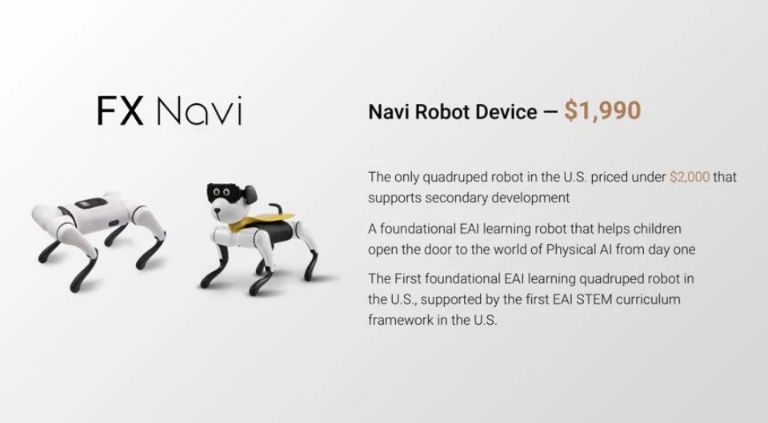
    Faraday Future FX Navi quadruped robot $1,990 poster
    Faraday Future FX Navi quadruped robot $1,990 posterv

    Introduction

    Educational robots have long occupied an awkward market position. Industrial-grade quadruped platforms like Boston Dynamics Spot cost $75,000, putting them out of reach for schools and families. Low-end programming toys like Sony toio are affordable but cannot deliver real robot interaction experiences. Faraday Future’s FX Navi attempts to break this deadlock—packing quadruped locomotion, STEM curriculum, and secondary development capabilities into a $1,990 base package.

    The FX Navi launched for immediate purchase on June 17, 2026, targeting families and schools with technology education needs. It features 12 joint motors, uses iOS/Android phones as the computing “brain,” includes a 9-level EAI STEM curriculum (annual fee $490), and offers a $390 permanent enhancement pack unlocking secondary development capabilities.


    Product Overview

    The FX Navi is Faraday Future’s first consumer-facing educational robot, and Jia Yueting’s latest attempt to cross over from electric vehicles to robotics. In stark contrast to the FF 91’s production struggles, the FX Navi chose a more pragmatic path: avoiding autonomous driving-level complexity to focus on “affordable embodied intelligence education.”

    The core design trade-off is “phone as brain”: the robot dog body handles only mechanical execution and sensor acquisition, while computation and AI processing are entirely offloaded to the user’s iOS or Android phone. This architecture significantly reduces base hardware costs (no need for built-in high-performance processors) while leveraging devices users already own. Twelve joint motors enable basic locomotion—walking, turning, sitting, standing, and simple obstacle avoidance.

    For battery life, the FX Navi includes a rechargeable battery delivering approximately 2 hours per charge, with support for use-while-charging. The lightweight plastic body keeps total weight under 3 kg, making it easy for children to carry and store.


    Technical Specifications and Curriculum

    The FX Navi offers a 9-level EAI STEM curriculum covering a complete learning path from kindergarten through high school:

    LevelThemeCore ContentAge Range
    Level 1-2Motion Control BasicsForward, backward, turning, speed adjustment5-7 years
    Level 3-4Sensor CognitionDistance detection, sound recognition, light sensing8-10 years
    Level 5-6Programming LogicConditional judgment, loop structures, event triggers11-13 years
    Level 7-8AI Algorithm IntroductionImage recognition, voice commands, path planning14-16 years
    Level 9Comprehensive ProjectSelf-designed tasks, team collaboration competitions17+ years

    The annual curriculum fee of $490 includes video tutorials, project assignments, and online Q&A. The $390 permanent enhancement pack unlocks secondary development capabilities: modifying walking algorithms, adding custom sensors, and integrating third-party AI services.

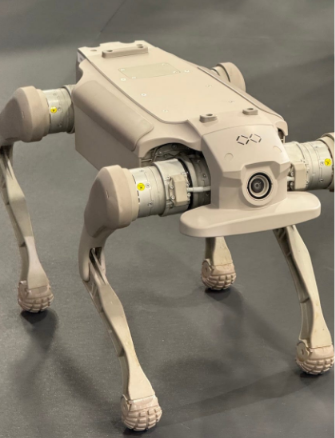
    FX Navi robot dog joint motors close-up
    FX Navi robot dog joint motors close-up

    The intelligence of this curriculum design lies in transforming “playing with robots” into “learning engineering.” Each level has clear skill objectives and quantifiable learning outcomes, allowing parents to track their children’s progress rather than buying a toy that gathers dust.


    “Phone as Brain”: Beyond Cost Cutting

    The FX Navi’s “phone as brain” design is not merely a cost compromise but an expression of educational philosophy.

    Traditional educational robots like LEGO Mindstorms suffer from fixed hardware and closed functionality, with students quickly hitting ceilings. The FX Navi achieves a “hardware-standardized, software-infinitely-extensible” architecture by using the phone as the computing hub. Users’ phones upgrade annually, and the robot dog’s “intelligence” upgrades along with them—meaning the FX Navi won’t become obsolete two years after purchase.

    A deeper benefit is lowered secondary development barriers. Students can use familiar mobile app interfaces (rather than unfamiliar embedded systems) to program robot control, creating a gentler learning curve. Support for Python and JavaScript allows advanced students to directly call mainstream AI frameworks like TensorFlow Lite, enabling genuine machine learning projects.

    Yet risks exist equally: phone performance varies enormously, with budget models potentially unable to run complex AI inference smoothly; Bluetooth/Wi-Fi connection stability directly impacts classroom experience; parents may be unwilling to let children occupy phones for extended periods.


    Competitive Comparison

    FeatureFaraday Future FX NaviUnitree Go2 EduXiaomi CyberDog 2Sony toio
    Price$1,990 base~$1,400~$1,800~$280
    Curriculum9-level EAI STEMNoDeveloper docs onlyBasic programming
    Annual Fee$490NoneNoneNone
    QuadrupedSupportedSupportedSupportedNot supported
    Secondary Dev$390 unlockSupportedSupportedLimited
    Phone DependencyRequiredOptionalOptionalNot required
    Target Age5-17 years12+ years14+ years6-10 years

    The FX Navi’s pricing strategy is particularly interesting. At $1,990 base + $490 annual + $390 skill pack, three-year total cost reaches approximately $3,850. Against Unitree Go2 Edu ($1,400, no curriculum) and CyberDog 2 ($1,800, developer-oriented), the FX Navi costs more but offers a more complete educational. Against Sony toio ($280, basic programming), the FX Navi delivers real quadruped robot experience rather than wheeled toys.

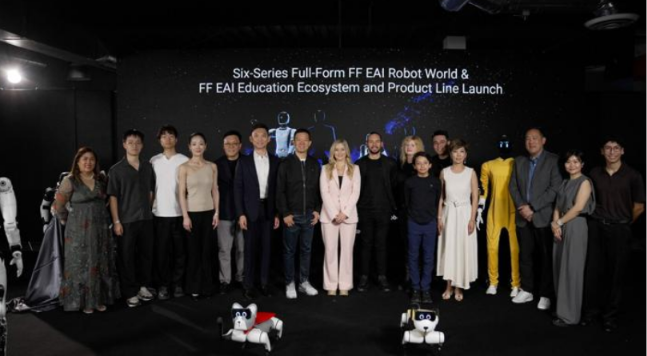
    Faraday Future FX Navi launch event with team
    Faraday Future FX Navi launch event with team

    Pros and Cons

    ProsCons
    $1,990 base lowers quadruped robot entry barrierMust depend on phone, budget models limit experience
    9-level curriculum provides systematic learning path$490 annual fee increases long-term cost
    “Phone as brain” enables continuous compute upgrades2-hour battery insufficient for full-day classes
    Secondary development cultivates advanced engineering thinkingBrand trust affected by FF 91 production struggles
    Lightweight design suits child operation and storagePlastic body durability remains to be validated

    Buying Guide

    Recommended for:

    • Middle-class families with tech education budgets: systematic curriculum + real robot experience proves more effective than fragmented online courses
    • Private schools and training institutions: needing standardized STEM teaching tools, with 9-level curriculum ready to embed into teaching systems
    • Students planning to enter robotics competitions: secondary development capabilities support custom projects with strong competition adaptability
    • Tech enthusiasts curious about the FF brand: wanting to experience Jia Yueting’s “new story” product

    Consider carefully if:

    • Budget-sensitive and unwilling to pay annual fees: three-year total cost nears $4,000, far exceeding one-time programming toys
    • Needing phone-independent operation: classroom phone management is complex, and occupies students’ personal devices
    • Pursuing industrial-grade precision and performance: the FX Navi is an educational tool, not a research platform, with limited 12-motor locomotion capability
    • Low trust in Faraday Future brand: FF 91 delivery history may affect purchase confidence

    FAQ

    Q: Does the FX Navi require phone connection to function? 

    A: Yes. The robot dog body handles mechanical execution; all computation and AI processing is completed through the mobile app. Offline mode only supports basic motion control.

    Q: Can the 9-level curriculum be purchased separately? 

    A: No. The curriculum is bundled with hardware sales; the $490 annual fee begins counting upon device activation.

    Q: What programming foundation is needed for secondary development? 

    A: Levels 7-8 require basic Python; Level 9 and the enhancement pack require familiarity with API calls and simple algorithms.

    Q: Does it support multi-robot collaboration? 

    A: Yes. Through mobile apps on the same Wi-Fi network, up to 3 FX Navi units can achieve formation collaboration.

    Q: Is the body waterproof? 

    A: No. Indoor dry environment use is recommended; avoid liquid splashing.


    Conclusion

    The Faraday Future FX Navi is not a perfect educational robot—battery life, phone dependency, and brand trust all have room for improvement. But it precisely targets a market gap: families and schools who want real quadruped robot experience without paying industrial-grade premiums; students who need systematic STEM learning rather than scattered programming toys.

    The “phone as brain” architecture transforms this device from “a cheaper robot dog” into “an upgradeable education platform.” Behind the $1,990 pricing lies a bet that content monetization can sustain hardware innovation.

  • Zhipu Lingji AI Learning Card Review

    Zhipu Lingji AI Learning Card Review

    Zhipu AI recently launched an interesting product—the Lingji AI Learning Card. At 799 yuan, featuring an e-ink screen, powered by the GLM large model, and designed specifically for primary and secondary school students’ Q&A needs. Not a tablet, not a learning machine, but a card-sized device that fits in your pocket.

    This positioning is precise. The current education hardware market is divided between thousand-yuan AI learning machines (iFLYTEK, TAL) and hundred-yuan dictionary pens (NetEase Youdao, Alpha Egg), with a gap for “lightweight AI Q&A” in between. The Lingji Learning Card aims to fill this exact.

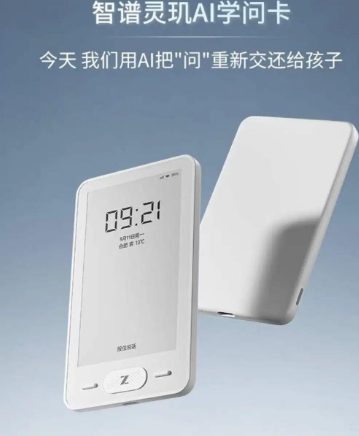
    Zhipu Lingji AI Learning Card official promotional poster
    Zhipu Lingji AI Learning Card official promotional poster

    Product Overview: A Card, An AI Tutor

    Who is Zhipu AI? A first-tier domestic large model player, with the GLM series earning solid reputation for Chinese understanding and generation. Previously focused on B2B APIs and C-end chatbots (Zhipu Qingyan), this move into education hardware signals their intent to bring GLM capabilities from “cloud” to “edge.”

    The Lingji Learning Card’s core design philosophy: lightweight, focused, and eye-friendly.

    Lightweight: Card-sized, estimated under 100g—lighter than phones, larger than dictionary pens. The e-ink screen’s extremely low power consumption means one charge lasts a week.

    Focused: Does one thing only—AI Q&A. Not an all-in-one learning machine; no videos, games, or social media. Students with questions about problems, vocabulary, or knowledge points can snap a photo or use voice input, and the GLM large model provides explanations and guidance.

    Eye-Friendly: E-ink screens don’t emit light themselves, relying on ambient light reflection, causing far less eye strain than LCD/OLED displays. This is one of the most important selling points for parents.

    Specifications: How Much Educational Intelligence Fits in One Card

    SpecDetails
    ScreenElectronic Ink Display (E-Ink)
    SizeCard-sized (estimated credit card dimensions)
    AI ModelZhipu GLM Large Model (edge + cloud hybrid)
    FunctionsAI Q&A, knowledge point analysis, learning records
    Input MethodsVoice + photo (likely with camera)
    BatteryE-ink low power consumption, estimated 7-14 days
    ConnectivityWi-Fi/Bluetooth
    Target UsersPrimary and secondary students (ages 6-18)
    Price799 yuan
    Pilot StatusPiloted in multiple schools nationwide

    Data source: Zhipu AI official launch materials

    Hands-On Experience: Can It Replace a Tutor?

    Zhipu Lingji AI Learning Card product features showcase
    Zhipu Lingji AI Learning Card product features showcase

    Bottom line first: The Lingji Learning Card can replace “simple Q&A” tutoring scenarios, but cannot replace “systematic tutoring” or “habit cultivation.”

    AI Q&A Quality: The GLM large model has advantages in Chinese understanding, capable of explaining math problem steps, analyzing Chinese reading comprehension, and explaining English grammar in “human language.” But the common large model weakness—hallucinations (confidently saying nonsense)—is fatal in education scenarios. If Lingji provides a student with a solution containing a formula error, the student might carry that mistake through the entire semester.

    Zhipu’s solution may be an “edge + cloud hybrid” approach: simple questions handled by a local GLM small model, complex questions uploaded to the cloud large model. But regardless, education scenarios demand far higher accuracy than chat scenarios, requiring Zhipu to invest heavily in model training and answer verification.

    Learning Management Features: The Lingji Learning Card likely includes learning records and weak point analysis. After each Q&A session, the AI records the student’s questions, error types, and knowledge mastery status, generating personalized learning reports. If executed well, this feature holds high value for parents—finally eliminating the need to ask “what did you learn today” every evening.

    E-Ink Experience: E-ink’s refresh rate is too low for dynamic content (videos, animations), but static text display is extremely comfortable. For “reading explanations and solutions” learning scenarios, e-ink is a bonus. However, photo input recognition speed and voice input response latency require real-world testing.

    School Pilot Value: Zhipu’s choice to pilot in schools rather than direct-to-consumer sales is smart. In school environments, teachers can supervise usage, provide product feedback, and validate teaching effectiveness. Promoting to parents after successful pilots carries more credibility than direct advertising.

    Comparison: Lingji vs iFLYTEK AI Learning Machine vs Youdao Dictionary Pen

    FeatureZhipu Lingji CardiFLYTEK AI Learning MachineYoudao Dictionary Pen X6 Pro
    Price799 yuan3,000-8,000 yuan1,000-1,500 yuan
    Form FactorE-ink cardTablet/laptopPen-shaped scanner
    AI ModelGLM (self-developed)iFLYTEK Spark (self-developed)Youdao Ziyue (self-developed)
    Function ScopeAI Q&A focusedFull-subject tutoring + videos + exercisesScan translation + listening
    Eye ProtectionE-ink (excellent)LCD screen (average)Small LCD screen (average)
    PortabilityExtremely high (card-level)Low (tablet-level)High (pen-shaped)
    Content EcosystemAI-generated dependentBuilt-in massive coursesBuilt-in dictionary database
    Parental ControlsNaturally restricted (no entertainment)Requires parental mode setupNaturally restricted
    Applicable ScenariosFragmented Q&ASystematic learningVocabulary lookup

    The three products occupy completely different tracks. The iFLYTEK learning machine is a “home classroom,” the Youdao dictionary pen is a “portable dictionary,” and the Lingji Learning Card is a “pocket tutor.” For parents with ample budgets and children needing systematic tutoring, choose iFLYTEK; for children weak in English requiring extensive vocabulary lookup, choose Youdao; for those needing only a lightweight AI Q&A tool with limited budget, Lingji is a solid choice.

    Alpha Egg D1 Ultra AI education hardware reference
    Alpha Egg D1 Ultra AI education hardware reference

    Pros and Cons

    ProsCons
    799 yuan budget-friendly, low trial costSingle-function, only AI Q&A, no videos/exercises
    E-ink eye protection, parent reassuranceLarge model hallucination risk, fatal in education
    Card form factor, always availablePhoto/voice input experience to be verified
    Naturally anti-addiction (no entertainment features)Dependent on school pilot promotion, low C-end awareness
    GLM Chinese understanding advantageOverlaps with Zhipu Qingyan app functions, hardware necessity questionable
    School pilot endorsement, teaching scenario validationBattery life and durability require long-term testing

    Who Should Buy

    Recommended for:

    • Parents of primary and secondary students with limited budgets needing AI Q&A tools
    • Families with extremely high eye protection requirements rejecting LCD screens
    • Children already owning tablets/computers needing supplementary lightweight AI learning tools
    • Families in schools with pilot programs and teacher recommendations

    Not recommended for:

    • Families needing systematic full-subject tutoring and video courses (choose learning machines)
    • Those whose primary need is English vocabulary lookup and translation (choose dictionary pens)
    • Risk-averse parents demanding extremely high large model accuracy with zero tolerance for errors
    • Families already satisfied with the Zhipu Qingyan app (function overlap)

    FAQ

    Q: Does the Lingji Learning Card require internet connectivity?

    A: Simple Q&A may support local edge processing, while complex questions require internet access to the cloud GLM large model. Recommend using in home or school Wi-Fi environments.

    Q: Can the e-ink screen display math problem images and formulas?

    A: E-ink can display static images and text, but with limited grayscale levels; complex geometric graphics may display less effectively than color screens. Formula display is usually fine.

    Q: When will school pilot programs open to parent sales?

    A: Official C-end sales timeline has not been announced. Recommend following Zhipu AI official channels or school notifications.

    Q: Does the 799 yuan include subsequent service fees?

    A: Currently unclear whether subscription or value-added services apply. Recommend confirming whether permanent AI Q&A service is included, or if subsequent paid upgrades are required before purchase.

    Conclusion

    The Zhipu Lingji AI Learning Card is a “precisely positioned” education hardware product. It doesn’t pursue all-in-one capabilities but instead maximizes one thing—AI Q&A—with lightweight design, eye protection, and affordability. At 799 yuan, its pricing sits at the “floor” of AI education hardware, lowering the barrier for parents to try it out.

    But Lingji’s success depends on three critical questions: First, can the GLM large model’s accuracy in education scenarios reach parent-trustworthy levels? Second, can school pilots quickly convert to C-end word-of-mouth? Third, can Zhipu continuously iterate the product rather than following the pattern of many AI hardware products that “peak at launch”?

    If Zhipu can resolve these three questions well, the Lingji Learning Card may become a “blockbuster” in AI education hardware—not because it has the strongest features, but because it has the most precise positioning. In an era where AI learning machines cost thousands of yuan, a 799-yuan pocket AI tutor is indeed a heartwarming choice.